Businesses, developers, and automation teams often receive important messages via SMS but need that information inside their systems — such as a CRM, Slack workspace, database, or internal API.
Unfortunately, smartphones don’t natively support sending incoming SMS messages to a webhook or API endpoint.
That’s where automation tools come in.
With AutoForward Text, you can automatically forward incoming SMS messages from a phone to a webhook URL in real time. This makes it easy to connect SMS with your backend systems, automation workflows, or monitoring tools.
The best part: it works with both Android and iPhone devices, so you can integrate SMS into your infrastructure without building a custom mobile app.
Key Takeaways (Quick Start)
If you want to forward SMS messages to a webhook quickly, the process is simple.
Forward SMS to a Webhook in 3 Steps
- Install AutoForward Text on the phone receiving SMS messages.
- Log in to the online dashboard and add your webhook URL.
- Incoming SMS messages will automatically be sent to your API endpoint.
Example workflow:
Incoming SMS → AutoForwardText App → Webhook URL → Your Server
Example webhook payload:
{
  "PhoneNumber": "+14155551234",
  "Content": "Your verification code is 928342",
  "Epoch Timestamp": "1772888943"
}
Common use cases include:
- CRM integrations
- OTP or verification code forwarding
- Slack notifications
- automation pipelines
- Zapier or Make workflows
What Does “Forward SMS to Webhook” Mean?
Forwarding SMS to a webhook means sending incoming text message data to a web server using an HTTP request.
When a phone receives a new SMS message, a webhook integration can automatically send the message details to a specific URL.
This usually happens using an HTTP POST request.
Typical data sent to the webhook includes:
- Sender phone number
- Message content
- Time received
- Device information
Example workflow:
Phone receives SMS
↓
AutoForwardText detects message
↓
Webhook request sent to your API
↓
Your system processes the message
This allows developers to integrate SMS data directly into software systems or automation tools.
Why Businesses Forward SMS to Webhooks
Forwarding SMS to a webhook is useful in many real-world scenarios.
CRM integrations
Businesses can automatically log incoming messages from customers into a CRM system.
Lead capture
Sales teams can instantly receive SMS leads and store them in a database or marketing platform.
OTP or verification code monitoring
Companies often receive authentication codes or alerts by SMS. Forwarding these OTP messages to a webhook allows systems to process them automatically.
Slack notifications
Important messages can trigger notifications in Slack or other team communication tools.
Customer support automation
Support teams can capture incoming SMS conversations and route them into ticketing systems.
Workflow automation
Webhook forwarding makes it easy to connect SMS messages with tools like:
- Zapier
- Make (Integromat)
- custom automation systems
Methods to Send SMS to a Webhook

There are several ways to forward SMS messages to a webhook endpoint.
Each method has advantages and limitations.
Method 1 — Using SMS Gateway APIs
Services like Twilio, Vonage, or other SMS providers allow developers to send and receive messages using APIs.
When you receive a message through these services, they can trigger a webhook.
Pros
- scalable
- cloud-based
- built for developers
Cons
- requires purchasing phone numbers
- Ongoing per-message costs
- requires API integration
For businesses that already use SMS gateways, this method works well.
However, many companies simply want to use an existing phone or SIM card.
Method 2 — Building a Custom Mobile App
Another approach is creating a custom Android app that listens for SMS messages and sends them to a server.
Pros
- complete control
- customizable logic
Cons
- requires development effort
- ongoing maintenance
- limited iPhone compatibility
Most companies don’t want to maintain a custom app just to forward SMS messages.
Method 3 — Using AutoForward Text (Recommended)

AutoForward Text provides an easier solution.
It allows you to automatically forward SMS messages to email addresses, phone numbers, or webhook endpoints.
Benefits
- no coding required
- works with existing phones
- supports Android and iPhone
- configurable through an online dashboard
- supports filters and automation rules
This approach lets developers integrate SMS data into their systems without building new infrastructure.
How to Forward SMS to a Webhook Using AutoForwardText
Setting up webhook forwarding takes only a few minutes.
Step 1 — Install the App
Install the AutoForwardText app on the phone that receives SMS messages.
Once installed, grant the necessary permissions so the app can detect incoming messages.
Step 2 — Log in to the Online Dashboard
AutoForwardText includes an online dashboard where you can manage forwarding rules and integrations.
From the dashboard, you can configure:
- email forwarding
- phone number forwarding
- webhook endpoints
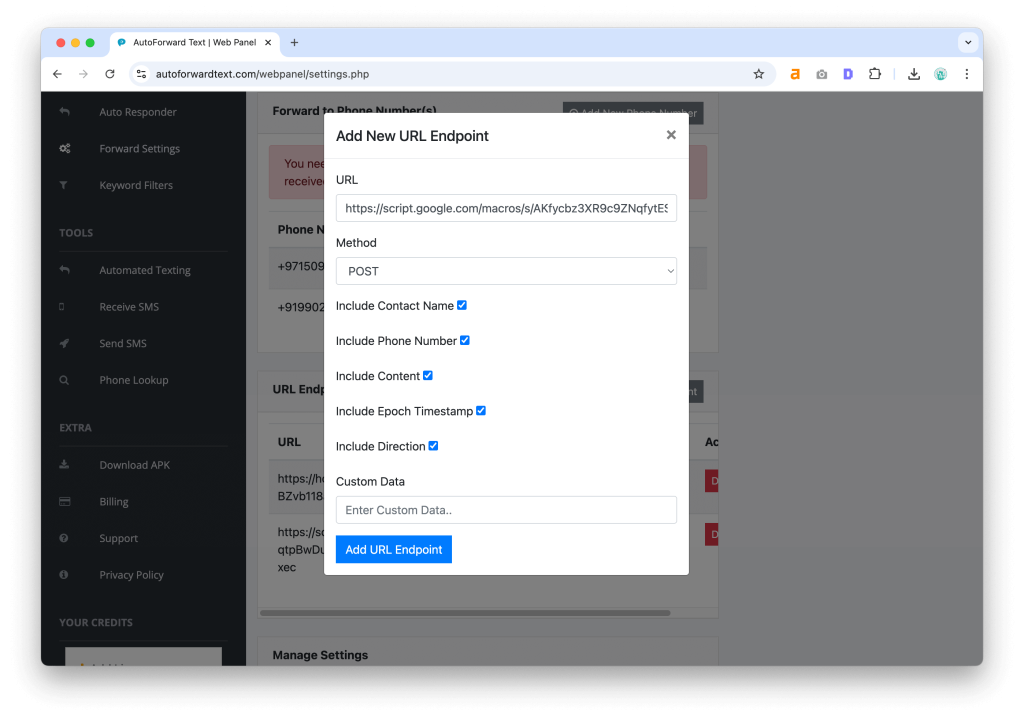
Step 3 — Add Your Webhook URL
Inside the dashboard, add the webhook URL where SMS data should be sent.
Example webhook endpoint:
https://example.com/api/sms
When a message arrives, the app will automatically send the data to this URL.
Step 4 — Configure Filters (Optional)
You may want to forward only specific messages.
AutoForwardText supports filtering rules such as:
- only messages from certain phone numbers
- messages containing keywords
- specific device filters
This helps reduce unnecessary webhook requests.
Step 5 — Test the Integration
Send a test SMS message to the phone.
If everything is configured correctly, your webhook endpoint should immediately receive the message data.
Example Webhook Payload
When an SMS message is received, AutoForwardText sends a request to your webhook endpoint containing message details.
Example payload:
{
  "from": "+14155551234",
  "message": "Your login code is 593841",
  "timestamp": "2026-03-07T10:42:11Z",
  "device": "Android"
}
Typical fields include:
from
Phone number that sent the SMS.
message
Text content of the message.
timestamp
The time the message was received.
device
The device that processed the message.
Your backend server can then process this data however needed.
For example:
- storing it in a database
- triggering automation workflows
- sending alerts
Use Cases for SMS Webhooks

Webhook integrations unlock powerful automation opportunities.
Here are some common use cases.
CRM automation
Automatically log incoming customer messages inside CRM systems such as:
- HubSpot
- Salesforce
- custom databases
OTP monitoring
Systems can capture one-time passwords or authentication codes and process them automatically.
Slack alerts
Forward important SMS messages to a Slack channel to notify team members instantly.
Customer support
Support teams can receive and process SMS inquiries through internal ticket systems.
Marketing automation
SMS messages can trigger campaigns, workflows, or analytics events.
Zapier and Make integrations
Webhook URLs from automation platforms make it easy to connect SMS messages to hundreds of applications.
Security and Best Practices
When sending SMS data to webhooks, it’s important to follow basic security practices.
Use HTTPS
Always send webhook requests to secure HTTPS endpoints.
Validate incoming requests
Your server should verify incoming webhook data before processing it.
Store logs
Keeping logs of incoming messages can help with debugging and monitoring.
Implement retries
If your server is temporarily unavailable, it’s useful to handle webhook retries.
Frequently Asked Questions
Can I forward SMS to Zapier?
Yes. Zapier provides webhook URLs that can receive incoming data. You can configure AutoForwardText to send SMS messages directly to a Zapier webhook.
Can I forward SMS to an API endpoint?
Yes. Any HTTP endpoint capable of receiving POST requests can be used as a webhook destination.
Does this work on iPhone?
Yes. AutoForwardText supports both Android and iPhone devices, allowing SMS forwarding across platforms.
Can I filter which SMS messages are forwarded?
Yes. You can configure filters to forward only specific messages based on phone numbers or keywords.
Are messages forwarded in real time?
Yes. SMS messages are forwarded immediately after they are received by the device.
Conclusion
Forwarding SMS messages to a webhook allows businesses and developers to integrate mobile communications directly into their software systems.
Instead of manually checking messages on a phone, incoming SMS can trigger automation workflows, CRM updates, alerts, or API processes.
With AutoForwardText, setting up SMS webhook forwarding is simple and requires no custom development.
You can quickly connect SMS messages from your phone to any webhook or API endpoint and unlock powerful automation possibilities.
Stop losing messages — log them automatically
Use AutoForwardText to forward incoming SMS straight to Google Sheets (or any webhook). Quick setup, reliable delivery, and full control over your data.
- ✔️ Forward texts to Zapier, Slack, webhooks, or email
- ✔️ Supports JSON & form payloads (perfect for Google Apps Script)
- ✔️ Lightweight, battery-friendly Android forwarding
By signing up you agree to our Terms and Privacy Policy.