You’re on a call, and something feels off. Maybe you hear a short beep, a delay before the other person responds, or voices briefly overlapping. It’s enough to make you wonder: is someone else on this call?
This concern is common on Android, especially when call quality drops or call waiting kicks in. But here’s the important thing to know up front: Android does not secretly add people to your calls. If a call becomes a 3-way (conference) call, Android shows clear, visible indicators on the screen.
In this guide, we’ll explain what a 3-way call actually is on Android, how it differs from other call behaviors, and what Android shows when a third person is truly added—so you know what’s normal and what isn’t.
- ✔ Android always shows when a call is merged or in conference mode.
- ✔ Look for labels like “Conference call”, “Manage”, or multiple callers on screen.
- ✔ Call controls change (Add Call disabled, Merge already active).
- ❌ Beeps, delays, or echoes do not mean someone joined the call.
- ❌ If only one caller is visible, you’re not on a 3-way call.
1) What Is a 3-Way (Conference) Call on Android?
A 3-way call—also called a conference call—is when three participants are actively connected to the same call at the same time. On Android, this only happens when a user intentionally merges calls.
It’s important not to confuse a real 3-way call with other call features that can sound similar.
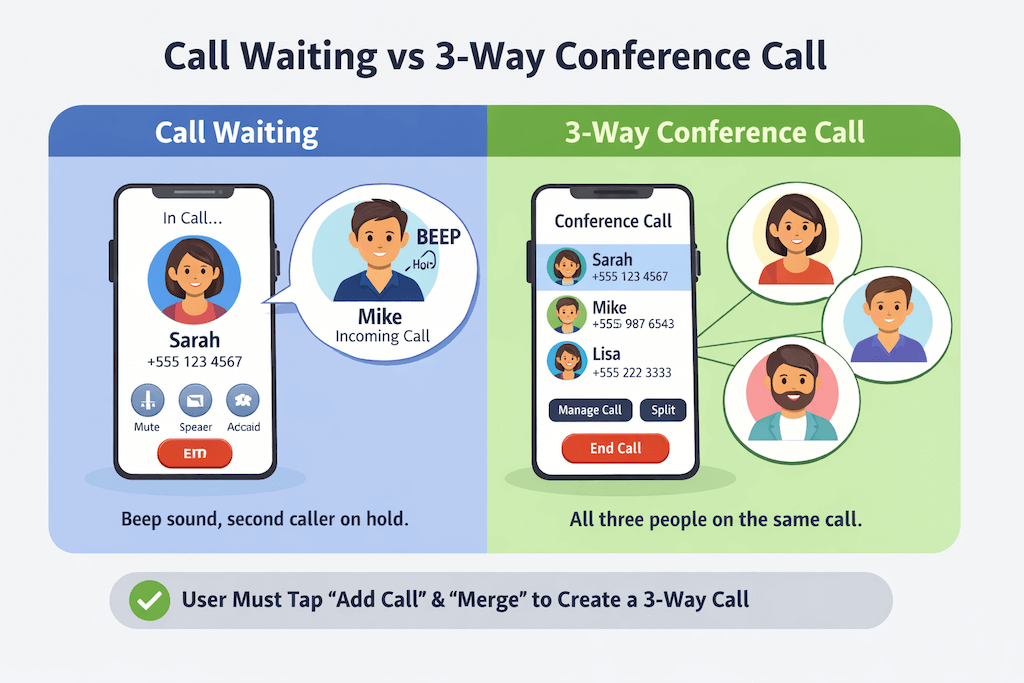
Call Waiting vs 3-Way Calls
Call waiting happens when:
- You’re on a call
- Another caller tries to reach you
- You hear a short beep or tone
At this point, the second caller is not connected. They’re on hold. No one is listening in.
A 3-way call happens only after:
- You answer or place a second call
- You tap Merge or Conference
- All participants are connected together
If you never merged calls, you’re not on a 3-way call.
3-Way Calls vs VoIP App Calls
Android supports two very different types of calls:
- Carrier-based calls (normal phone calls through your mobile network)
- VoIP calls (apps like WhatsApp, Zoom, Teams)
Carrier-based Android calls:
- Require explicit user action to add participants
- Always show conference indicators
VoIP apps:
- Use their own interfaces
- May show participants differently
- Still displays visible indicators inside the app
In neither case does Android silently add people without showing it.
Why Android Requires User Action to Merge Calls
Android is designed to prevent hidden participants.
To create a 3-way call, someone must:
- Tap Add call
- Dial or answer another number
- Tap Merge or Conference
When this happens, Android updates the call screen to show:
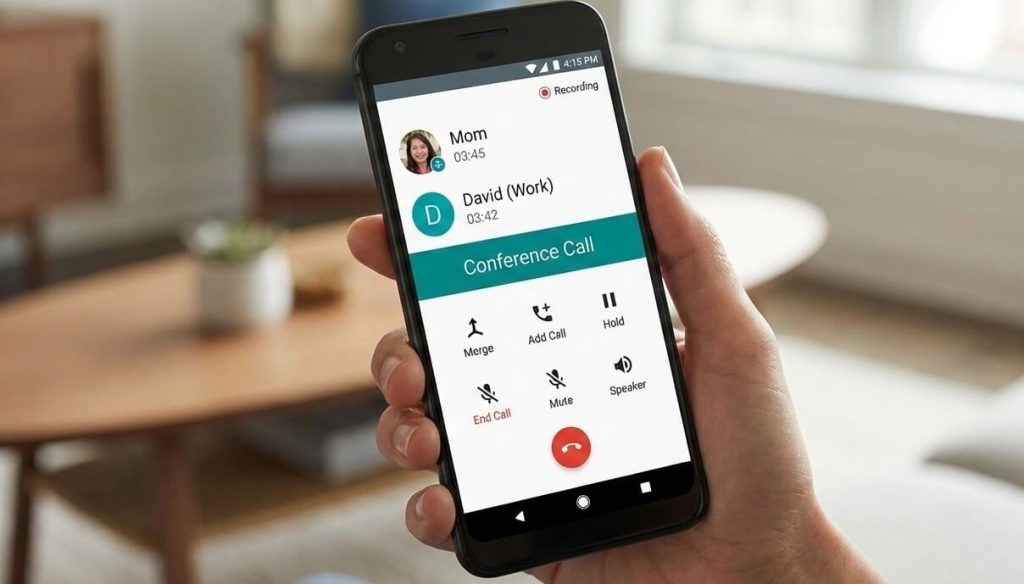
- “Conference call”
- Multiple caller names or numbers
- Options to manage or split the call
If you don’t see these, the call isn’t merged.
2) On-Screen Signs You’re on a 3-Way Call
If you’re actually on a 3-way (conference) call on Android, the screen will tell you. This is the most reliable way to know—far more reliable than sounds or call quality.
Android does not hide merged calls.
2.1 Conference / Merge Indicators
When a third person is added, Android updates the call interface immediately. You’ll typically see one or more of the following:
- A “Conference call” label on the call screen
- A “Manage”, “Split”, or “Conference” option
- Multiple caller names or phone numbers are listed on the screen
These indicators are explicit. Android assumes users should always know who is on the call.
If you don’t see any of these, the call is not merged.0
2.2 Call Controls Change
Call buttons also change during a real 3-way call.
Common changes include:
- “Add call” becomes disabled or unavailable
- “Merge” is already active or replaced with conference controls
- “Swap” appears when switching between participants
These changes only happen after a user intentionally adds and merges another call.
Important:
If Android shows only one caller and standard call controls, you are not on a 3-way call.
3) Audio Clues (Hints — Not Proof)
Some people rely on sounds to guess whether someone joined a call. While audio cues can raise questions, they are not confirmation.
Common audio clues people notice:
- A short beep or tone
- Slight voice delays or people talking over each other
- Sudden background noise changes
These can feel suspicious—but they have normal explanations.
What to understand clearly
- Beeps often indicate call waiting, not a merged call
- Delays are common with VoLTE and Wi-Fi calling
- Background noise changes happen when signal quality fluctuates
⚠️ Audio clues alone do not confirm a 3-way call.
If a third person joins, Android will show it visually.
4) Carrier & Network Factors (Why People Get Confused)
Many “I think someone joined my call” moments are actually caused by carrier or network behavior.
Call Waiting Tones ≠ Someone Listening
A call waiting beep simply means:
- Another person tried to call you
- They are not connected
- They cannot hear your conversation
No merging happens unless you take action.
VoLTE and Wi-Fi Calling Artifacts
Modern calls often use:
- VoLTE (Voice over LTE)
- Wi-Fi calling
These technologies can cause:
- Brief audio drops
- Echoes
- Delays or compression artifacts
They may sound odd, but they don’t add participants.
Poor Network Conditions
Weak signal or congestion can cause:
- Overlapping speech
- Echo or feedback
- Delayed responses
These issues are technical—not signs of a third listener.
5) Can Someone Add a Third Person to a Call Without You Knowing on Android?
Short answer: No, not on standard Android phone calls.
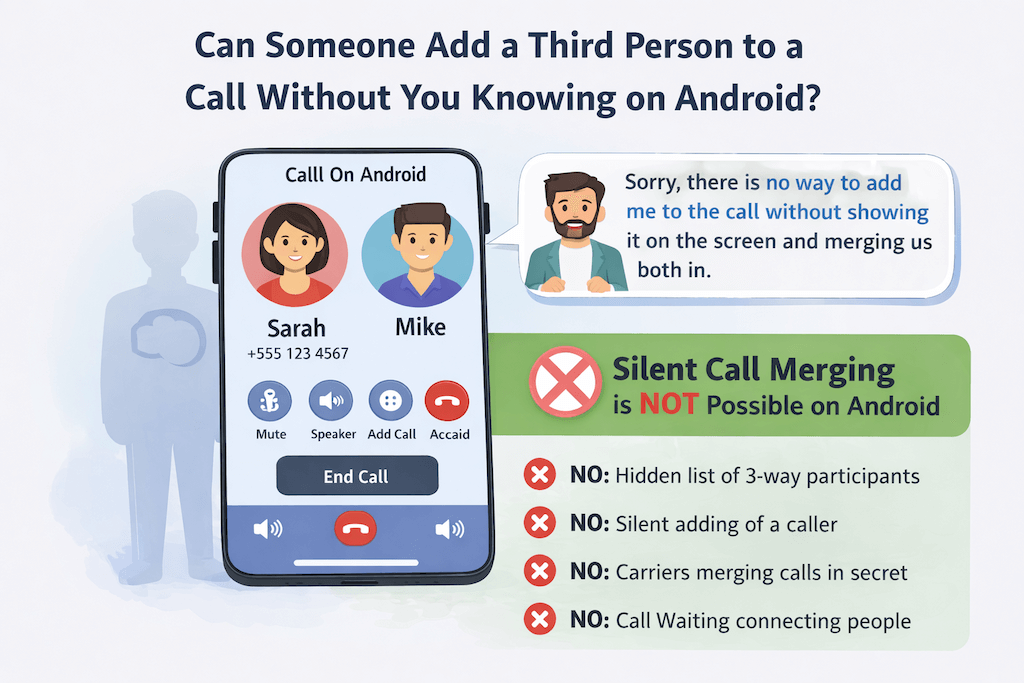
Android’s calling system does not allow silent call merging. A third person cannot be added to your call without visible, on-screen indicators and explicit user action.
Let’s break this down clearly.
How 3-Way Calls Actually Happen on Android
For a third person to join a call, someone must intentionally do all of the following:
- Tap Add call
- Dial or answer another number
- Tap Merge (or Conference)
When this happens:
- The call screen changes immediately
- Android displays a conference call interface
- Multiple participants are shown
There is no background or hidden process that skips these steps.
What Android Does Not Allow
Android does not allow:
- Silent call merging
- Hidden listeners joining calls
- Carriers adding participants without notice
- Third parties “listening in” through call waiting
If none of the conference indicators are visible, the call is one-to-one.
What About VoIP or Business Phone Systems?
This is where confusion sometimes comes from.
Carrier-based Android calls
- Require user interaction to merge
- Always show visual indicators
- Cannot add people silently
VoIP apps (Zoom, WhatsApp, Teams, etc.)
- Use their own interfaces
- Still show participant indicators inside the app
- Do not hide additional participants
Business PBX or call center systems
- May route calls differently
- Still notify participants when calls are transferred or merged
- Do not allow secret listeners on personal devices
Even in business environments, transparency is required.
Legal & Privacy Reality Check
In most regions:
- Adding a participant without notification violates telecom rules
- Silent call monitoring requires legal authorization
- Android devices are designed to prevent this by default
This isn’t just a design choice — it’s a legal safeguard.
6) How to Double-Check After the Call (If You’re Still Unsure)
If you want extra reassurance after hanging up, here’s what you can check.
Check the Call Screen History
- Android call logs usually show:
- One incoming/outgoing call
- Not multiple participants
- Conference calls may appear differently depending on the carrier
Check Carrier Call Details (Limited Use)
- Carrier bills may show:
- Multiple outgoing calls close together
- Call waiting events
- They typically do not show all participants clearly
This is normal and not proof of a merged call.
If concerns around calls come from needing reliable communication records, some Android users automatically forward important text messages to email. This keeps a copy available even if messages are deleted or the phone is unavailable.
Final Answer: How to Tell If You’re on a 3-Way Call on Android
Here’s the simplest rule you can trust:
If Android does not show a conference call or multiple callers on screen, you are not on a 3-way call.
Audio glitches, beeps, or delays can feel suspicious — but Android always uses visual confirmation for merged calls.
One last practical note: If your concern around calls or conversations is really about keeping reliable records, relying on memory or call logs alone isn’t always enough.
Some Android users choose to automatically forward important text messages to email, so conversations remain accessible even if messages are deleted or a phone is unavailable. Learn how AutoForwardText works →