Want incoming Twilio text messages to land directly in your email inbox?
If you use Twilio for business texting, support messages, appointment requests, OTPs, alerts, or customer replies, checking the Twilio console every time is not practical. Your team probably lives in Gmail, Outlook, or a shared inbox already.
That is where Twilio SMS to email forwarding becomes useful.
With the right setup, every incoming Twilio SMS can automatically be forwarded to one or more email addresses, so you never miss an important message.
The catch? Twilio does not simply give you a built-in “forward all SMS to email” button.
But there are several working methods — from simple no-code forwarding to custom webhook setups.
How Twilio SMS to Email Forwarding Works
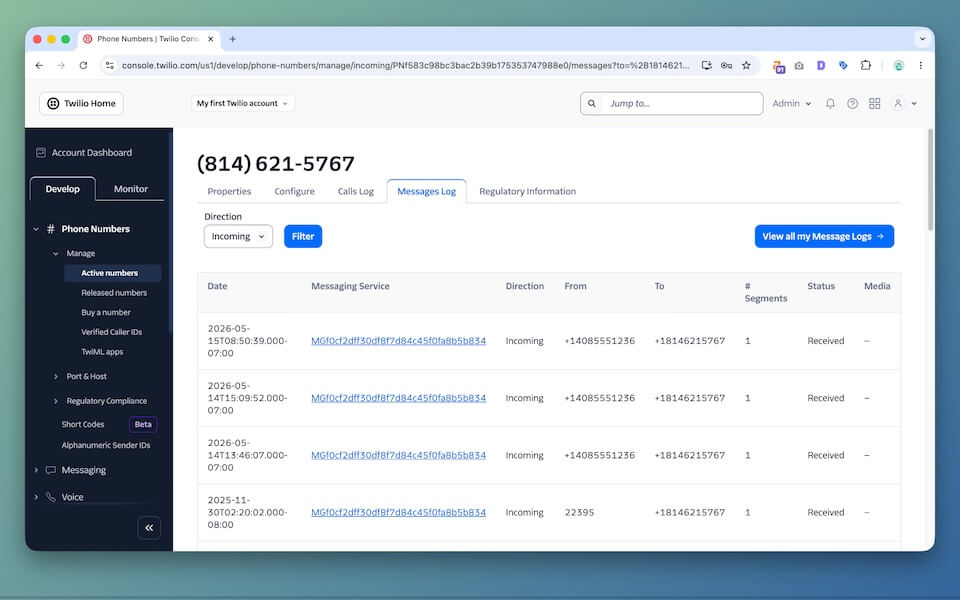
Twilio is very powerful, but it is developer-first. When someone sends an SMS to your Twilio number, Twilio needs to know what to do with that message.
That usually happens through a webhook.
Basic flow:
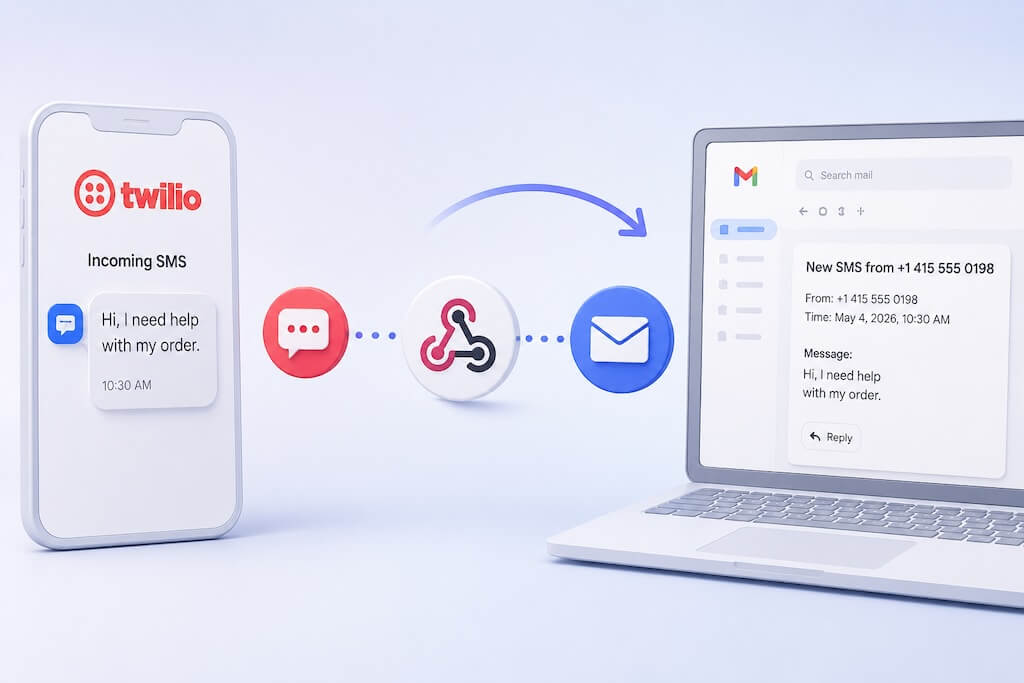
Incoming SMS → Twilio Number → Webhook URL → Forwarding App → Email Inbox
Here is what happens behind the scenes:
- A customer sends a text message to your Twilio number.
- Twilio receives the message.
- Twilio sends the message details to your webhook URL.
- Your app or forwarding service reads the sender, recipient, message body, and timestamp.
- The message is formatted and delivered to your email inbox.
That sounds simple, but the details matter. You need to handle formatting, retries, duplicate messages, spam filtering, email deliverability, logs, and sometimes replies.
This is why many businesses start with a simple forwarding tool instead of building the whole thing from scratch.
Method 1: Use AutoForward Text for Twilio SMS to Email
This is the easiest method if your goal is straightforward: receive Twilio SMS messages in email automatically.
Instead of writing code, you connect your Twilio number and configure forwarding rules inside AutoForward Text.
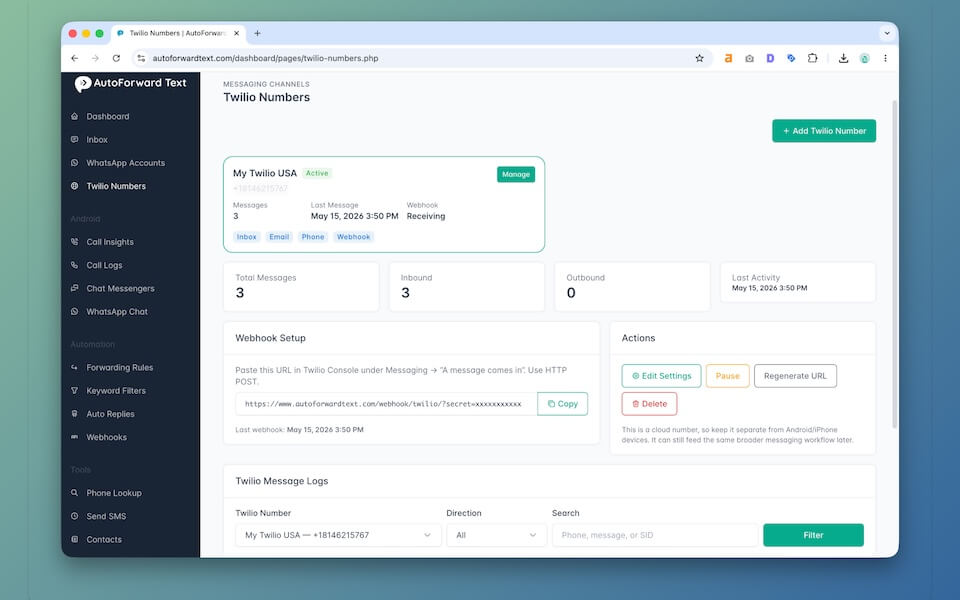
How to Set It Up
- Log in to your AutoForward Text dashboard.
- Add your Twilio number connection.
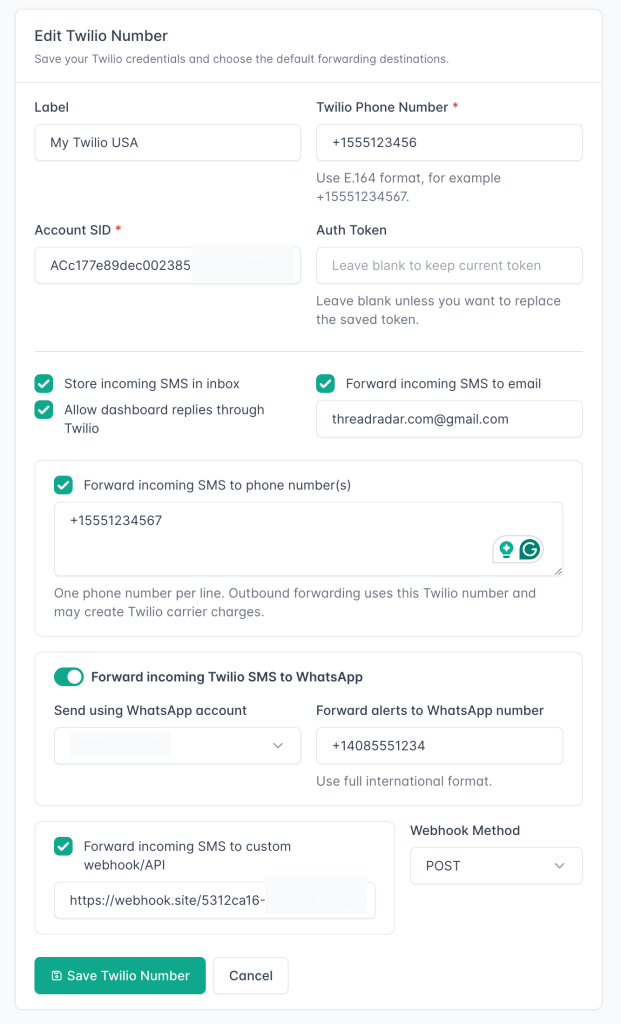
- Enter your Twilio Account SID, Auth Token, and phone number details.
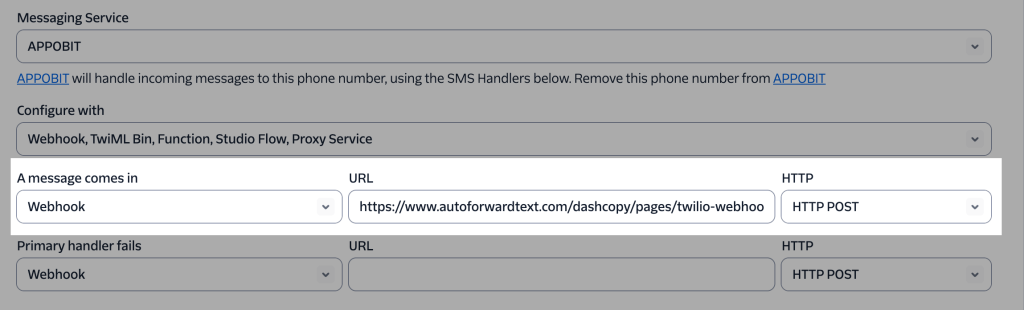
- Configure your Twilio incoming messaging webhook.
- Add the email address where incoming SMS messages should be forwarded.
- Enable SMS-to-email forwarding.
After setup, new SMS messages received by your Twilio number can be sent directly to your selected email address.
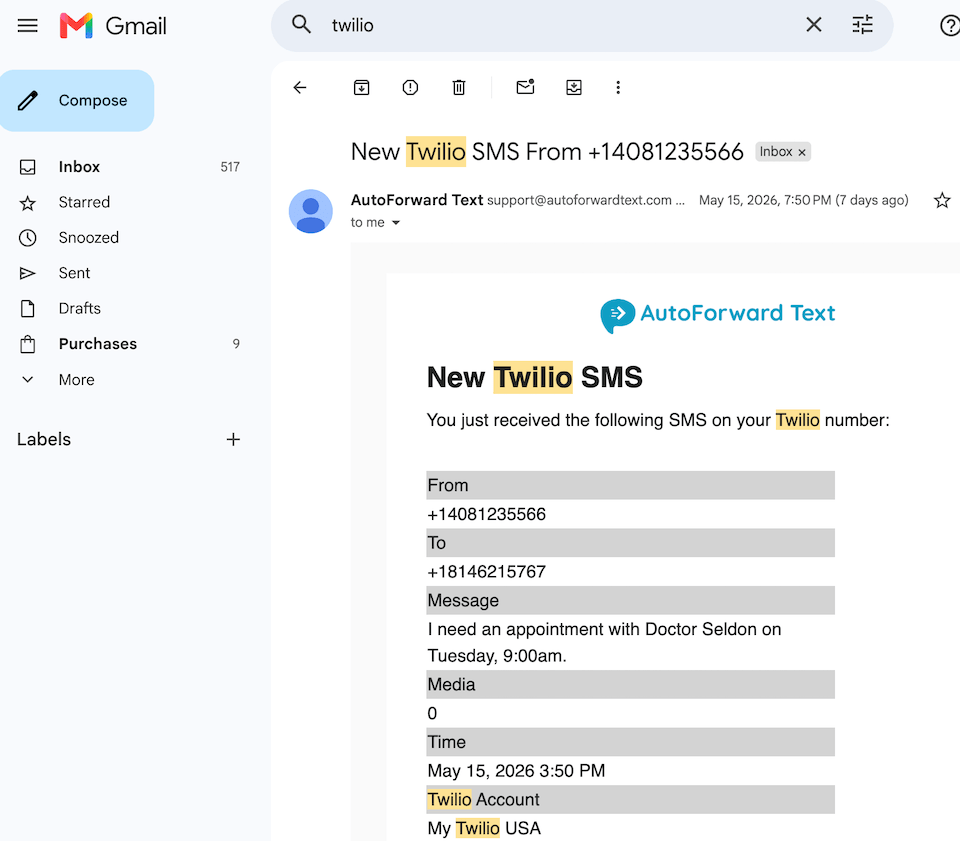
Example forwarded email
Subject: New SMS from +1 415 555 0101
From: +1 415 555 0101
To: Your Twilio Number
Time: May 22, 2026, 9:41 AM
Message:
Hello, I need help with my order. Can someone call me back?
Why This Method Works Well
- No custom server required
- No Twilio Function coding
- No SMTP configuration
- Works with business email workflows
- Useful for shared team visibility
- Can be expanded later into routing, alerts, and reply workflows
For most small businesses, this is the practical route. Twilio gives you the number and SMS infrastructure. AutoForward Text gives you the workflow layer.
Important: Twilio is excellent for developers, but most business owners do not want to babysit webhooks. They just want texts to appear where their team already works. That is the real value of SMS-to-email forwarding.
Forward Twilio SMS to Email Automatically
Stop checking Twilio manually. Send incoming SMS messages directly to Gmail, Outlook, or your shared team inbox.
- Forward Twilio SMS to email
- Keep message logs and history
- Route messages to your team
- Set up business messaging workflows without custom code
Method 2: Use Twilio Functions and SendGrid
If you are comfortable with code, you can build SMS-to-email forwarding using Twilio Functions and an email service like SendGrid.
The flow looks like this:
Twilio SMS → Twilio Function → SendGrid → Email Inbox
This method is flexible because everything is under your control. You can customize the subject line, email body, recipients, routing logic, and message formatting.
Pros
- Highly customizable
- Good for developers
- Can support complex routing
- No third-party forwarding dashboard required
Cons
- Requires coding
- You must manage SendGrid or another email provider
- You need to debug webhook errors yourself
- Email deliverability can become a problem
- Logs, retries, and two-way replies require extra work
A very basic Twilio Function may receive the SMS body and sender number, then call an email API to send the message. But a production-ready version needs more than a few lines of code.
// Simplified example only
exports.handler = async function(context, event, callback) {
  const from = event.From;
  const to = event.To;
  const body = event.Body;

  // Send this data to your email provider here
  // Example: SendGrid, Mailgun, Postmark, Amazon SES

  return callback(null, 'Message forwarded');
};
This is fine for a developer project. For a business workflow, you usually want logging, retries, message history, and a way to see what happened when something fails.
Method 3: Use Zapier or Make
You can also forward Twilio SMS to email using automation platforms like Zapier or Make.
The setup usually looks like this:
New Twilio SMS Trigger → Gmail / Outlook Email Action
This is a decent option if you want a quick no-code prototype.
Pros
- No coding required
- Easy to test
- Can connect with Gmail, Outlook, Slack, Sheets, and CRMs
Cons
- Can get expensive as volume grows
- Automations may run with delays
- Debugging failed tasks can be annoying
- Not ideal for mission-critical SMS alerts
- Two-way reply workflows are harder
Zapier and Make are useful if you are testing a workflow. But if Twilio SMS is part of your daily customer communication, you may eventually want a dedicated system built for messaging.
Method 4: Build Your Own SMS-to-Email Webhook
The most flexible option is to build your own webhook using PHP, Node.js, Python, or another backend language.
This is the route many technical teams take when they need full control.
Typical Setup
- Twilio phone number
- Webhook endpoint on your server
- Email provider like Mailgun, SendGrid, Postmark, or Amazon SES
- Database table for message logs
- Retry logic for failed email delivery
- Security validation for incoming Twilio requests
A simple webhook can be built quickly. A reliable one takes more work.
What You Need to Handle
- Inbound SMS parsing
- Duplicate webhook events
- MMS attachments
- Email formatting
- Failed email delivery
- Spam and abuse protection
- Message search and logs
- Reply routing if you want two-way SMS from email
For developers, this can be a fun project. For most businesses, it is unnecessary overhead unless SMS is deeply tied into your internal software.
Best Use Cases for Twilio SMS Email Forwarding

Forwarding Twilio SMS to email is useful whenever text messages need visibility beyond one dashboard or one person.
Customer Support
Incoming texts can be sent to a support inbox so your team can respond faster. This is useful for small businesses that already use email as their main support channel.
Sales Leads
If prospects text your Twilio number, forwarding those messages to email helps you avoid missed leads. Speed matters. A lead that waits hours for a reply may already be gone.
Appointment Requests
Clinics, salons, repair shops, consultants, and local service businesses can receive booking-related SMS messages directly in their inbox.
Operations Alerts
Some teams use Twilio numbers for operational alerts, vendor messages, driver updates, dispatch notifications, or internal confirmations. Email forwarding creates an easy audit trail.
Shared Team Visibility
Instead of one person owning the Twilio login, incoming texts can be shared with multiple team members via email forwarding.
Backup and Archiving
Email creates a searchable archive of important SMS conversations. This can be useful when you need to look back at past customer messages.
Gmail, Outlook, and Shared Inbox Workflows
One reason SMS-to-email forwarding works so well is that most teams already know how to work from email.
| Email Tool | How It Helps |
|---|---|
| Gmail | Use labels, filters, stars, and mobile notifications for incoming SMS alerts. |
| Outlook | Useful for Microsoft-based teams that already manage customer communication in Outlook. |
| Shared Inbox | Forward SMS into HelpScout, Front, Zendesk, Freshdesk, or another team inbox. |
| CRM Inbox | Route incoming SMS messages into sales or support workflows. |
This is where Twilio SMS forwarding becomes more than a notification. It becomes a lightweight messaging workflow.
Limitations to Be Aware Of
Let’s be honest: forwarding Twilio SMS to email is useful, but it is not magic.
SMS Delivery Can Still Be Delayed
If the mobile carrier delays the original SMS, email forwarding cannot fix that. The forwarding only starts once Twilio receives the message.
Email Deliverability Matters
If your email sending domain is not configured properly, forwarded messages can land in spam. This is why using a reliable email provider or forwarding platform matters.
MMS Requires Extra Handling
Text-only messages are easy. MMS messages with photos, PDFs, or other files require media handling and attachment forwarding.
Replies Are More Complicated
Forwarding SMS to email is one-way by default. If you want to reply from email and send the response back as SMS, you need reply routing logic. That usually means unique reply addresses, tokens, or thread mapping.
Twilio Costs Still Apply
Forwarding messages to email does not remove Twilio messaging costs. You still pay Twilio for SMS usage according to your Twilio pricing and number setup.
Frequently Asked Questions
Can Twilio forward SMS to email?
Yes. Twilio can forward SMS to email through a webhook, Twilio Function, automation platform, or forwarding tool like AutoForward Text.
Does Twilio have built-in SMS-to-email forwarding?
Not as a simple one-click inbox forwarding feature. Twilio expects you to configure webhooks or build logic around incoming messages.
Can I receive Twilio SMS in Gmail?
Yes. You can forward incoming Twilio SMS messages to a Gmail address using a webhook, automation tool, or AutoForward Text.
Can I forward Twilio SMS to multiple email addresses?
Yes. Depending on your setup, you can send incoming SMS messages to multiple recipients, a shared inbox, or a support email address.
Can I reply to Twilio SMS from email?
Yes, but it requires a two-way reply system. The system needs to know which SMS conversation your email reply belongs to and then send the reply back through Twilio.
Can Twilio MMS be forwarded to email?
Yes, but MMS forwarding is more complex than plain text SMS because media files need to be downloaded and attached or linked in the forwarded email.
Is Zapier good for Twilio SMS to email?
Zapier can work for simple forwarding. It is usually fine for low-volume workflows, but it may become expensive or less reliable for high-volume or business-critical messaging.
Is this useful for business texting?
Yes. Twilio SMS to email forwarding is especially useful for customer support, sales leads, appointment requests, operations alerts, and shared team visibility.
Final Thoughts
Twilio is powerful, but raw Twilio is not always friendly for everyday business workflows.
If you only want to receive customer texts in your inbox, building a custom webhook may be overkill. You need message forwarding, clean formatting, logs, routing, and reliability — not another mini software project.
For developers, Twilio Functions, SendGrid, and custom webhooks are good options.
For business owners and teams, a forwarding layer like AutoForward Text is usually the smarter move.
Forward Twilio SMS to Email Automatically
Stop checking Twilio manually. Send incoming SMS messages directly to Gmail, Outlook, or your shared team inbox.
- Forward Twilio SMS to email
- Keep message logs and history
- Route messages to your team
- Set up business messaging workflows without custom code