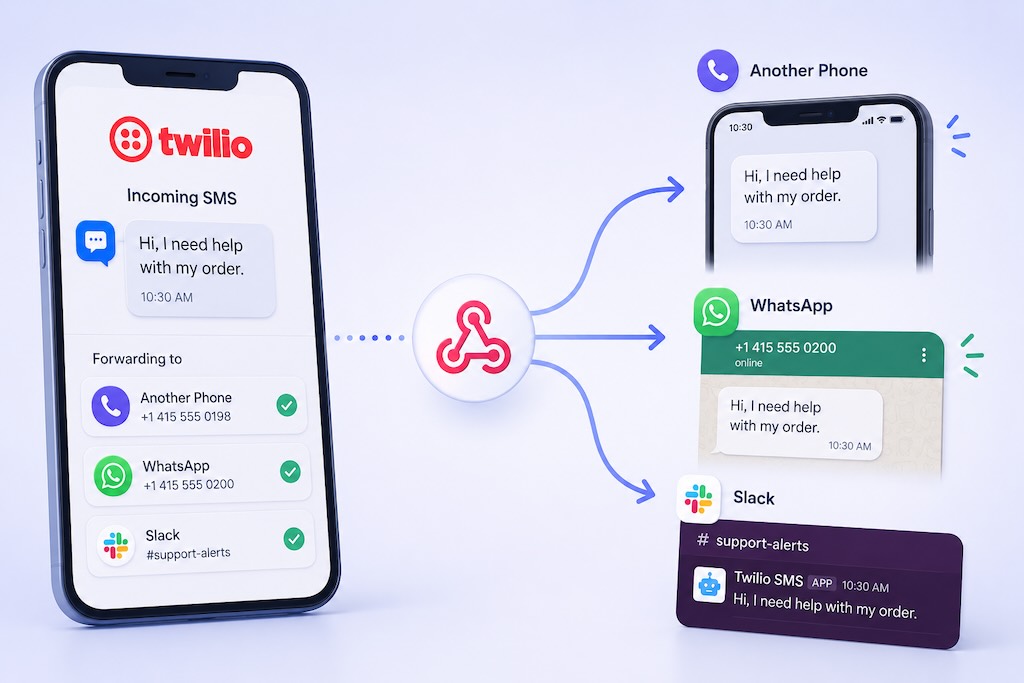
Want incoming Twilio text messages to go somewhere useful — like another phone, WhatsApp, email, Slack, or your own webhook?
Twilio is powerful, but by default, it is not a simple “forward every SMS wherever I want” tool. It is developer-first. That is great if you want to build a custom messaging system, but annoying if your actual goal is simple: receive incoming Twilio SMS messages where your team already works.
Maybe you want customer texts forwarded to your mobile phone. Maybe you want sales leads sent to WhatsApp. Maybe you want SMS alerts copied to email, Slack, or a custom API endpoint. All of that is possible — but the right method depends on how much control you need and how much technical setup you want to deal with.
This guide explains the practical ways to forward Twilio SMS to another phone number, WhatsApp, multiple numbers, email, Slack, webhooks, and more.
Quick Answer: Forward Twilio SMS in Minutes
The fastest way to forward incoming Twilio SMS is to connect your Twilio number to a forwarding workflow and choose where each message should go.
- Add your Twilio number.
- Connect the Twilio webhook.
- Choose your forwarding destination.
- Enable forwarding.
- Start receiving Twilio SMS alerts automatically.
With AutoForward Text, you can forward incoming Twilio SMS messages to:
- another phone number
- Slack
- custom webhooks or API endpoints
- multiple recipients
Fastest Method
Use AutoForward Text as the workflow layer for your Twilio number. Instead of building your own forwarding scripts, you can route incoming SMS messages to phones, email, WhatsApp, Slack, and webhooks from one dashboard.
Try AutoForward TextHow Twilio SMS Forwarding Works
When someone sends a text message to your Twilio number, Twilio receives the message and then sends the message data to a webhook URL.
Basic flow:
Incoming SMS → Twilio Number → Webhook URL → Forwarding Logic → Destination
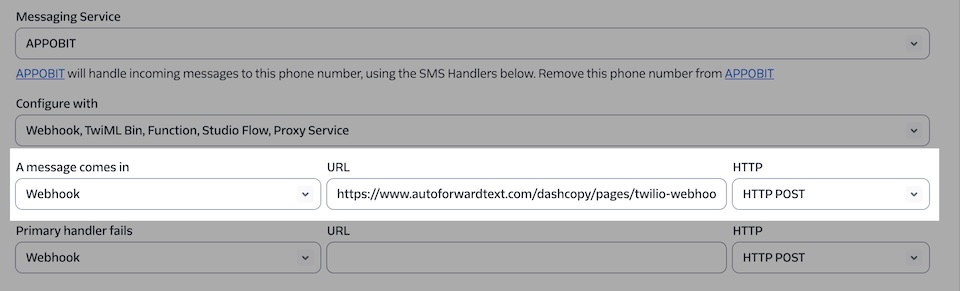
The destination can be almost anything:
- a mobile phone number
- an email address
- a WhatsApp account or group
- a Slack channel
- a CRM
- a custom webhook
- an internal database
The key part is the forwarding logic. Twilio receives the SMS, but something still needs to be decided on what happens next. That “something” can be custom code, Twilio Functions, Zapier, Make, or a dedicated forwarding platform like AutoForward Text.
Method 1: Use AutoForward Text for Twilio SMS Forwarding
This is the easiest method if you want Twilio SMS forwarding without turning it into a mini development project.
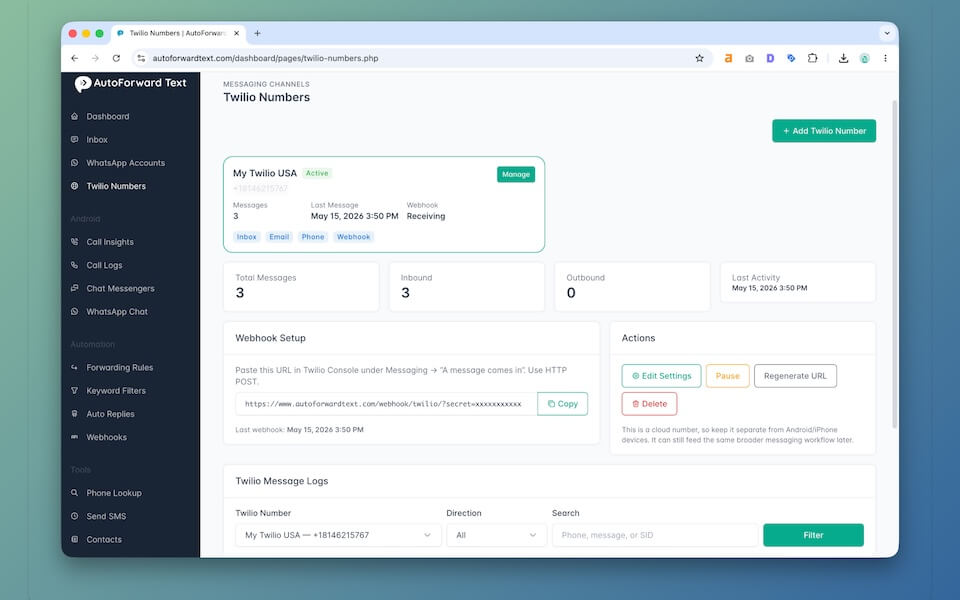
Inside AutoForward Text, you can add your Twilio number and choose the default forwarding destinations. This lets you handle several forwarding workflows from one place instead of creating a separate Twilio Function or webhook script for every destination.
How to Set It Up
- Log in to your AutoForward Text dashboard.
- Add or edit your Twilio number.
- Enter your Twilio phone number, Account SID, and Auth Token.
- Enable the forwarding options you need.
- Add your destination email, phone number, WhatsApp number, or webhook URL.
- Save the Twilio number.
Once configured, incoming SMS messages received by your Twilio number can be stored in your inbox and forwarded automatically to the destinations you selected.
Why This Method Works Well
- No Twilio Function coding required
- No custom server needed for basic forwarding
- Supports multiple forwarding destinations
- Useful for teams, support, sales, and operations
- Keeps incoming Twilio SMS activity easier to track
- Can grow into more advanced workflows later
Twilio gives you the phone number and messaging infrastructure. AutoForward Text gives you the routing and workflow layer on top of it.
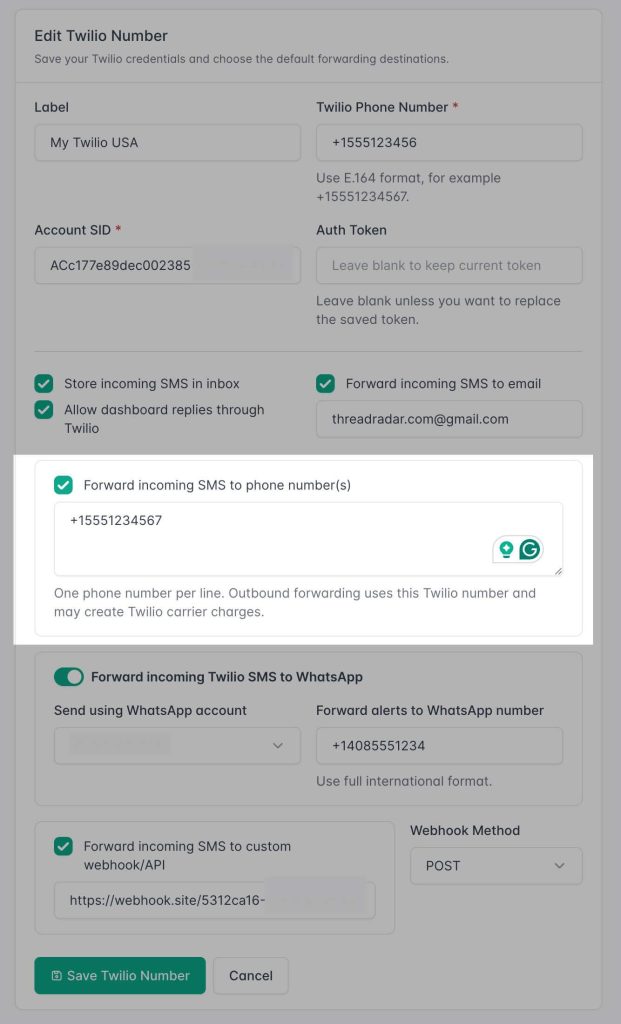
Forward Twilio SMS to Another Phone Number
Forwarding Twilio SMS to another phone number is one of the most practical workflows.
This is useful when you have a Twilio business number, but you want incoming texts copied to a real mobile phone so someone can see them quickly.
Common Use Cases
- Forward business texts to the owner’s phone
- Send after-hours messages to a duty phone
- Forward customer texts to a dispatcher
- Send urgent SMS alerts to a backup number
- Route leads to a sales rep’s phone
This is simple, but important. A lot of small businesses miss messages because the Twilio number is technically working, but nobody is watching it closely.
Note: Forwarding SMS to another phone may create additional Twilio messaging charges because outbound SMS messages are being sent from your Twilio number.
Forward Twilio SMS to WhatsApp
Forwarding Twilio SMS to WhatsApp is useful when your team already communicates inside WhatsApp and does not want to monitor another dashboard.
The workflow is simple:
Incoming Twilio SMS → AutoForward Text → WhatsApp Alert
This can work well for:
- sales leads
- appointment requests
- customer support alerts
- operations updates
- shared WhatsApp groups
- business owners who live inside WhatsApp
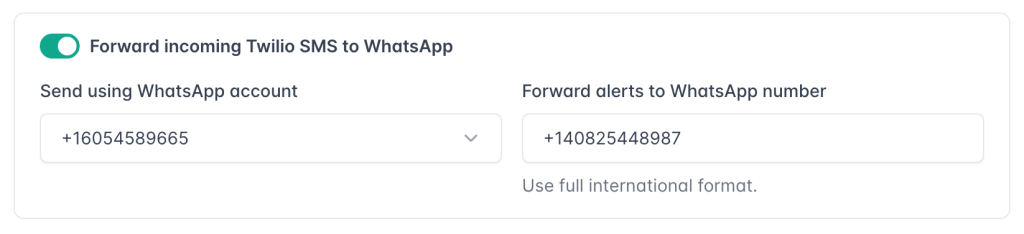
For example, if a prospect texts your Twilio number, the message can be forwarded to a WhatsApp number or group so the right person sees it quickly.
Here is the honest part: this does not magically turn SMS into a native WhatsApp conversation. It forwards the SMS content into WhatsApp as an alert. That is still extremely useful for visibility, but it is not the same thing as replacing Twilio SMS with WhatsApp messaging.
For many teams, that is enough. The real problem is not “native sync.” The real problem is missed messages.
Forward Twilio SMS to Multiple Numbers
Sometimes one person is not enough.
If incoming Twilio SMS messages are important, you may want them sent to multiple phone numbers at the same time. This is useful for teams that need shared visibility without relying on one person to check the Twilio dashboard.
Good Use Cases
- support teams
- sales teams
- dispatch teams
- field service businesses
- emergency alerts
- backup coverage when one person is unavailable
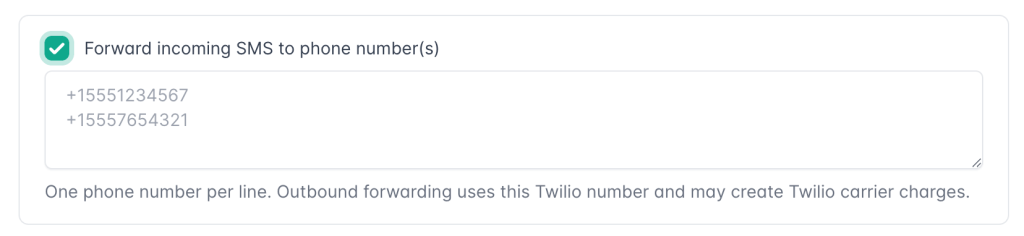
Example workflow:
Customer SMS → Twilio → AutoForward Text → Owner + Manager + Support Phone
This is where forwarding becomes more than a convenience. It becomes a lightweight escalation system.
Instead of one person owning the Twilio login, the right people get notified directly. That can reduce delays and prevent missed customer messages.
Forward Twilio SMS to Email
Email forwarding is one of the most common Twilio SMS workflows because email is still where many teams manage daily work.
Forwarding Twilio SMS to email is useful for:
- Gmail notifications
- Outlook workflows
- shared support inboxes
- ticketing systems
- message archiving
- searchable customer history
The big advantage is that email creates a searchable record. If a customer texts your Twilio number today, you can find that message later inside Gmail, Outlook, or your helpdesk.
If you want the detailed setup, read the full guide: How to Forward Twilio SMS to Email Automatically.
Forward Twilio SMS to Slack or Webhooks
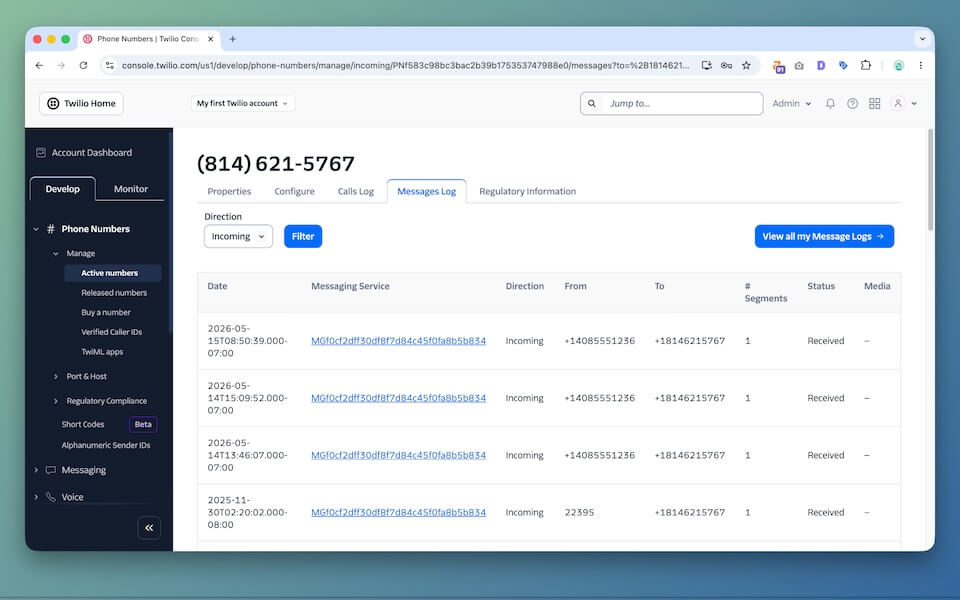
If your team uses Slack, forwarding Twilio SMS alerts into a Slack channel can be very useful.
For example:
- sales leads can go to
#sales - support texts can go to
#support - operations alerts can go to
#ops - urgent notifications can go to a private channel
Webhook forwarding is even more flexible. Instead of forwarding a message to a human inbox, you can forward it to another system.
Webhook/API Destinations
- custom dashboards
- CRMs
- lead enrichment tools
- AI classification workflows
- internal databases
- ticketing systems
- automation platforms
Example webhook flow:
Twilio SMS → AutoForward Text → Your API Endpoint → CRM / Database / AI Workflow
This is where Twilio SMS forwarding becomes real infrastructure. You are no longer just copying messages. You are routing business events into the systems that run your company.
For a SaaS business, agency, local service company, or support team, that can be a big deal.
Can You Forward Twilio SMS to Google Voice?
Not reliably.
This is one of those cases where it is better to be honest than clever. Google Voice is not built as an open SMS automation destination in the same way that email, Slack, or webhook endpoints are.
You may find hacky workarounds, but they are usually not reliable enough for business use.
Better Alternatives
- forward Twilio SMS to another real mobile number
- forward Twilio SMS to email
- forward Twilio SMS to WhatsApp
- forward Twilio SMS to Slack
- send Twilio SMS data to a webhook or CRM
If the goal is visibility, those options are usually cleaner than trying to force Google Voice into the workflow.
Method 2: Use Twilio Functions and Custom Code
If you are comfortable with code, you can build Twilio SMS forwarding yourself.
The flow usually looks like this:
Twilio SMS → Twilio Function or Webhook → Custom Logic → Destination
Your code can forward messages to email, another phone number, Slack, a webhook, or a database.
Basic Twilio Function Example
// Simplified example only
exports.handler = async function(context, event, callback) {
  const from = event.From;
  const to = event.To;
  const body = event.Body;

  // Add your forwarding logic here:
  // - send an email
  // - post to Slack
  // - forward as SMS
  // - call your API

  return callback(null, 'Message received');
};
This is fine for developers. But for a production workflow, you need more than a basic function.
What You Need to Handle
- message logging
- failed delivery retries
- duplicate webhook events
- recipient rules
- security validation
- MMS media handling
- two-way replies
- rate limits and error handling
Building your own setup gives you control, but it also gives you maintenance. That tradeoff is fine for technical teams. It is overkill for many small businesses.
Best Use Cases for Twilio SMS Forwarding
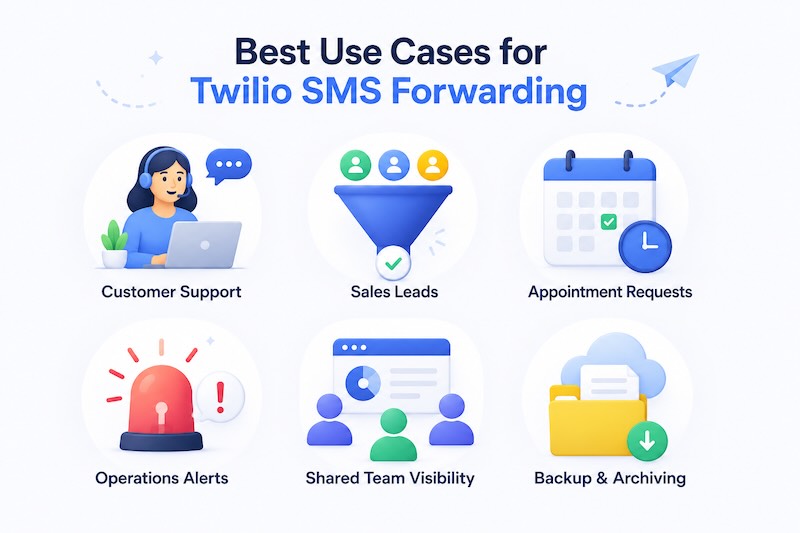
Twilio SMS forwarding is useful whenever incoming text messages need visibility beyond one dashboard or one person.
Customer Support
Incoming texts can be routed to support staff, email inboxes, or Slack channels so the team can respond faster.
Sales Leads
If prospects text your Twilio number, forwarding those messages helps reduce missed opportunities. Speed matters. A lead that waits hours for a reply may already be gone.
Appointment Requests
Clinics, salons, repair shops, consultants, and local service businesses can route booking-related SMS messages to the right person.
Operations Alerts
Forward vendor messages, driver updates, dispatch notifications, internal confirmations, or system alerts to the people who need them.
Shared Team Visibility
Instead of one person owning the Twilio login, incoming messages can be shared across a team.
Backup and Archiving
Forwarding messages to email, logs, or webhooks can create a searchable record of important communication.
Shared Inbox and Team Workflows
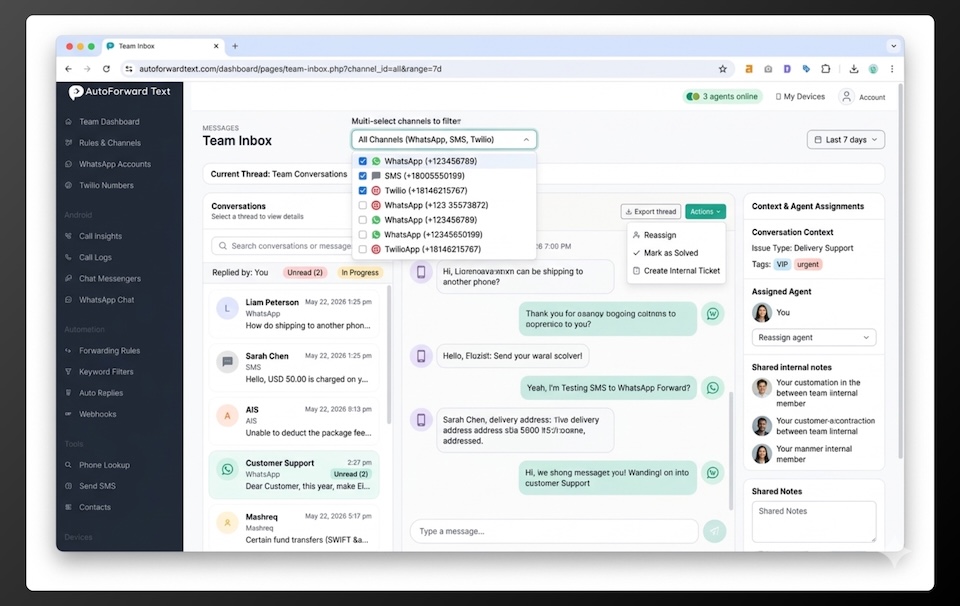
The bigger opportunity is not just forwarding. It is a workflow.
Once Twilio SMS messages can be routed automatically, you can build simple team systems around them.
This is why Twilio forwarding should not be treated as a tiny utility. For many businesses, it becomes part of how messages move through the company.
| Workflow | Forwarding Destination | Why It Helps |
|---|---|---|
| Support texts | Email or shared inbox | Keeps customer issues visible to the team. |
| Sales leads | WhatsApp or phone number | Helps sales reps respond quickly. |
| Operations alerts | Slack or webhook | Routes operational messages into existing workflows. |
| Backup coverage | Multiple phone numbers | Prevents one person from becoming the bottleneck. |
| Archiving | Email or database | Creates a searchable record for future reference. |
Limitations to Be Aware Of
Twilio SMS forwarding is useful, but it has limits. Here is the realistic version.
Twilio Costs Still Apply
If you forward SMS to another phone number, that usually means sending another SMS from Twilio. That can create additional usage costs.
WhatsApp Forwarding Is Not Native SMS Sync
Forwarding Twilio SMS to WhatsApp is best used for alerts and visibility. It does not turn SMS into a native WhatsApp thread.
Email Deliverability Matters
If you forward messages to email, make sure the email sender is configured properly. Otherwise important alerts may land in spam.
MMS Is More Complicated
Plain text SMS is easy. MMS messages with photos or attachments need extra media handling.
Google Voice Is Not a Great Automation Destination
Google Voice is useful as a phone service, but it is not the best destination for programmable SMS forwarding workflows.
Two-Way Replies Require Extra Logic
Forwarding an SMS is one thing. Replying back from email, WhatsApp, or a shared inbox requires proper conversation mapping.
Frequently Asked Questions
Can Twilio forward SMS automatically?
Yes. Twilio SMS can be forwarded automatically using webhooks, Twilio Functions, automation tools, or a forwarding platform like AutoForward Text.
Can I forward Twilio SMS to another phone number?
Yes. Incoming Twilio SMS can be forwarded to another phone number. Keep in mind that outbound SMS forwarding may create Twilio messaging charges.
Can I forward Twilio SMS to multiple numbers?
Yes. You can forward incoming Twilio SMS messages to multiple recipients depending on your forwarding setup.
Can Twilio SMS be forwarded to WhatsApp?
Yes. You can forward incoming Twilio SMS alerts to WhatsApp using a forwarding workflow. This is best for notifications and visibility, not full native SMS-to-WhatsApp conversation sync.
Can Twilio SMS be forwarded to email?
Yes. Twilio SMS can be forwarded to Gmail, Outlook, shared inboxes, and helpdesk tools through a webhook or forwarding service.
Can Twilio SMS be forwarded to Slack?
Yes. Incoming Twilio SMS messages can be sent to Slack channels through webhooks, custom code, automation tools, or AutoForward Text workflows.
Can Twilio SMS trigger a webhook?
Yes. Webhooks are one of the main ways Twilio handles incoming SMS events. You can send message data to your own API endpoint or another system.
Can I forward Twilio SMS to Google Voice?
Not reliably. Google Voice is not the best destination for automated Twilio SMS forwarding. Forwarding to another phone, email, WhatsApp, Slack, or a webhook is usually cleaner.
Do I need coding to forward Twilio SMS?
Not necessarily. Developers can use Twilio Functions or custom webhooks, but business users can use a forwarding platform like AutoForward Text to avoid custom setup.
Can I reply after forwarding a Twilio SMS?
It depends on the destination and setup. Basic forwarding is one-way. Two-way replies require conversation mapping and routing logic.
Final Thoughts
Twilio is a strong messaging platform, but it is not always the easiest workflow tool for everyday business users.
If your goal is to forward incoming SMS messages to another phone, WhatsApp, email, Slack, or a webhook, you have two main choices:
- build the forwarding logic yourself
- use a dedicated forwarding layer
For developers, custom Twilio Functions and webhooks can work well.
For businesses that just want the messages delivered where the team already works, AutoForward Text is usually the more practical option.
Forward Twilio SMS Automatically
Route incoming Twilio SMS messages to another phone number, WhatsApp, email, Slack, or your own webhook without building everything from scratch.
- Forward Twilio SMS to phones, email, and WhatsApp
- Send SMS alerts to Slack or webhooks
- Keep incoming messages visible to your team
- Build practical messaging workflows around your Twilio number