

You can share a Telegram message to WhatsApp manually, or use AutoForward Text to automatically forward new Telegram messages to a WhatsApp contact or group. The automatic method supports incoming private-chat messages, group messages and channel posts, with sender, chat and keyword filters.
Quick answer: For one message, copy or share it from Telegram into WhatsApp. For ongoing forwarding, connect your Telegram and WhatsApp accounts to AutoForward Text using QR authentication, choose a WhatsApp destination, and configure your forwarding rules. New matching incoming text messages are forwarded automatically, even when your phone is offline, as long as the linked accounts remain connected.
How to Forward a Telegram Message to WhatsApp Manually
If you only need to share one message, start with Telegram’s normal sharing controls. Depending on your device, message type and Telegram version, you may be able to share directly to WhatsApp or copy the text instead.
- Open the Telegram conversation containing the message.
- Press and hold the message to open its actions.
- Use Share when available and choose WhatsApp, or select Copy.
- Open the WhatsApp contact or group, paste the text if needed, and send it.
For photos or documents, you may need to save the file and share it separately. This is fine for an occasional update, but it does not automatically forward future messages.
How to Automatically Forward Telegram Messages to WhatsApp
AutoForward Text connects an authorized Telegram account with a WhatsApp account and forwards supported incoming text messages to a configured destination. No separate Telegram bot or phone-installed forwarding app is required for this workflow.
Step 1: Create your AutoForward Text account
Visit AutoForward Text signup, create an account and open the dashboard.
Step 2: Connect Telegram using QR authentication
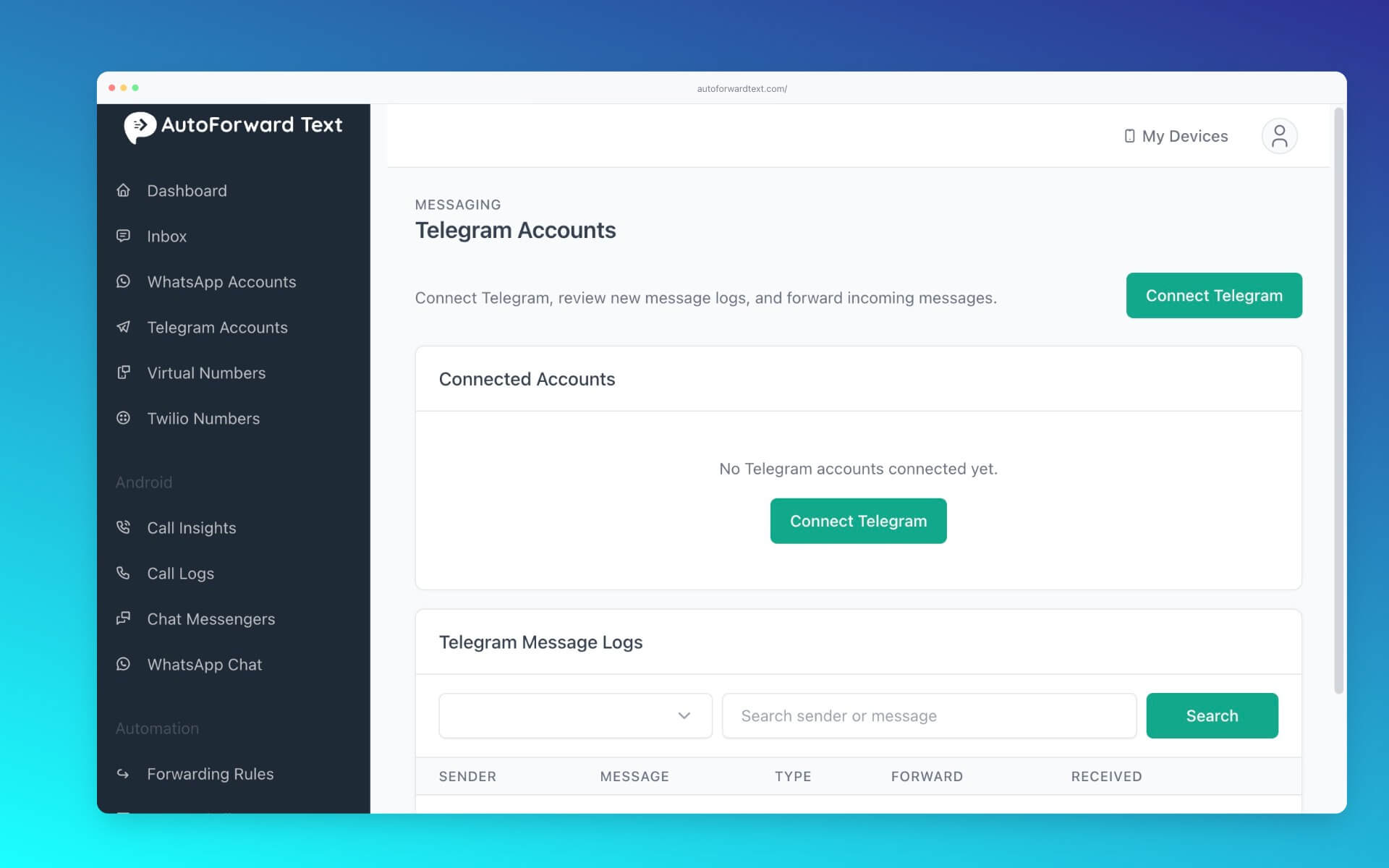
Open Telegram Accounts, start a new connection and follow the QR authentication instructions. Confirm the account appears as connected before continuing.
Step 3: Connect WhatsApp
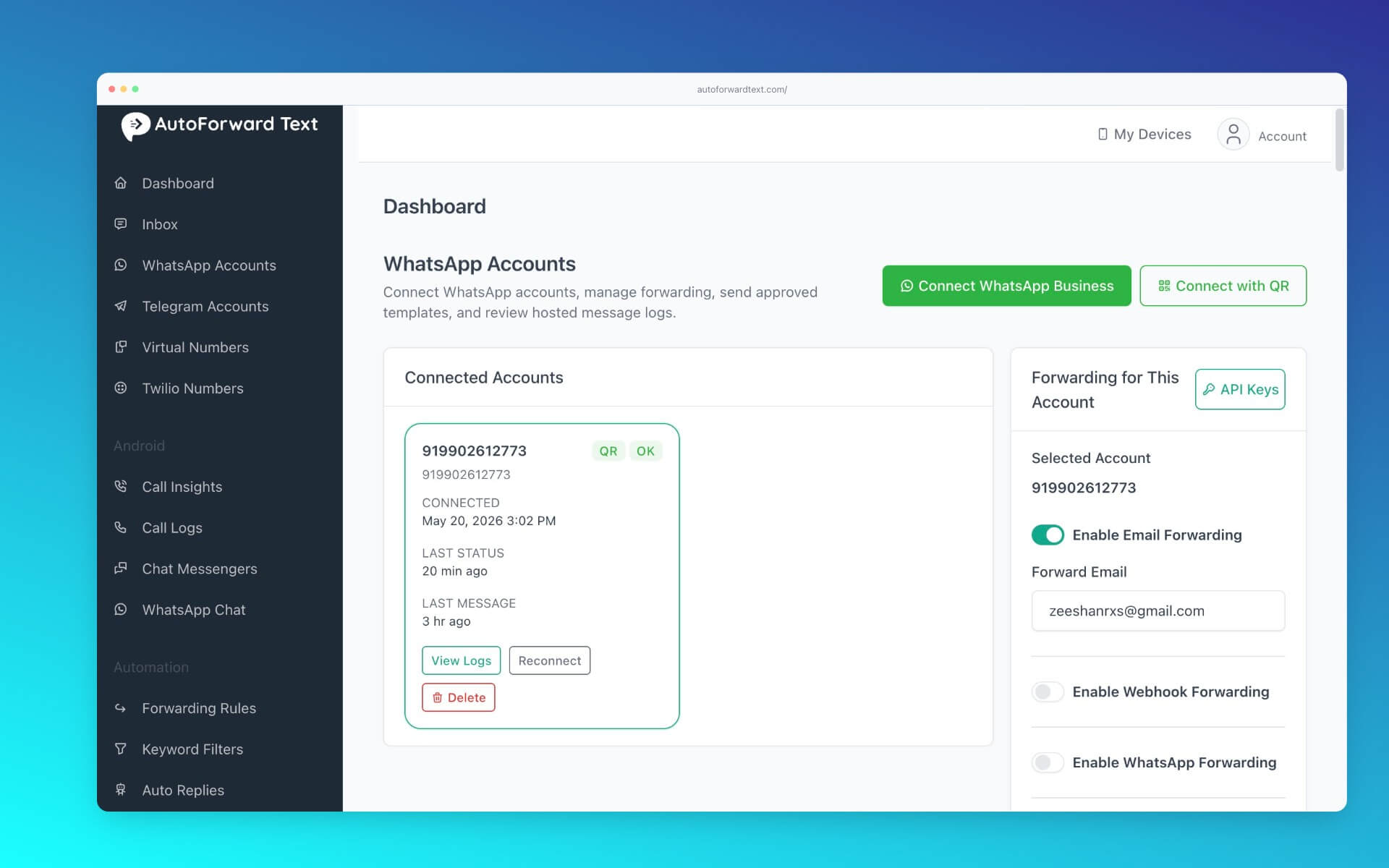
Open WhatsApp Accounts and link the WhatsApp QR account you intend to use for sending forwarded messages. Keep both connected accounts authorized and active.
Step 4: Configure the WhatsApp destination
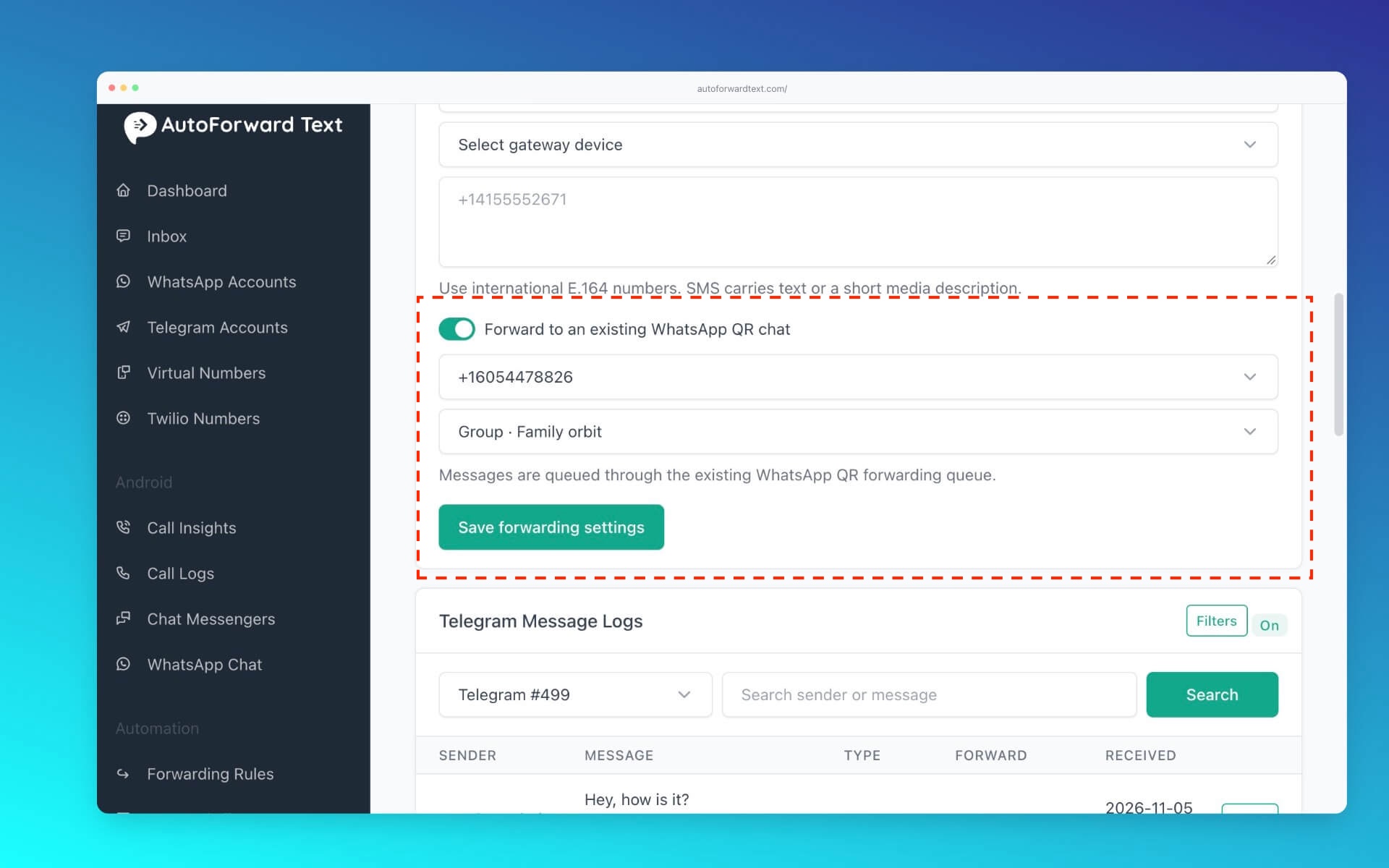
Return to Telegram forwarding settings, select the supported WhatsApp forwarding destination and specify the contact or group that should receive messages. The currently tested setup supports one WhatsApp recipient destination per Telegram forwarding configuration, not a fan-out to several recipients.
Step 5: Configure optional sender, chat and keyword filters
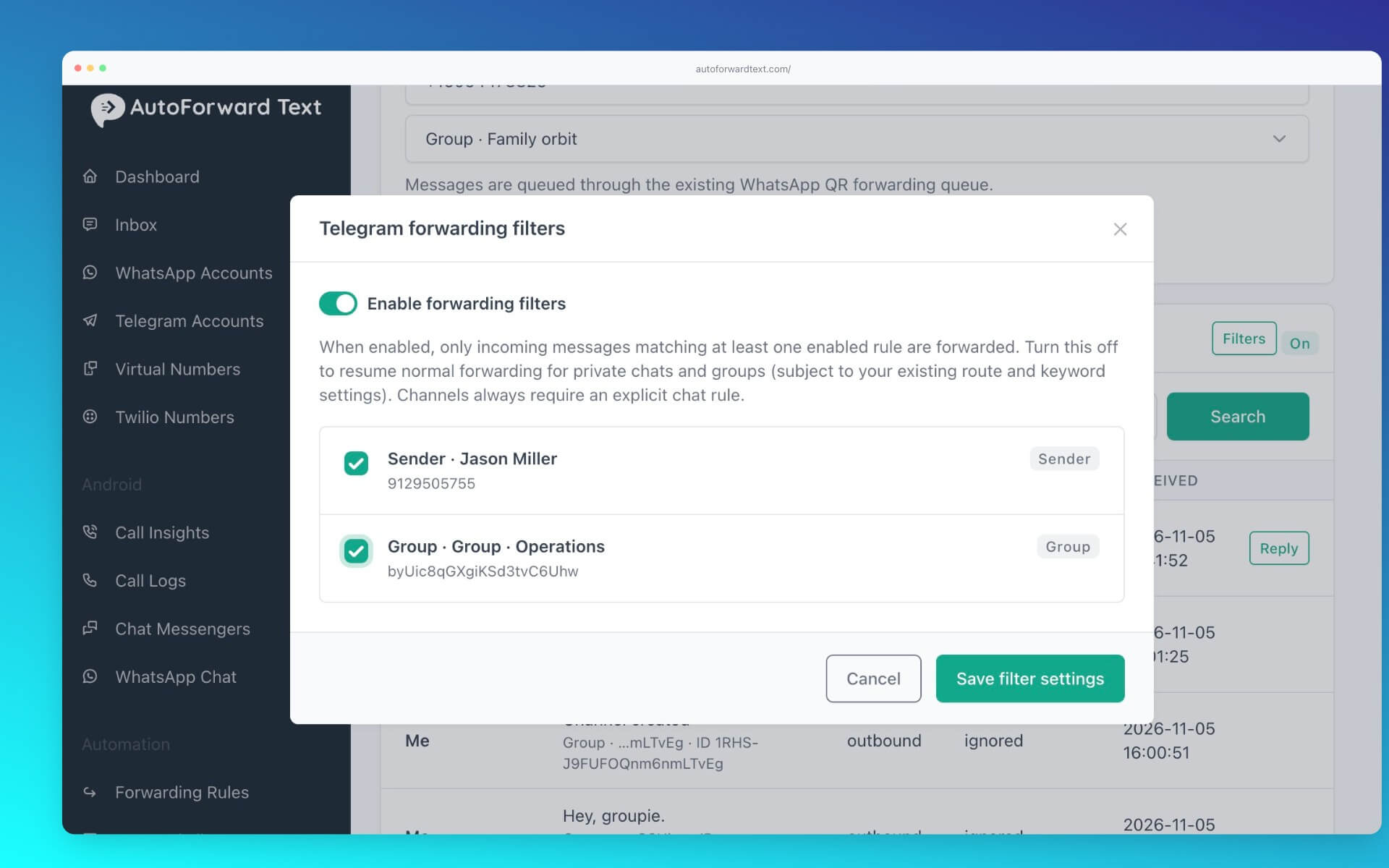
Use Filters to control which Telegram messages are eligible to forward. You can click a sender name to create a sender rule, or use Filter beside a chat to create a chat rule. You can also use keyword filters.
Step 6: Send a test message
- Send a new message to a selected Telegram private chat, group or channel.
- Open the Telegram message logs and confirm the message was received.
- Check the WhatsApp destination for the forwarded text and the original sender/chat label.
- Send a nonmatching message to confirm filtering behaves as intended.
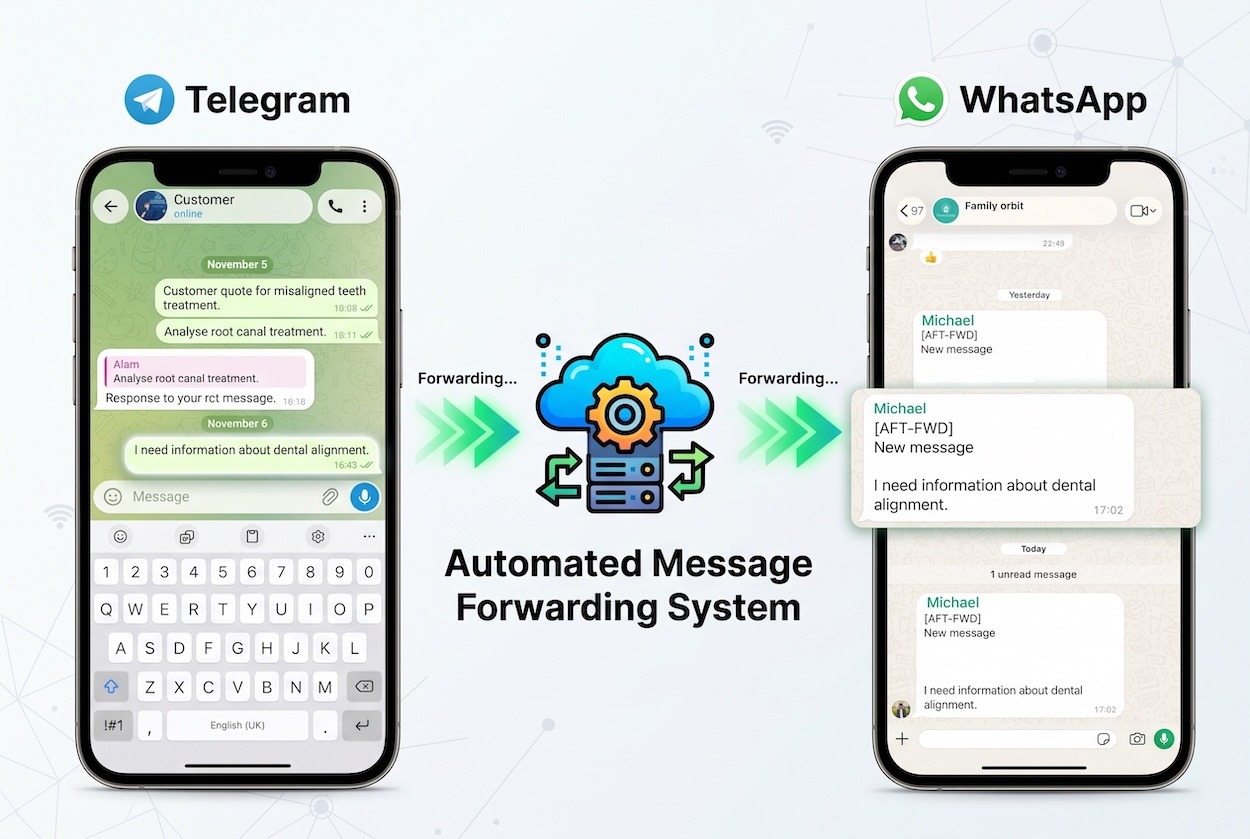
Forward Telegram Text to WhatsApp Automatically
Connect Telegram and WhatsApp with QR authentication, configure forwarding, and choose which senders or chats should be included.
Forward Telegram Groups and Channels to WhatsApp
Telegram group to WhatsApp group
In live testing, AutoForward Text successfully forwarded incoming Telegram group text messages to a WhatsApp group. This can help teams who coordinate in different apps receive the same operational updates without manually copying messages.
Telegram channel to WhatsApp
Telegram channel text posts were also successfully forwarded to WhatsApp. For a controlled channel-mirroring workflow, turn on sender/chat filtering and add an exact chat rule for that channel. Channel posts are not authorized by a sender-only rule.
These workflows forward text content, not a complete replica of the Telegram conversation or its media. Only redistribute channel or group content when you have permission to do so.
↓
Optional sender/chat and keyword filters
↓
AutoForward Text
↓
One configured WhatsApp contact or group
Choose Which Telegram Messages Get Forwarded
There are two distinct filtering mechanisms. Sender/chat rules choose which conversations or senders are allowed. Keyword filters restrict messages based on their text. Where both are configured, the message must satisfy the applicable conditions.
| Rule | What it does |
|---|---|
| Sender rule | Allows incoming messages from a particular Telegram sender, except that channel posts require a chat rule. |
| Chat rule | Allows incoming messages from a particular Telegram chat, group or channel. |
| Keyword filter | Restricts forwarding to messages matching configured keywords. |
| No matching sender/chat rule when filtering is on | Message stays in logs as “Filtered by rule” instead of being forwarded. |
| Outgoing message | Excluded from forwarding. |
Sender and chat rules operate as alternative matches for ordinary incoming chats: a matching sender or chat can allow a message. Be careful when allowing a sender who participates in multiple groups; their messages from other chats may also match. Use exact chat rules when the goal is to mirror one group or channel.
What Happens to Photos, Videos and Attachments?
Telegram-to-WhatsApp media forwarding is not currently supported in the tested integration. Images are not delivered as WhatsApp images, and videos, PDFs, voice notes and multiple attachments are not forwarded as WhatsApp media. Do not use this setup for a media-heavy channel expecting full post replication.
There is an important alternative: AutoForward Text has successfully forwarded Telegram image attachments to email. If retaining images is essential, configure an email destination instead of assuming WhatsApp will receive them.
| Telegram content | To WhatsApp | To email |
|---|---|---|
| Text message | Tested: works | Tested: works |
| Image attachment | Not supported as WhatsApp media | Tested: works |
| Video, PDF, voice note or multiple attachments | Not supported as WhatsApp media | Not verified in these tests |
Manual vs. Automatic Telegram Forwarding
| Capability | Manual sharing | AutoForward Text |
|---|---|---|
| Send one Telegram message to WhatsApp | Yes | Yes, via a configured route |
| Automatically forward new text messages | No | Yes |
| Telegram group to WhatsApp group | Copy/share manually | Tested: works |
| Telegram channel text posts | Copy/share manually | Tested: works |
| Sender, chat and keyword filters | No automatic rules | Available; validate configuration |
| Forward without keeping phone online | No | Tested: works while accounts stay connected |
| Send images as WhatsApp media | Possible through manual sharing | Not supported |
| Reply to Telegram in web inbox | No | Tested: works |
Practical Uses for Telegram-to-WhatsApp Forwarding
Team operations
Send text updates from a Telegram operations group to the WhatsApp group your colleagues already check. Use an exact Telegram chat rule to avoid leaking unrelated conversations.
Community announcements
Mirror text announcements from an authorized Telegram channel to a WhatsApp group. An exact channel rule helps ensure unrelated Telegram chats do not appear in the community.
Customer enquiries
Forward incoming Telegram enquiry text to a designated WhatsApp contact for awareness, then use the AutoForward Text unified inbox to reply through the original Telegram account. A WhatsApp forward is not itself a reply to the Telegram sender.
Notifications and automation
When WhatsApp isn’t the right destination, AutoForward Text also supports Telegram-to-email and webhook forwarding. For example, an email workflow can preserve tested image attachments, while webhooks can connect to external automations.
Troubleshooting Telegram-to-WhatsApp Forwarding
The Telegram message appears in logs but not WhatsApp
Check whether the log says Filtered by rule. If so, review enabled sender/chat rules and keywords. Also verify the WhatsApp destination is connected and correctly configured.
A channel post isn’t forwarded
If sender/chat filtering is enabled, a channel needs an enabled exact chat rule. A sender rule alone will not allow channel posts.
Messages from unrelated Telegram conversations are forwarded
Review the filter toggle and allowed rules. With sender/chat filtering off, all incoming conversations are eligible under the general forwarding settings. A broad sender rule can also match messages across different chats.
The forwarded message has no image
That is a current product limitation, not necessarily a connection error. Telegram-to-WhatsApp media forwarding is not supported in this integration. Use the tested Telegram-to-email image workflow when suitable.
Forwarding stops unexpectedly
Check both Telegram and WhatsApp account connection statuses, the selected destination, message logs, and any filtering rules. Reconnect an account if the dashboard indicates its authorization has expired or disconnected.
Frequently Asked Questions
Can Telegram messages be forwarded to WhatsApp automatically?
Yes. AutoForward Text forwards supported incoming Telegram text messages to a connected WhatsApp contact or group after the accounts and forwarding destination are configured.
Can I forward Telegram group messages to a WhatsApp group?
Yes. This text-forwarding scenario has been tested successfully. Use chat filtering when you want only one Telegram group to be eligible.
Can I forward Telegram channel posts to WhatsApp?
Yes, for text posts. When sender/chat filtering is enabled, the channel requires an exact enabled chat rule.
Can I forward only messages from a particular Telegram chat?
Sender/chat filters have been implemented to allow specific chats and senders. Create a chat rule and enable filtering. The new filter UI and live behavior should be verified before depending on it for sensitive messages.
Can I forward Telegram images to WhatsApp?
Not as WhatsApp media in the current integration. Telegram images have been successfully forwarded to email instead.
Does my phone need to remain online?
Not continuously. Offline-phone forwarding worked in testing, provided the linked Telegram and WhatsApp accounts remain connected and the services are available.
Can I forward one Telegram message to several WhatsApp recipients automatically?
Not with the currently tested configuration, which supports one WhatsApp recipient destination. A WhatsApp group can be used to share an update with multiple members.
Can I reply to Telegram messages from AutoForward Text?
Yes. The unified inbox supports replying through the connected Telegram account.
Do I need to create a Telegram bot?
No. The tested setup uses QR authentication to connect the Telegram account.
Connect Telegram and WhatsApp Without Copying Every Message
Forward supported Telegram text from private chats, groups and channels to a WhatsApp contact or group. Add sender, chat and keyword rules to control what gets through.