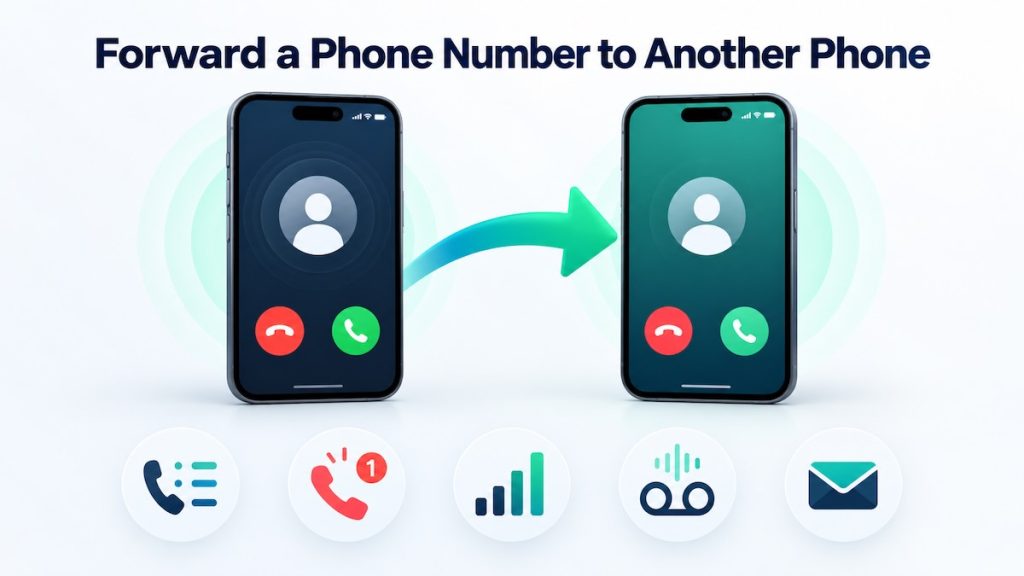
You can forward calls from one phone number to another using your phone settings, a carrier code, or your carrier account. But forwarding the calls does not usually forward text messages, call history, missed-call alerts, or voicemail. Those require separate settings or a service designed to handle them.
Quick answer: Open your phone’s call settings, find Call Forwarding, switch it on, and enter the destination number. If the setting is unavailable, configure forwarding through your mobile carrier. Choose unconditional forwarding to redirect every call, or conditional forwarding to redirect calls only when the line is busy, unanswered, or unreachable.
This guide explains how to forward calls on iPhone, Android, and landlines, how to turn forwarding off, and what to do if you also need to forward text messages. It also covers the part ordinary call forwarding leaves behind: tracking call activity, receiving missed-call alerts, reviewing call analytics, and sending voicemail to email.
The Fastest Way to Forward a Phone Number
- Open the phone or carrier settings for the number you want to forward.
- Find Call Forwarding, Supplementary Services, or a similarly named option.
- Choose whether to forward every call or only calls that are busy, unanswered, or unreachable.
- Enter the complete destination number, including the country code when required.
- Save the setting.
- Call the original number from a third phone to make sure the forwarding route works.
The exact menu and available options depend on the device, mobile carrier, country, and type of phone service. If your phone does not show a forwarding setting, that does not necessarily mean forwarding is unavailable. Your carrier may require you to use a dial code, its mobile app, its website, or customer support.
| What you want to do | Best method |
|---|---|
| Send every incoming call to a second number | Always-on or unconditional call forwarding |
| Forward only calls you do not answer | Conditional or no-answer forwarding |
| Forward calls when your phone is off or offline | Forward when unreachable |
| Forward SMS messages as well as calls | A separate SMS forwarding method or service |
| Move the phone number permanently to another carrier | Number porting, not call forwarding |
| Send call logs or missed-call records to email | Call-log forwarding on a supported Android device |
| Receive unanswered voicemail by email | No-answer forwarding to a voicemail-enabled virtual number |
What Does “Forward a Phone Number” Mean?
People often use the same phrase for four different actions. Choosing the right one matters because each produces a different result.
Call Forwarding
Redirects new incoming calls from one phone number to another. The original number remains active with its existing carrier.
Call Transfer
Moves a call that has already been answered to another person or extension. This is common in office phone systems.
Text Forwarding
Copies incoming SMS or supported messages to another phone, email address, or business tool. Call forwarding does not normally do this.
Number Porting
Moves the number itself to a different carrier or phone service. This is a permanent service change rather than a temporary redirect.
In plain English: If you want another phone to ring, use call forwarding. If you want to keep the number but change carriers, port it. If you want copies of texts or call records, configure those separately.
How to Forward Calls From a Landline
Traditional telephone providers commonly let customers activate forwarding by dialing a service code. In the United States, *72 is often used to turn on unconditional forwarding and *73 to turn it off, but these codes are not universal.
- Pick up the landline and wait for a dial tone.
- Dial your provider’s call-forwarding activation code.
- Enter the phone number that should receive the calls.
- Wait for a confirmation tone or recorded message.
- Hang up and call the landline from another phone to test it.
Some providers require the destination phone to answer once before forwarding is activated. Others confirm the change immediately. Business phone systems, VoIP services, and hosted PBX systems may place these controls in an online administrator portal instead of using star codes.
Forward only unanswered landline calls
Ask the provider for conditional forwarding, no-answer forwarding, or delayed call forwarding. This lets the original telephone ring first. If nobody answers within the configured period, the provider redirects the call to another number.
This is the better option when you want to keep answering normal calls on the original line but send missed calls to a backup employee, answering service, or voicemail-enabled virtual number.
Do not assume that *72 and *73 work everywhere. Codes, charges, and supported destination numbers vary. Check your provider’s current instructions before activating forwarding.
How to Forward Calls on iPhone
On a supported iPhone and carrier, Apple places the main forwarding control in the Phone settings.
- Open the Settings app.
- Tap Apps, then Phone.
- Tap Call Forwarding.
- Turn on Call Forwarding.
- Tap Forward To and enter the destination number.
- Return to the previous screen, then place a test call to the original number.
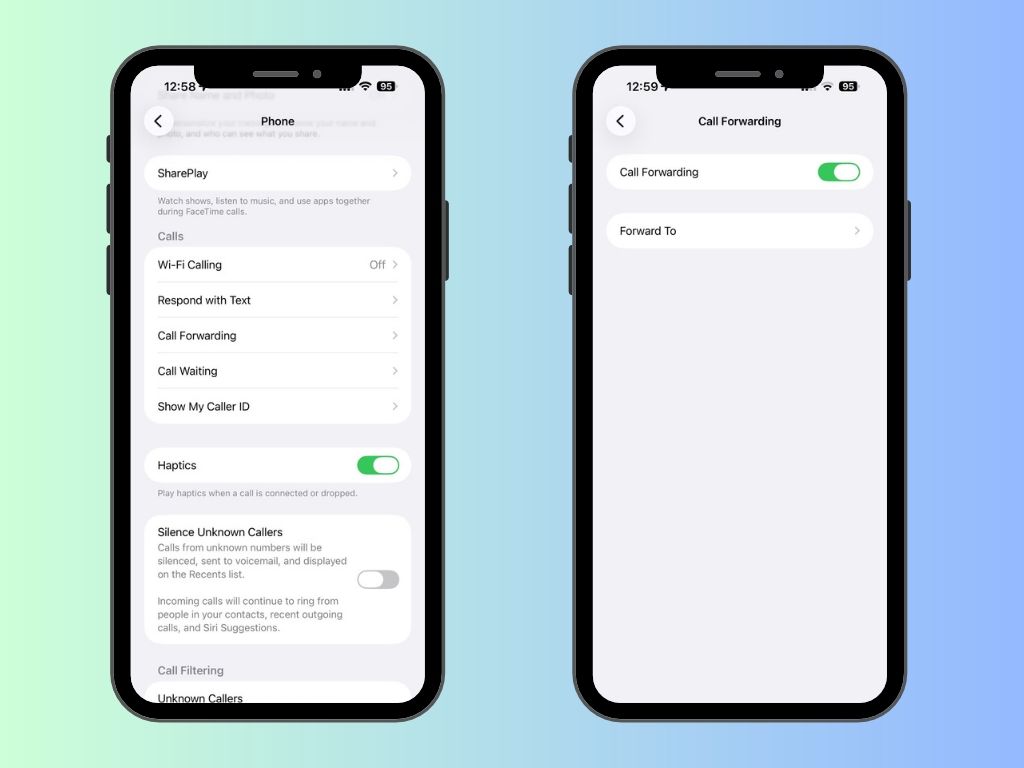
Apple notes that the visible setting is available with supported GSM cellular service. If the option is missing, contact your carrier. Some carriers handle forwarding through dial codes or account controls rather than the iPhone menu.
Can you forward iPhone calls to an Android phone?
Yes. The receiving number does not have to belong to another iPhone. You can normally forward an iPhone number to an Android phone, landline, virtual number, or another supported telephone number. The forwarding happens through the phone network, not through iMessage or an Apple Account.
Calls on Other Devices is not the same thing
Apple also offers Calls on Other Devices, which lets nearby Apple devices signed into the same Apple Account make and receive calls through the iPhone. That is useful for answering on a Mac or iPad, but it is different from forwarding calls to a separate phone number.
How to Forward Calls on Android
Android manufacturers and carriers use different menu names, so there is no single path that appears on every phone. The following route is common on phones using the Google Phone app and on many other Android devices.
- Open the Phone app.
- Open the menu and select Settings.
- Tap Calling accounts, Calls, or Supplementary services.
- Select the correct SIM or mobile carrier if prompted.
- Tap Call forwarding.
- Choose a forwarding condition.
- Enter the destination number and activate the setting.
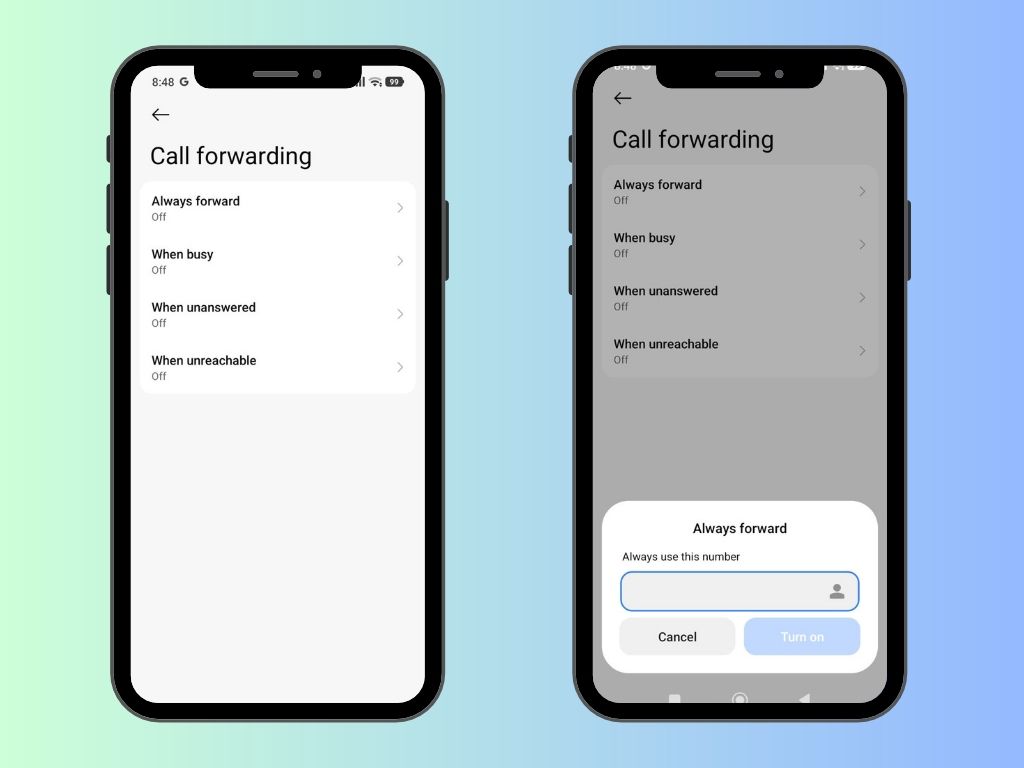
Samsung may place the setting under Phone → Settings → Supplementary services → Call forwarding. Pixel and other Google Phone devices may show it under a calling account or carrier menu. Dual-SIM phones usually require you to select the SIM whose calls should be forwarded.
If the Android setting is missing
Try one of these routes:
- Open your carrier’s mobile app or online account.
- Look for call management, call features, or forwarding.
- Use the carrier’s supported dial code.
- Contact the carrier and ask whether forwarding is enabled for your plan.
For a more detailed Android walkthrough, see how to check and configure call forwarding on Android.
The Four Main Types of Call Forwarding
| Forwarding type | What happens | Useful for |
|---|---|---|
| Always forward | Every incoming call immediately goes to the destination number. | Travel, a temporary replacement phone, or permanently routing a business line. |
| Forward when busy | The call is redirected when the original line is already handling another call. | Overflow coverage and reducing busy signals. |
| Forward when unanswered | The original phone rings first; the call is redirected only if nobody answers. | Backup staff, answering services, voicemail-to-email, and missed-call recovery. |
| Forward when unreachable | The call is redirected when the phone is off, offline, or outside network coverage. | Poor-signal locations, travel, or keeping a business reachable during an outage. |
Always forward is also called unconditional forwarding. The other three options are forms of conditional forwarding. Your carrier may offer only some of these modes, or it may combine unanswered and unreachable calls under one setting.
Best choice for most businesses: Use no-answer forwarding rather than forwarding every call. The primary phone can continue taking calls normally, while only unanswered calls move to the backup route.
How to Test and Turn Off Call Forwarding
Test the complete route
Do not test by calling from either the original phone or the destination phone. Use a third number so you can see what a real caller experiences.
- Call the original number from a third phone.
- Confirm whether the original phone rings as expected.
- Confirm that the destination phone receives the call.
- Let one test call go unanswered to check which voicemail system answers.
- Check the caller ID shown on the destination phone.
Turn forwarding off
Return to the same iPhone or Android call-forwarding menu and switch the feature off. For a landline or carrier code, use the provider’s deactivation code. Then place another test call and make sure the original phone rings again.
Turning off forwarding normally does not notify the destination number, so do not rely on the other person to confirm the change.
Does Call Forwarding Also Forward Text Messages?
No. Standard call forwarding does not forward SMS or MMS messages. Calls and text messages travel through different carrier services, so moving the calls does not automatically copy the texts.
Forward messages between Apple devices
Apple’s Text Message Forwarding can make messages from an iPhone available on compatible Apple devices signed into the same Apple Account. In current iOS versions, go to Settings → Apps → Messages → Text Message Forwarding and enable the Apple devices that should send and receive messages from the iPhone.
This is useful inside the Apple ecosystem, but it is not general forwarding to any unrelated phone number or business tool.
Forward Android SMS to another destination
For an Android phone, AutoForward Text can route supported SMS and device activity to destinations such as email, another phone, or connected business workflows. This is configured separately from the carrier’s live-call forwarding.
Read the full guide to automatically forwarding text messages to another phone for platform-specific options and setup instructions.
Important: If your goal is to move both calls and texts, plan them as two routes. Use your phone or carrier for live calls, then configure a supported message-forwarding method for SMS.
What Basic Call Forwarding Leaves Behind
Call forwarding does one job: it changes where an incoming call rings. That may be enough for personal use. For a business, however, moving the call often solves only the first half of the problem.
Ordinary forwarding may not provide:
- A shared record of incoming, outgoing, and missed-call activity.
- Email notifications when an important call is missed.
- A dashboard showing when calls arrive and how often they are missed.
- A way for remote staff to see call activity without holding the original phone.
- An automatic acknowledgement for a caller who could not reach anyone.
- Voicemail recordings and details delivered to a monitored email inbox.
- A combined workflow for calls, text messages, and business notifications.
The practical difference:
↓
Call management shows what happened and what needs follow-up.
This is where AutoForward Text fits. It does not pretend to replace your carrier’s live-call network. Instead, it adds visibility and follow-up workflows around supported call activity, missed calls, text messages, and voicemail.
Manage Call Activity With AutoForward Text
AutoForward Text can complement call forwarding when you need more than a second phone to ring. The available workflow depends on whether you are monitoring activity on a supported Android phone or sending unanswered calls to an AutoForward Text virtual number.
Forward call logs
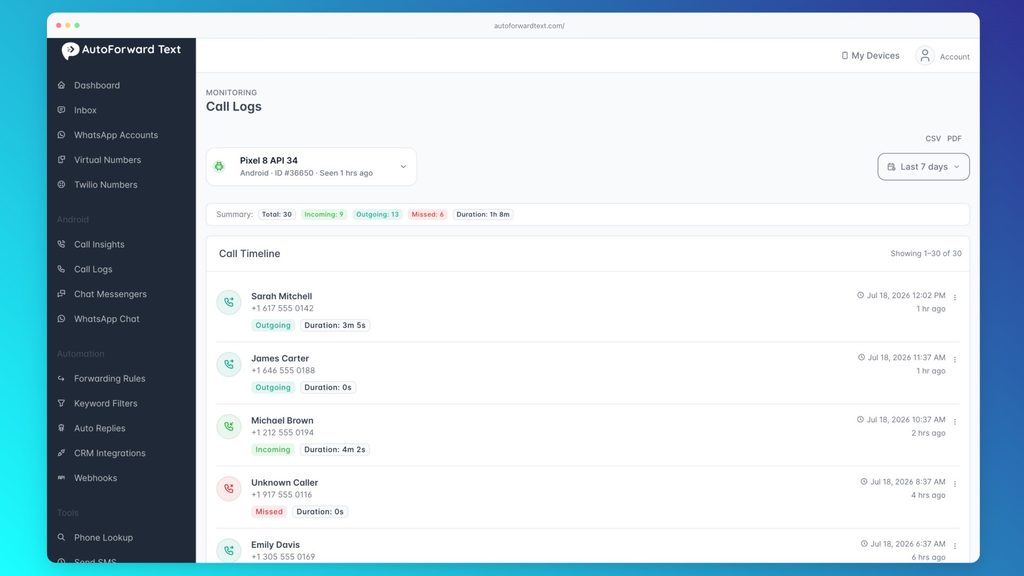
On a supported Android device, AutoForward Text can capture supported incoming, outgoing, and missed-call records and make that activity available through configured destinations and the online dashboard.
A forwarded call record can include details such as:
- The caller’s number or available contact name.
- Whether the call was incoming, outgoing, or missed.
- The date and time of the call.
- The call duration when the device makes it available.
This creates a searchable record without requiring a manager or remote employee to keep checking the physical phone.
Review call analytics
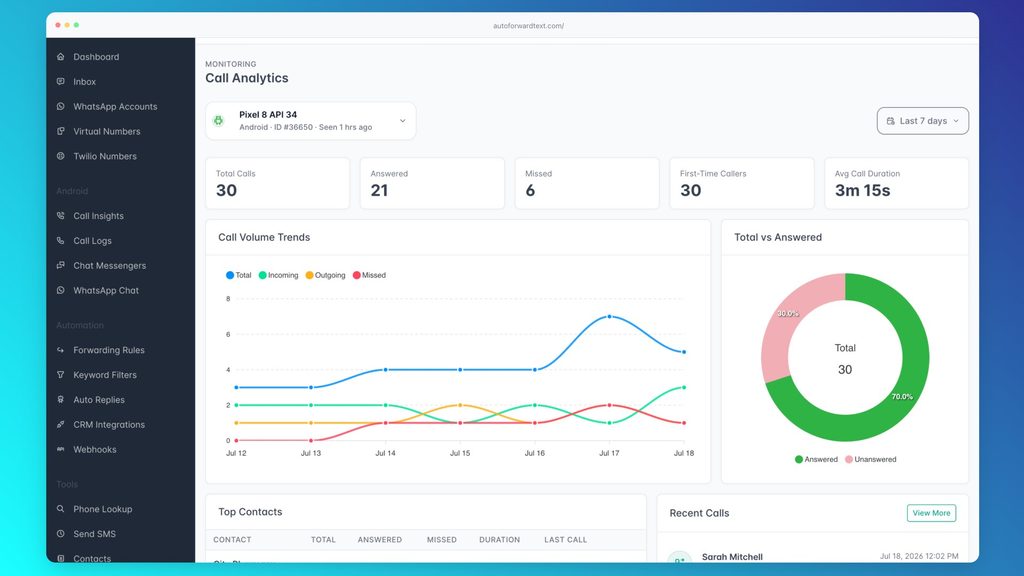
A call list tells you what happened one call at a time. Call analytics helps reveal the pattern behind those calls.
Businesses can use supported call activity to review questions such as:
- How many calls were answered and how many were missed?
- Which days or times receive the most calls?
- Which callers are contacting the business repeatedly?
- Is call volume increasing or falling?
- Are missed calls being noticed and followed up?
The point is not to create another complicated telephone system. It is to stop important call activity from being trapped in one employee’s Recents screen.
Receive missed-call alerts
A missed-call record can be routed into a supported alert workflow so the right person knows that follow-up is required. This is useful when the original Android phone is unattended, shared, kept at a branch location, or used as an operational device.
Because this workflow is based on supported call activity and device permissions, the Android phone must be connected and correctly configured. AutoForward Text cannot silently retrieve the unrelated call history of a phone on which it has not been installed and authorized.
Automatically text back missed callers
For a different kind of recovery workflow, a call can reach an AutoForward Text virtual number either directly or through carrier no-answer forwarding. If the call goes unanswered there, missed-call text back can send a short SMS or WhatsApp acknowledgement through a configured outbound channel.
Example response:
“Sorry we missed your call. Please reply with your name and what you need help with, and our team will get back to you.”
This does not replace a real conversation, and it should not become an aggressive marketing sequence. A short, useful acknowledgement gives the caller another way to continue the enquiry while the team is busy.
Send voicemail to email
Instead of leaving unanswered calls inside a carrier voicemail box that one person has to check manually, configure no-answer forwarding to a voicemail-enabled AutoForward Text virtual number.
When the caller leaves a message, supported voicemail details and the recording can be delivered to email. This makes the message easier to share, search, assign, and review from a normal inbox.
Keep the distinction clear: Your carrier forwards the live call. AutoForward Text handles supported call records, alerts, analytics, missed-call follow-up, or voicemail after the relevant device or virtual-number event reaches the service.

Two Practical AutoForward Text Setups
Setup 1: Monitor call activity on an Android phone
↓
Supported Android call-log event
↓
AutoForward Text
↓
Email, dashboard, alerts, and analytics
Use this setup when the Android phone and SIM remain the main calling line, but another person or team needs visibility into what is happening.
- Install AutoForward Text on the Android phone you own or are authorized to manage.
- Connect the phone to your AutoForward Text account.
- Grant the call-log and other permissions required for the features you enable.
- Configure the destination or workflow for supported call activity.
- Place incoming, outgoing, and missed test calls.
- Confirm that the records appear in the dashboard and intended destination.
This setup does not redirect the audio of a live call. It creates visibility around the call records generated by the Android phone.
Setup 2: Route unanswered calls to voicemail and follow-up
↓
Your normal phone rings
↓
No answer
↓
Carrier forwards to an AFT virtual number
↓
Voicemail to email and optional missed-call response
Use this setup when you want to keep your existing business number and normal answering process, but need a better experience when nobody can answer.
- Add and configure a supported AutoForward Text virtual number.
- Enable its voicemail or missed-call workflow.
- Configure no-answer forwarding with the carrier that controls your existing business number.
- Set the AFT virtual number as the conditional forwarding destination.
- Call the business number and deliberately let it ring unanswered.
- Leave a test voicemail and verify the email delivery.
- If using missed-call text back, confirm that the approved outbound channel sends the intended response.
This is usually better than unconditional forwarding because the business can continue answering calls on its existing phone. Only missed calls continue into the recovery workflow.
Call Forwarding vs. AutoForward Text
| Capability | Phone or carrier call forwarding | AutoForward Text |
|---|---|---|
| Redirect the audio of a live carrier call | Yes | No — use your phone or carrier |
| Forward only unanswered calls | When conditional forwarding is supported | Can receive the resulting call at a configured virtual number |
| Forward supported SMS messages | Usually no | Yes, through a supported device or messaging route |
| Forward supported Android call logs | No | Yes |
| Show call analytics | Usually limited or unavailable | Yes, for supported activity |
| Send missed-call alerts | Carrier-dependent | Yes, through supported workflows |
| Automatically acknowledge a missed caller | No | Yes, after a call reaches a configured AFT virtual number |
| Deliver supported voicemail to email | Carrier-dependent | Yes, through a configured virtual-number workflow |
Forward the Call. Keep Visibility After It.
Carrier forwarding gets the call to another number. AutoForward Text helps you track supported call activity, identify missed calls, review call patterns, and turn unanswered calls into email-delivered voicemail or controlled follow-up workflows.
Common Business Use Cases
Small businesses
Forward unanswered calls to a backup number or virtual-number workflow while giving the owner visibility into missed-call activity. This helps when one person handles sales, operations, and customer calls.
Home-service companies
Plumbers, electricians, repair companies, and contractors often receive time-sensitive calls while staff are already on a job. A missed-call acknowledgement gives the caller an immediate way to provide an address or explain the problem.
Sales teams
Call analytics and shared call records can show when enquiries are being missed and whether call volume is concentrated at times when coverage is weak.
On-call employees
Conditional forwarding can route calls to the employee currently on duty, while alerts and call records help create a shared operational history.
Remote managers
A manager does not need to keep asking someone at the branch to check the phone’s recent-call list. Supported Android call activity can be made visible through the dashboard and configured workflows.
Travel and temporary phone replacement
Always-on forwarding can temporarily send calls to another active number. Before travelling, check international forwarding charges and confirm that the original line will remain active.
Call Forwarding Troubleshooting
The Call Forwarding option is missing
Your carrier may not expose the setting through the phone menu. Check its app or website, try its documented dial code, or contact customer support. On iPhone, availability can depend on the type of cellular service.
The original phone still rings
You may have enabled no-answer forwarding rather than always-on forwarding. With no-answer forwarding, the original device should ring before the call is redirected.
The call reaches the wrong voicemail
Two voicemail systems may be competing: the original carrier voicemail and the voicemail attached to the destination number. Adjust the no-answer delay or ask the carrier which voicemail route takes priority.
Calls forward, but texts do not
That is expected. Call forwarding does not normally affect SMS or MMS. Configure text forwarding separately.
The destination shows the wrong caller ID
Some carriers preserve the original caller’s number, while others may display the forwarding line or another identifier. This behavior is controlled by the network and phone service.
AutoForward Text is not showing Android call records
Check that the correct Android device is connected, the required permissions are enabled, the device has internet access, and battery optimization is not preventing the app from running as required. Then place a new test call instead of waiting for old history to appear.
Voicemail-to-email is not triggered
Confirm that the test call actually reached the configured virtual number. If the original carrier’s voicemail answered first, shorten its forwarding delay or ask the carrier to change the no-answer route. Also confirm that voicemail and the correct notification email are enabled for the virtual number.
Frequently Asked Questions
Can I forward my phone number to another phone?
You can forward incoming calls from the number to another phone. The original number remains with its current carrier. If you want to permanently move the number itself, request a number port instead.
How do I forward calls from one cell phone to another?
Open the Phone or call settings, select Call Forwarding, enable the appropriate forwarding type, and enter the destination number. If the option is missing, use your carrier’s app, website, dial code, or support service.
Can I forward calls from an iPhone to an Android phone?
Yes. Carrier call forwarding can redirect iPhone calls to an Android number. The destination does not need to use the same operating system.
Can I forward only unanswered calls?
Yes, when your carrier supports conditional or no-answer call forwarding. The original phone rings first, and the call moves to the second number only if nobody answers.
Does the original phone need to stay turned on?
Carrier-level unconditional forwarding can normally continue even when the original phone is off because the network redirects the call. Device-based features and apps may still require the original phone to remain powered, connected, and permitted to run.
Does call forwarding forward text messages?
No. Standard call forwarding redirects calls, not SMS or MMS. Use Apple’s Text Message Forwarding for compatible Apple devices or a supported message-forwarding service for other destinations.
Will callers know their call was forwarded?
Usually there is no announcement, but the experience depends on the carrier, destination, ringing delay, greeting, and caller ID behavior. Test the route from an outside number before using it with customers.
Can I forward a number without access to the original phone?
Possibly, if you are the authorized account holder and your carrier lets you configure forwarding through its website, app, or customer support. You should not attempt to change forwarding on a line you do not own or have permission to manage.
Does AutoForward Text forward live phone calls?
No. The phone or carrier handles the live-call forwarding. AutoForward Text can complement it with supported Android call-log forwarding, call analytics, missed-call alerts, virtual-number workflows, and voicemail-to-email.
Can AutoForward Text send an automatic message after a missed call?
Yes, when the missed call reaches a correctly configured AutoForward Text virtual number. The follow-up can then be sent through an eligible, connected SMS or WhatsApp channel.
How can I send voicemail to email?
One option is to configure no-answer forwarding from your existing number to a voicemail-enabled AutoForward Text virtual number. When the caller leaves a message, supported voicemail details and the recording can be delivered to the configured email address.
Is call forwarding free?
Not always. Carriers may charge for forwarded call minutes, international destinations, or the underlying service plan. Check your provider’s rates before forwarding calls for extended periods.
Make Missed Calls Easier to Act On
Use your carrier to control where live calls ring. Use AutoForward Text when you also need supported call records, missed-call visibility, analytics, voicemail-to-email, or an automatic follow-up route.