How do I send an email as an SMS to any phone number?
AutoForward Text lets you send an SMS simply by sending an email.
The destination phone number is placed before:
@reply.autoforwardtext.com
For example, to send an SMS to:
+1 415 555 2671
Send an email to:
14155552671@reply.autoforwardtext.com
Use digits only, including the country code. Do not include the + sign, spaces, brackets, or dashes.
Before you begin
You need one of the following SMS sending methods connected to your AutoForward Text account:
-
An Android phone with SMS Gateway enabled
-
A connected Twilio number
You must also enable Email to Text in your dashboard.
How to configure Email to Text
-
Sign in to your AutoForward Text dashboard.
-
Open Workflows -> Email to Text.
-
Turn on Enable Email to Text.
-
Under Send SMS using, select:
-
Android gateway, or
-
Twilio number
-
-
Select the Android device or Twilio number that should send the SMS.
-
Add any approved sender email addresses.
-
Click Save Settings.
Your AutoForward Text account email is authorized automatically.
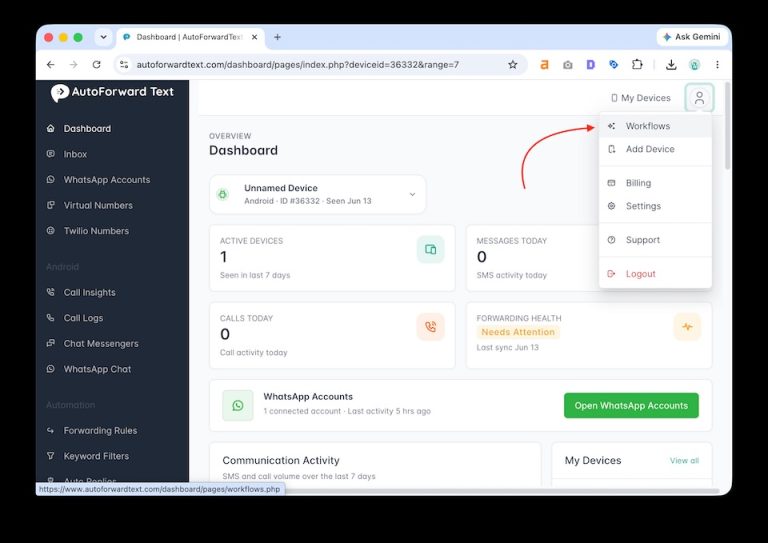
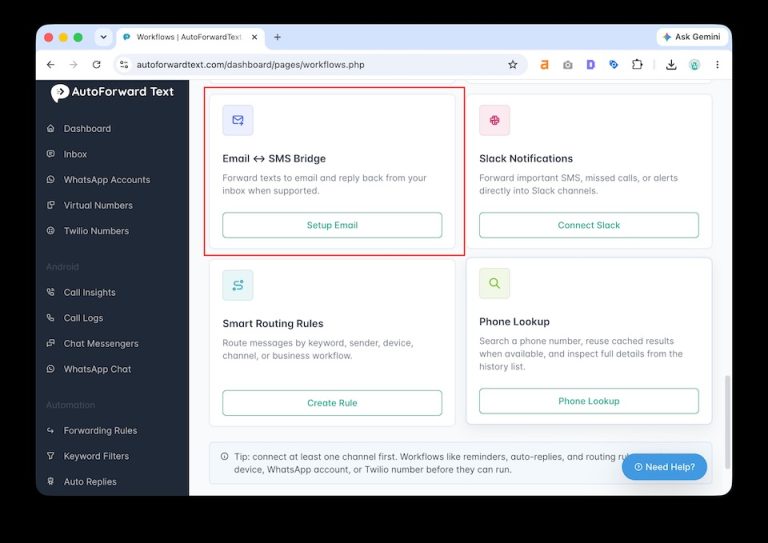
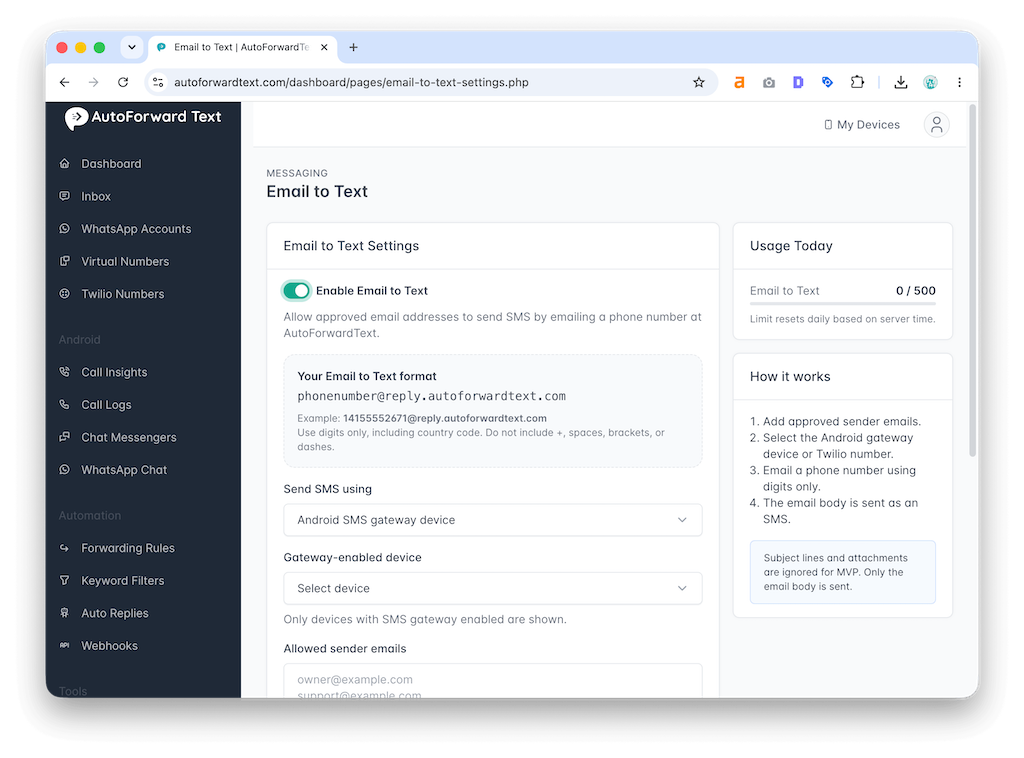
How to send an SMS from email
Create a new email from an approved sender address.
In the To field, enter the destination phone number followed by:
@reply.autoforwardtext.com
Example:
14155552671@reply.autoforwardtext.com
Write the SMS message in the email body and send the email.
AutoForward Text receives the email and sends the message as an SMS using your selected Android gateway or Twilio number.
What part of the email is sent?
The email body is used as the SMS message.
For best results:
-
Keep the message concise
-
Avoid long email signatures
-
Avoid unnecessary formatting
-
Do not rely on attachments
Email subjects and attachments are ignored for the standard Email to Text workflow.
Can I send to different phone numbers?
Yes.
You can send to any valid phone number by changing the recipient email address.
Examples:
447700900123@reply.autoforwardtext.com
919876543210@reply.autoforwardtext.com
61412345678@reply.autoforwardtext.com
Always include the destination country code.
Who is allowed to send emails to Text messages?
Only approved sender email addresses can trigger an SMS.
Your registered AutoForward Text account email is always approved. You can add additional sender addresses from the Email to Text settings page.
Emails from unapproved senders are rejected.
Are there sending limits?
Yes.
Your daily Email-to-Text allowance is shown on the settings page. Messages above the daily limit are rejected.
Your mobile carrier, Android device, or Twilio account may also apply separate sending limits and charges.
Why was my message not sent?
Check the following:
-
Email to Text is enabled
-
The email was sent from an approved address
-
The destination contains digits only
-
The destination includes the country code
-
Your Android gateway is online
-
Your Twilio number is active
-
Your daily sending limit has not been reached
You can review this detailed article for further instructions.