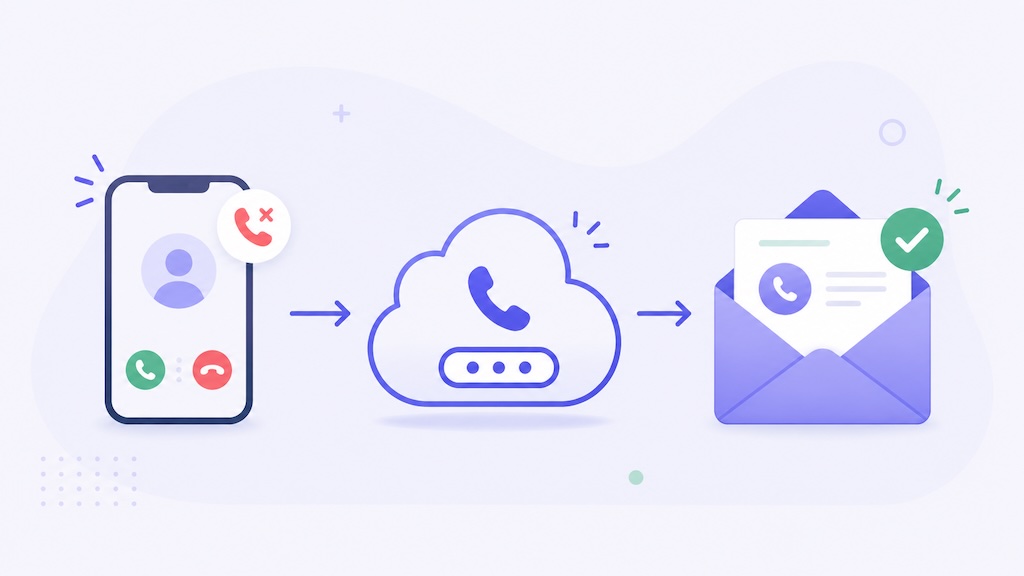
Missed calls are not just missed calls. For many businesses, there are missed appointments, missed sales, missed service jobs, and missed follow-ups.
If your business receives calls from customers, leads, patients, tenants, vendors, or field staff, unanswered calls should not disappear into a phone log that nobody checks. They should become alerts your team can actually act on.
That is where missed call alerts by email help. Instead of relying on one person to notice a missed call on one phone, you can receive an email notification whenever an unanswered call is routed to your business workflow.
With AutoForward Text, you can use a virtual number to receive forwarded unanswered calls, detect missed calls, and send the alert to email or other workflow destinations.
Quick Answer: How Do Missed Call Alerts by Email Work?
You can get missed call alerts by email by forwarding unanswered calls from your existing business number to a virtual number that detects the call and sends an email notification.
The setup usually works like this:
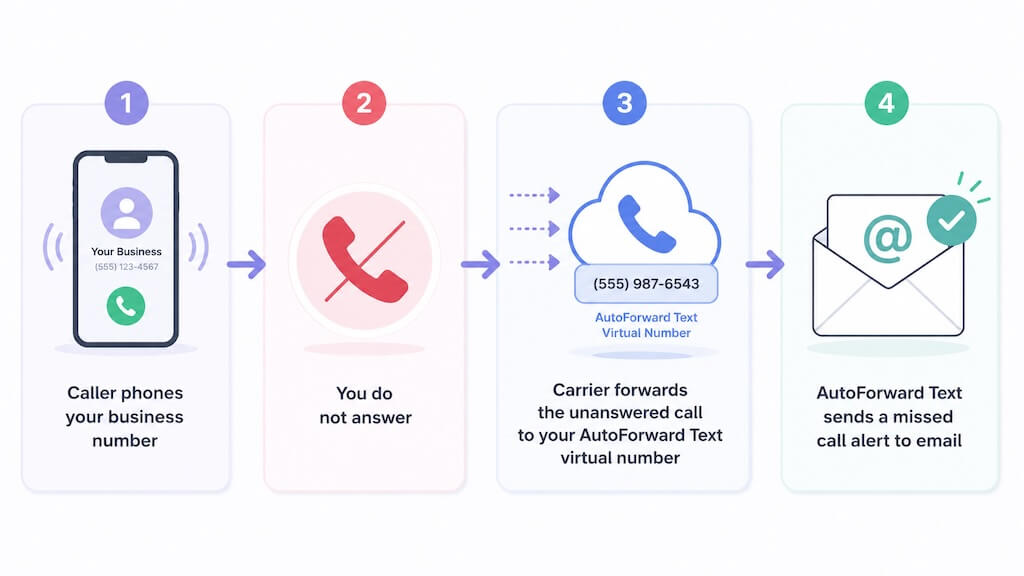
The email alert can include useful details such as the caller number, the number that received the call, the date and time, and whether the call was captured by your virtual number.
This is a better workflow than hoping someone checks a missed call list manually. The missed call becomes a visible email record that your team can follow up on.
Turn Missed Calls Into Email Alerts
Use AutoForward Text to capture unanswered calls with a virtual number and send missed call alerts to your inbox or business workflow.
What Are Missed Call Alerts by Email?
A missed call alert by email is a notification sent to your inbox when someone calls and the call is not answered.
Instead of the missed call staying only on a phone screen, it gets delivered as an email record. That makes it easier to track, share, assign, and follow up.
| Missed Call Detail | What It Helps With |
|---|---|
| Caller number | Know who called and call them back quickly. |
| Call time | See when the lead or customer tried to reach you. |
| Destination number | Know which business line or virtual number received the call. |
| Email notification | Send the alert to one person or a shared team inbox. |
| Workflow routing | Send missed call events to email, logs, WhatsApp workflows, or webhooks. |
For personal use, a missed call may be a minor inconvenience. For a business, it can be money left on the table.
Why Businesses Need Missed Call Email Alerts
Businesses often lose leads because nobody follows up fast enough. This is especially true for local service businesses where customers call multiple companies until someone answers.
If a customer calls an HVAC company, plumber, clinic, salon, or real estate agent and nobody responds, they may simply call the next business on Google.
Plain truth: A missed call sitting quietly on a phone is not a follow-up system. It is a leak in your sales process.
Missed call alerts by email help solve that leak by turning every unanswered call into something visible.
Business Benefits
- Get notified when customers call and nobody answers.
- Send missed call alerts to a shared inbox instead of one phone.
- Follow up faster with new leads.
- Keep a searchable record of missed calls.
- Improve after-hours call handling.
- Reduce dependency on one employee checking one device.
- Route missed call alerts into internal workflows.
For businesses that rely on phone calls, this is not a nice-to-have feature. It is basic lead protection.
Why Use a Virtual Number for Missed Call Alerts?
A virtual number works well for missed call alerts because it can act as a cloud-based destination for unanswered calls.
Instead of relying only on the voicemail or call log on your mobile phone, you can forward unanswered calls to a virtual number. That virtual number can then detect the missed call and send an alert via email.
Simple version:
Your regular phone number handles normal calls.
Your virtual number handles unanswered calls.
AutoForward Text sends the missed call alert.
This setup gives you more flexibility than a traditional phone-only missed call log.
What a Virtual Number Adds
- Cloud-based call handling.
- Email alerts for missed calls.
- Optional voicemail capture.
- Better team visibility.
- Cleaner business records.
- Support for workflow destinations beyond email.
That is the real point: the virtual number is not just another phone number. It becomes the bridge between your missed calls and your business workflow.
Important: Carrier-Level Call Forwarding Is Required
This part matters.
AutoForward Text can detect and process calls that reach your AutoForward Text virtual number. But if you want to capture missed calls from your existing business phone number, that existing phone number must forward unanswered calls to the virtual number.
That forwarding is controlled by your mobile carrier, landline provider, VoIP provider, or cable phone provider.
Important: Missed call alerts only work after your existing number is configured to forward unanswered calls to your AutoForward Text virtual number. If your carrier does not forward the call, AutoForward Text cannot detect it or send the missed call alert.
This is usually called one of the following:
- No Answer Call Forwarding
- Conditional Call Forwarding
- Forward When Unanswered
- Call Forward No Reply
The wording depends on your provider, but the idea is the same: your phone rings first, and if nobody answers, the call is forwarded to another number.
Example No Answer Call Forwarding Codes
Carrier codes vary by country and provider, so there is no single universal code that works everywhere. Still, many providers use common forwarding patterns.
| Phone Type / Provider | Typical Setup | What It Does |
|---|---|---|
| iPhone / GSM-style forwarding | *004*YOUR_VIRTUAL_NUMBER# | Forwards unanswered, unreachable, or busy calls on many GSM networks. |
| Some landline / cable providers | *71 YOUR_VIRTUAL_NUMBER | Common conditional forwarding pattern for some home or business phone providers. |
| Other providers | *92 YOUR_VIRTUAL_NUMBER | Used by some providers for no-answer forwarding. |
If these do not work, search your carrier’s support site for No Answer Call Forwarding or Conditional Call Forwarding.
Tip: Always test the setup after entering the forwarding code. Call your business number, do not answer, and check whether the missed call alert arrives by email.
How to Set Up Missed Call Alerts by Email
The setup is straightforward once you understand the role of the virtual number and carrier forwarding.
Step 1: Create or Select a Virtual Number
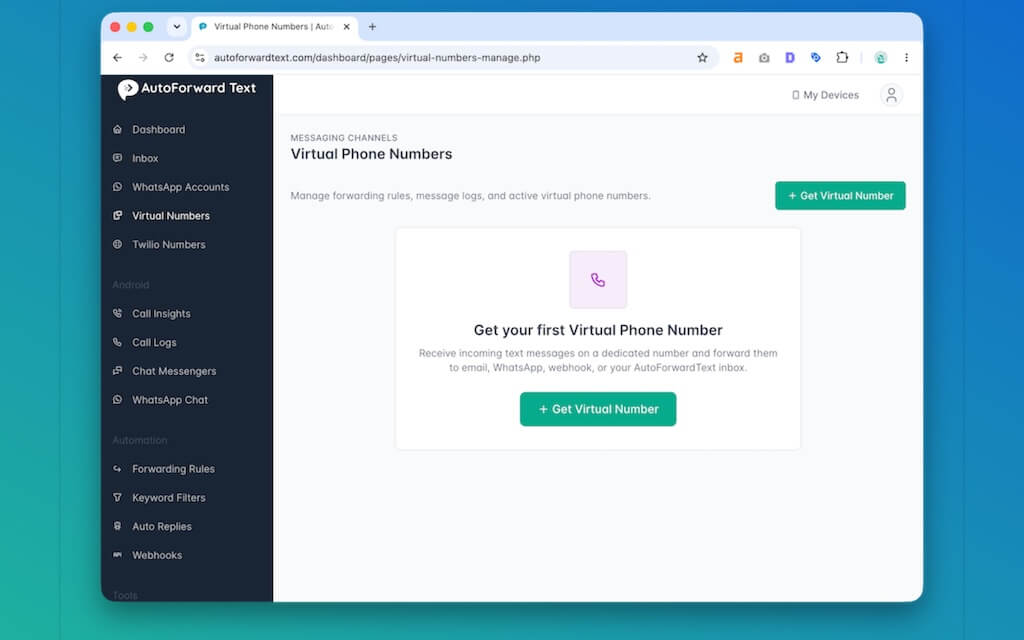
In AutoForward Text, go to your virtual numbers and choose the number you want to use for missed call alerts.
This virtual number becomes the destination for unanswered calls from your existing phone number.
Step 2: Copy Your AutoForward Text Virtual Number
Copy the virtual number shown in your dashboard. You will use this number as the forwarding destination in your carrier settings or forwarding code.
Step 3: Enable No Answer Call Forwarding
On your existing phone number, enable no-answer forwarding and set the forwarding destination to your AutoForward Text virtual number.
For example:
Your Business Number → If Unanswered → AutoForward Text Virtual Number
This lets your normal phone ring first. If nobody answers, the carrier forwards the call to the virtual number.
Step 4: Enable Missed Call Alerts in AutoForward Text
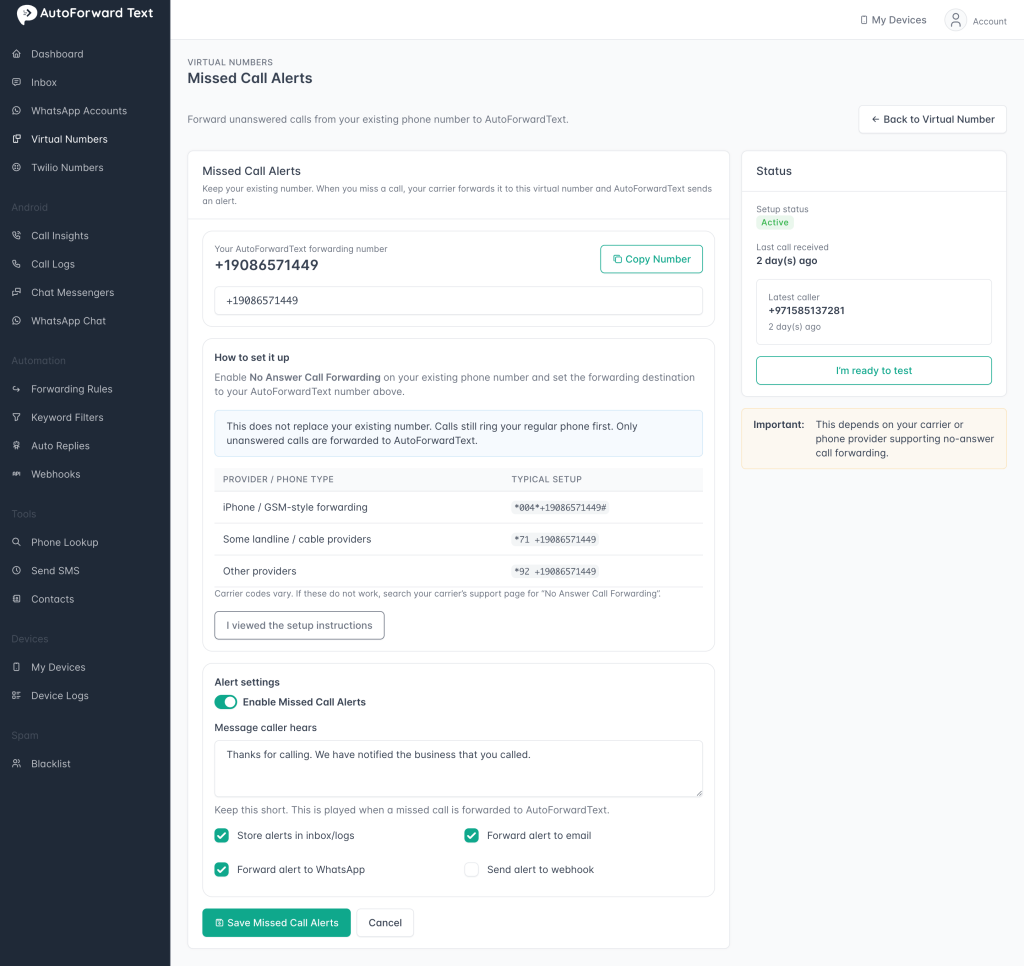
Open the missed call alert setup for the virtual number and enable missed call notifications.
Choose email as the destination, so alerts are sent to your inbox.
Step 5: Choose the Email Destination
You can send missed call alerts to your own email address or a shared business inbox.
For business use, a shared inbox usually works better:
sales@yourcompany.comsupport@yourcompany.comdispatch@yourcompany.comappointments@yourcompany.com
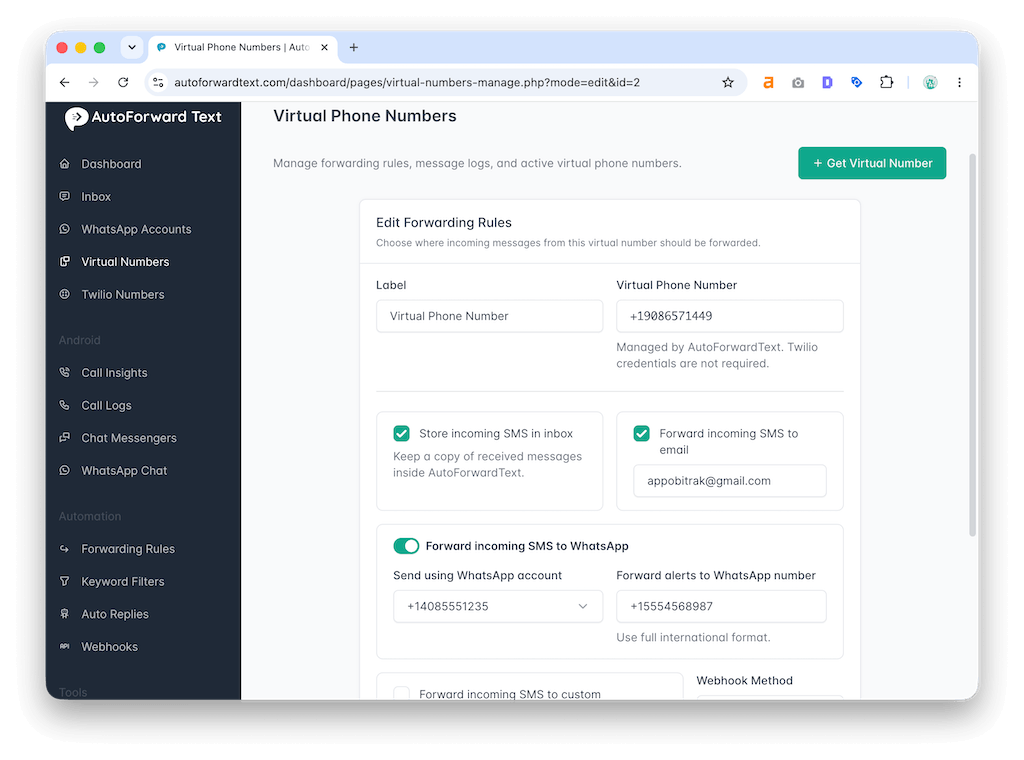
Step 6: Decide Whether Also to Record Voicemail
Some businesses only need missed call alerts. Others want missed call alerts plus voicemail recording.
The strongest setup is usually:
Send missed call alert and record voicemail
That way, you get notified even if the caller hangs up, and you also capture voicemail when they leave a message.
Step 7: Test the Workflow
Call your existing business number from another phone. Do not answer the call. Wait for the call to forward, then check your email inbox.
If the alert arrives, the setup is working.
Capture Missed Calls Before Leads Go Cold
Set up missed call alerts with AutoForward Text and send unanswered call notifications to your email inbox or team workflow.
What the Missed Call Email Looks Like
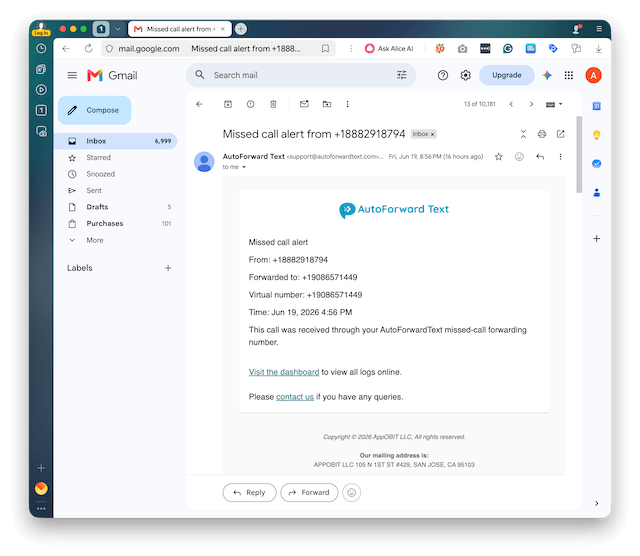
A missed call email should be simple and actionable. The goal is to help someone call back quickly.
Once the alert is in email, your team can reply internally, assign the follow-up, star the message, label it, or forward it to the right person.
Can You Text Back Missed Callers Automatically?
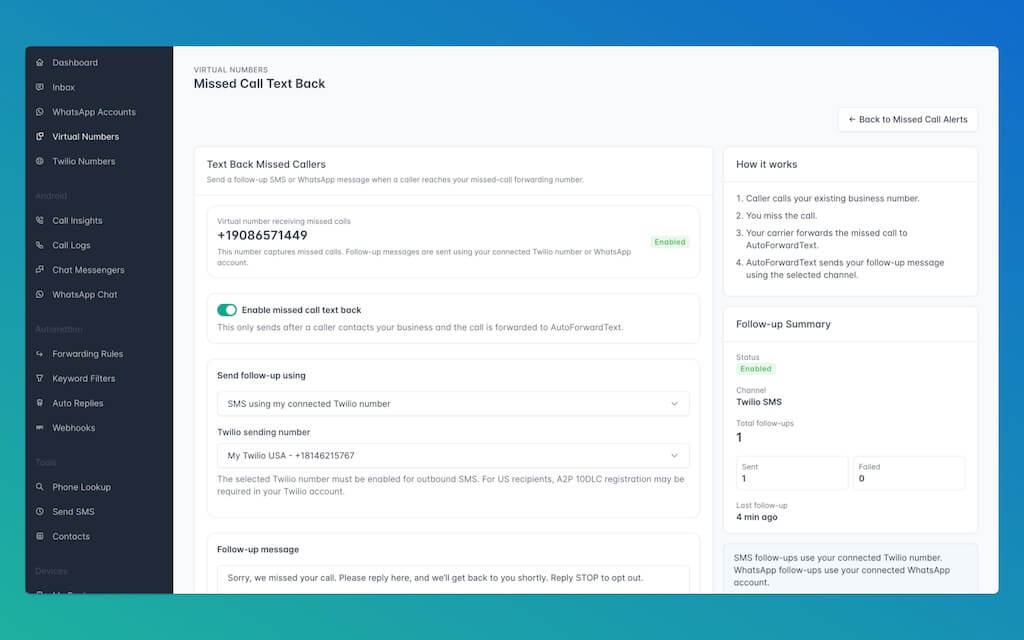
Email alerts help your team see the missed call. But in some cases, you may also want to send a quick follow-up message back to the caller.
AutoForward Text can support a missed call text-back workflow where a caller receives a short SMS or WhatsApp follow-up after an unanswered call is captured.
Example text-back flow:
Missed call captured → Email alert sent to your team → Optional SMS or WhatsApp follow-up sent to the caller
A simple message can reassure the caller that their call was not ignored:
This is best used as a transactional follow-up after someone has called your business. It should not be used for cold outreach or marketing blasts.
For SMS follow-ups, businesses may need to use their own connected Twilio number with outbound messaging enabled. WhatsApp follow-ups can be sent through a connected WhatsApp account when available.
Missed Call Alerts vs Voicemail to Email
Missed call alerts and voicemail to email are related, but they are not the same thing.
| Feature | Missed Call Alerts | Voicemail to Email |
|---|---|---|
| Main purpose | Notify you that someone called and was not answered. | Capture the caller’s voice message and send it to email. |
| Works if caller hangs up? | Yes, if the forwarded call reaches the virtual number. | No voicemail is recorded if the caller hangs up before leaving a message. |
| Includes audio recording? | Not necessarily. | Yes. |
| Best for | Fast lead follow-up. | Capturing detailed caller messages. |
| Recommended business setup | Use both: send a missed call alert and record a voicemail. | |
For most businesses, the best setup is both. A missed call alert tells you someone tried to reach you. Voicemail to email gives you the caller’s message if they leave one.
Best Business Use Cases
Missed call alerts by email are especially useful for businesses where calls directly turn into revenue, appointments, or urgent tasks.
1. HVAC, Plumbing, Electrical, and Home Services
Local service customers often call multiple companies. If you miss the call and do not follow up quickly, the job may go to someone else.
Email alerts help dispatchers, owners, or office staff see missed calls and call back fast.
2. Clinics and Appointment-Based Businesses
Dental clinics, medical offices, therapists, salons, spas, and consultants all depend on appointment calls.
A missed call email can become a simple follow-up task for the front desk.
3. Real Estate Agents and Property Managers
Property leads may call once and move on. Missed call alerts help agents and property managers respond before the lead goes cold.
4. Small Business Owners
Owners are busy. They cannot always answer every call personally. Sending missed call alerts to email makes follow-up easier without constantly checking the phone.
5. After-Hours Calls
Many businesses receive calls after closing time. Missed call alerts help you review those calls the next morning or route urgent calls to the right person.
6. Remote and Distributed Teams
If your team is not in one office, missed call alerts by email make call activity visible without giving everyone access to the same phone or carrier account.
7. Agencies and Lead-Driven Businesses
Marketing agencies, legal offices, insurance agents, consultants, and sales teams can use missed call alerts to reduce lead leakage from phone calls.
Business workflow example:
Missed customer call → Email alert to sales inbox → Team calls back → Lead is saved
Send Missed Call Alerts to a Shared Inbox
For business use, sending missed call alerts to one person’s private email is often not enough.
A shared inbox gives the whole team visibility. It also prevents missed calls from being trapped with one employee who is busy, offline, or on vacation.
Good Shared Inbox Examples
- Sales team:
sales@company.com - Support team:
support@company.com - Dispatch team:
dispatch@company.com - Appointments team:
appointments@company.com - Office admin:
office@company.com
You can also use Gmail or Google Workspace filters to label missed call alerts, archive them, forward them, or assign them through your existing workflow.
Tip: Create an email label called Missed Calls so these alerts do not get buried in your main inbox.
Can This Work Without a Physical Phone?
Yes, depending on how customers call you.
If customers call your AutoForward Text virtual number directly, you do not need a physical phone for that number. The virtual number can receive the call and trigger missed call or voicemail workflows.
If customers call your existing mobile, landline, or VoIP number, then that number must forward unanswered calls to your AutoForward Text virtual number.
| Setup | What Happens |
|---|---|
| Customer calls the virtual number directly | AutoForward Text can handle missed call alerts directly. |
| Customer calls existing business number | Your carrier must forward unanswered calls to the virtual number. |
| Carrier forwarding is not enabled | AutoForward Text will not receive the missed call and cannot send the alert. |
This distinction is important. A virtual number can do the alerting, but it can only alert on calls it actually receives.
Common Problems and Fixes
If missed call alerts are not arriving, the issue is usually related to forwarding setup, email delivery, or call routing.
| Problem | Likely Cause | Fix |
|---|---|---|
| No missed call email arrives | No-answer call forwarding is not enabled. | Recheck carrier forwarding setup and test again. |
| Phone rings but never forwards | The forwarding code did not work or the carrier does not support that code. | Check your carrier’s conditional call forwarding instructions. |
| Caller reaches old voicemail | Your carrier still routes unanswered calls to its own voicemail. | Change no-answer forwarding to your AutoForward Text virtual number. |
| Alert goes to the wrong email | Email destination is configured incorrectly. | Update the alert destination in your missed call settings. |
| Alerts are delayed | Email delivery or processing delay. | Check spam/promotions folders and test again. |
| Wrong number receives forwarded calls | The virtual number was typed incorrectly. | Copy and paste the number from your AutoForward Text dashboard. |
The first thing to check is always carrier-level no-answer forwarding. If the call never reaches the virtual number, no alert can be sent.
Privacy and Security Tips
Missed call alerts may contain customer phone numbers and business communication records, so treat them properly.
- Only forward calls from phone numbers you own or are authorized to manage.
- Send alerts to secure email accounts.
- Use strong passwords and two-factor authentication for your email account.
- Be careful when sending alerts to shared inboxes.
- Limit access to missed call records to people who need them.
- Delete or archive old alerts according to your business policy.
- Follow your local privacy and communication rules.
If you also enable voicemail recording, make sure your voicemail greeting and recording workflow are appropriate for your location and business use.
Frequently Asked Questions
Can I get missed call alerts by email?
Yes. You can use AutoForward Text with a virtual number to detect missed calls and send email alerts when unanswered calls are forwarded to that virtual number.
Do I need a virtual number for missed call alerts?
A virtual number is the easiest way to capture forwarded missed calls and turn them into email alerts or workflow events.
Can I use my existing business phone number?
Yes, but you need to enable No Answer Call Forwarding with your carrier so unanswered calls from your existing number are forwarded to your AutoForward Text virtual number.
What is No Answer Call Forwarding?
No Answer Call Forwarding is a carrier or phone provider feature that forwards a call to another number when you do not answer.
Will missed call alerts work if my carrier does not forward the call?
No. AutoForward Text can only send alerts for calls that reach your virtual number. If the carrier does not forward the unanswered call, AutoForward Text cannot detect it.
Can missed call alerts go to a shared inbox?
Yes. You can send missed call alerts to a shared business inbox such as sales, support, dispatch, appointments, or office email.
Can I also record a voicemail?
Yes. You can set up missed call alerts together with voicemail recording, so you get notified when someone calls and also receive the voicemail if the caller leaves a message.
Can I automatically text back missed callers?
Yes. AutoForward Text can support missed call text-back workflows using a connected SMS or WhatsApp channel. This is best used as a short transactional follow-up after someone has called your business.
What is better: a missed call alert or voicemail to email?
For business use, both are useful. Missed call alerts tell you someone called, even if they hang up. Voicemail to email captures the caller’s message if they leave one.
Can missed call alerts be sent somewhere other than email?
Depending on your AutoForward Text workflow, missed call events may be routed to logs, WhatsApp workflows, or webhooks in addition to email.
Why am I not receiving missed call alerts?
The most common reason is that No Answer Call Forwarding is not set up correctly. Check that your existing number forwards unanswered calls to your AutoForward Text virtual number.
Is this useful for small businesses?
Yes. It is especially useful for businesses that depend on inbound phone calls, such as service businesses, clinics, real estate agents, salons, consultants, and appointment-based offices.
Do I need coding to set up missed call alerts?
No. With AutoForward Text, you can configure missed call alerts from your dashboard. The main external step is enabling no-answer forwarding with your phone provider.
Final Thoughts
Missed calls are easy to ignore when they stay buried on a phone. That is a bad setup for any business that depends on inbound calls.
Missed call alerts by email make the problem visible. A customer calls, the call is not answered, the carrier forwards it to your AutoForward Text virtual number, and your team receives an email alert.
That gives you a chance to call back before the lead disappears.
The setup is not magic. Your existing number must forward unanswered calls at the carrier level. But once that is configured, a virtual number can turn missed calls into email alerts, voicemail workflows, and follow-up records.
Get Missed Call Alerts by Email
AutoForward Text helps businesses capture unanswered calls with a virtual number and send missed call alerts to email, logs, WhatsApp workflows, or webhooks.
- Use a virtual number for missed call capture
- Forward unanswered calls from your existing business number
- Send missed call alerts to your inbox or shared team email
- Optionally record voicemail and receive voicemail-to-email notifications
- Optionally send a missed call text-back through a connected SMS or WhatsApp channel