Want missed calls and voicemail messages delivered straight to your email inbox instead of sitting forgotten on a phone?
That is exactly where voicemail to email with a virtual number becomes useful. Instead of depending on one person to manually check voicemail, you can use a virtual number to record missed calls, capture voicemail messages, optionally transcribe them, and send the details to email automatically.
For personal use, this is convenient. For businesses, it is much more important. A missed call can be a missed lead, a missed appointment, a missed customer complaint, or a missed service request. Traditional voicemail is easy to ignore because it stays hidden inside a phone or carrier voicemail box.
With AutoForward Text, you can use a virtual number as your voicemail forwarding number. When an unanswered call reaches that virtual number, AutoForward Text can record the voicemail and send it to your email or workflow destinations.
Quick Answer: Can You Send Voicemails to Email with a Virtual Number?
Yes. You can send voicemails to email by using a virtual number that answers missed calls, records voicemail messages, and sends the voicemail details to your inbox.
There are two common ways this works:
| Setup | How It Works | Best For |
|---|---|---|
| Caller dials your virtual number directly | The virtual number handles the call and records voicemail if you do not answer. | Business numbers, lead capture, dedicated voicemail lines. |
| Caller dials your existing phone number | Your carrier forwards unanswered calls to the virtual number, which records voicemail. | Replacing or improving voicemail for an existing mobile or landline number. |
If you want voicemail from your existing phone number to arrive by email, the key step is No Answer Call Forwarding. Your carrier must forward unanswered calls to the virtual number. Once the call reaches AutoForward Text, the voicemail can be recorded and emailed.
Your Existing Number → No Answer Call Forwarding → AutoForward Text Virtual Number → Voicemail to Email
Send Voicemails to Email Automatically
Use AutoForward Text to capture missed calls, record voicemail, receive transcriptions, and forward voicemail alerts to your email or business workflow.
What Is Voicemail to Email?
Voicemail to email means a voicemail message is delivered to your email inbox as an email notification. The email usually includes the caller number, call time, voicemail duration, recording, and sometimes a text transcription of the message.
| Item | What It Means |
|---|---|
| Caller number | The phone number that called and left the voicemail. |
| Call time | When the voicemail was received. |
| Recording | The actual voicemail audio file or recording link. |
| Duration | How long the voicemail recording is. |
| Transcription | A text version of the voicemail, if transcription is enabled. |
The main benefit is simple: you no longer need to dial into voicemail or open a phone app just to find out who called and what they wanted. The voicemail becomes an email record.
That email can then be searched, labeled, forwarded, archived, assigned, or shared with your team. This is much more useful than a voicemail trapped on one phone.
Why Use a Virtual Number for Voicemail to Email?
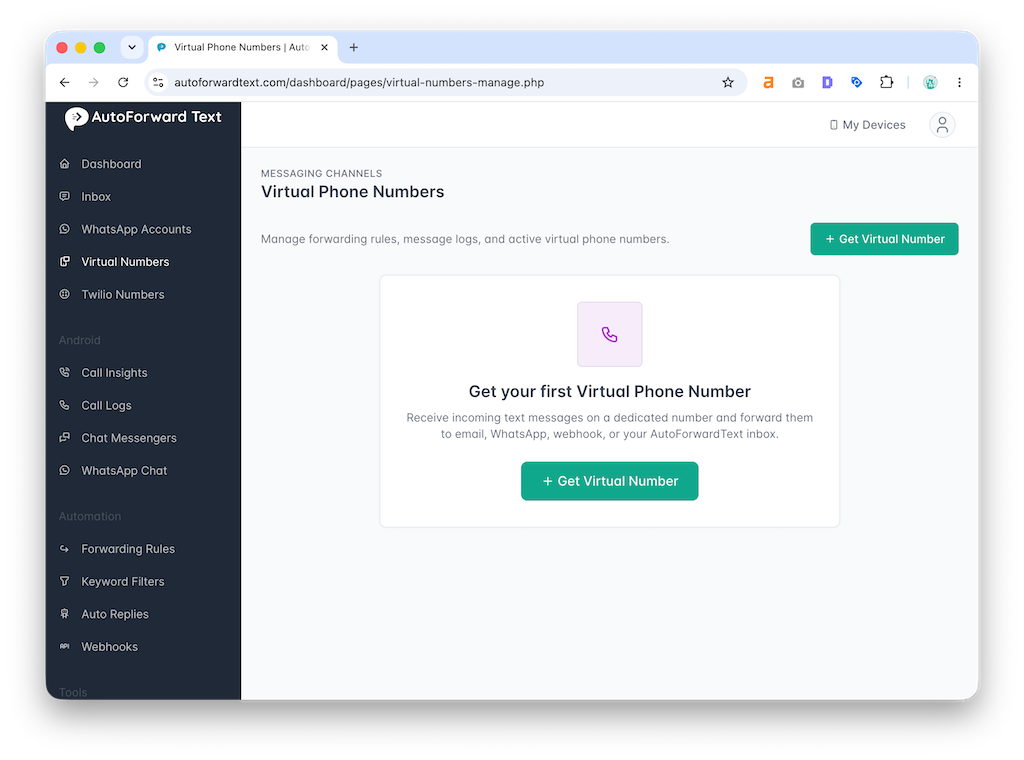
A virtual number is useful because it is not tied to one physical phone. It can act as a cloud-based phone number for receiving calls, capturing missed calls, and sending voicemail alerts to email.
For businesses, this is the real value. A voicemail sitting on one person’s phone is not a workflow. It is a bottleneck.
Benefits of Using a Virtual Number
- No need to keep a second phone switched on all day.
- Voicemails can be sent to email automatically.
- Teams can access voicemail from a shared inbox.
- Recordings can be stored for follow-up.
- Transcriptions make missed calls easier to scan.
- Missed call alerts can be logged even when no voicemail is left.
- Voicemail events can be routed into business workflows.
This is especially useful if your business receives calls from customers, prospects, patients, tenants, vendors, drivers, or field staff. Those calls should not disappear just because one person was busy.
How the Setup Works
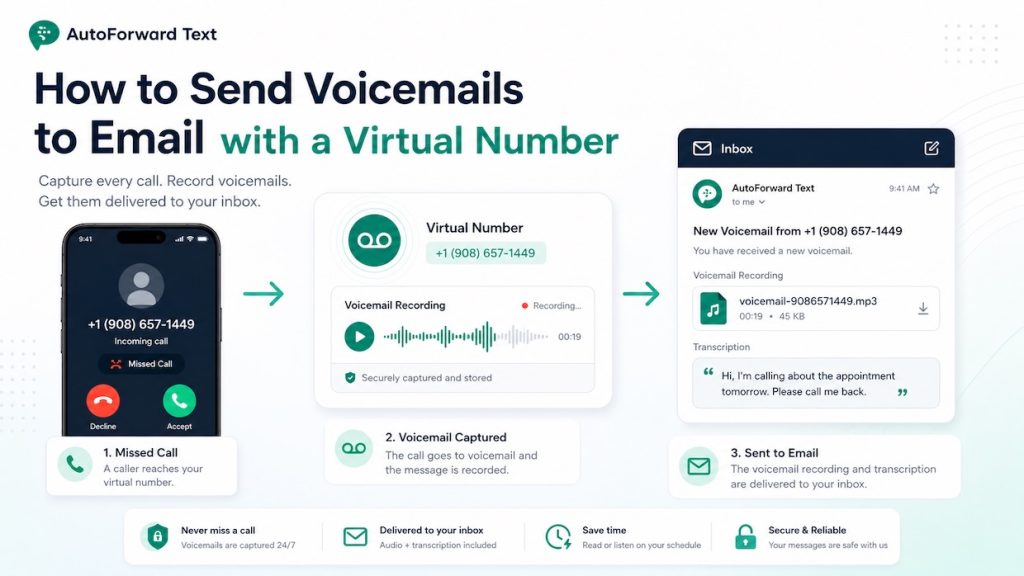
The setup is straightforward once you understand the call path. The virtual number does not magically control your existing carrier line. It receives the call after the call is forwarded to it.
Step 1: Get a Virtual Number
First, you need a virtual number that can receive forwarded calls and handle voicemail. In AutoForward Text, this is the number that will receive unanswered calls and record the voicemail message.
Step 2: Enable No Answer Call Forwarding on Your Existing Number
Next, you set your existing phone number to forward unanswered calls to your AutoForward Text virtual number. This is normally done through your carrier or phone provider.
This step matters. If your existing number does not forward the missed call, the virtual number will never receive it.
Step 3: The Virtual Number Answers the Forwarded Call
When you do not answer your regular phone, the carrier forwards the call to the virtual number. AutoForward Text answers the forwarded call and plays your voicemail greeting.
Step 4: The Caller Leaves a Voicemail
The caller hears your greeting and records a voicemail message. You can customize the greeting to match your business or personal use case.
Step 5: The Voicemail Is Sent to Email
Once the voicemail is recorded, AutoForward Text sends the voicemail details to your selected email destination. If transcription is enabled, the email can also include a text version of the voicemail.
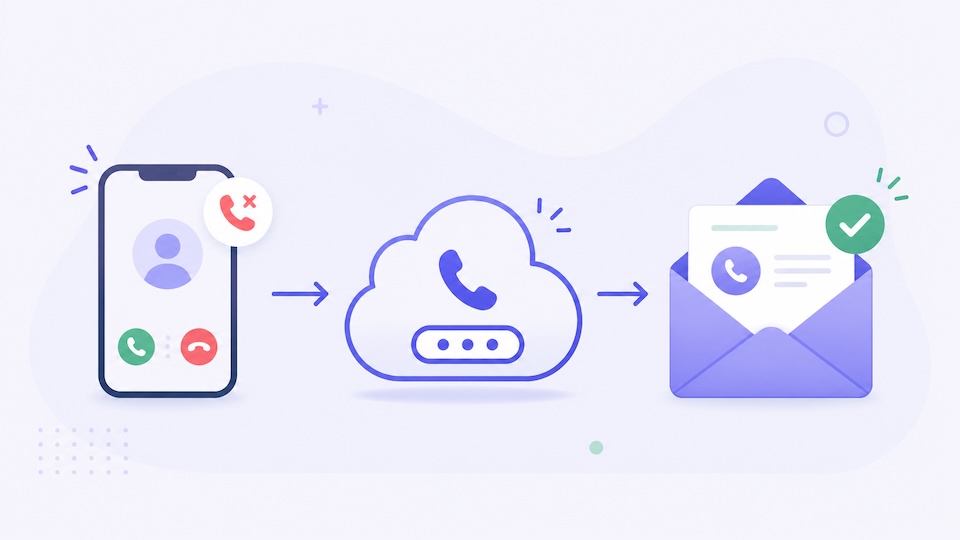
Caller phones your normal number → You do not answer → Carrier forwards the call to your virtual number → AutoForward Text records voicemail → Voicemail is sent to email
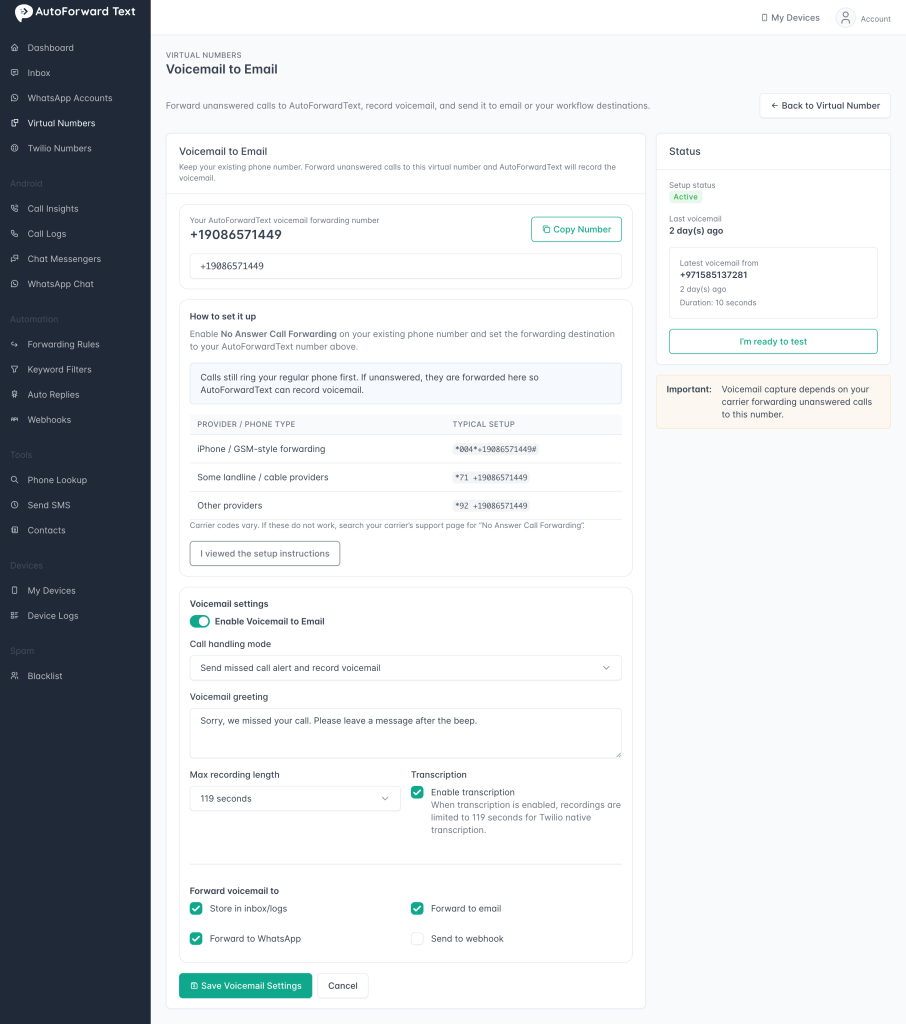
Important: Carrier-Level Call Forwarding Is Required
This is the part many people miss.
AutoForward Text can receive the forwarded call, record the voicemail, and send the email. But your carrier controls whether unanswered calls from your existing number are forwarded to the virtual number.
Important: Voicemail to email only works for your existing phone number after that number is configured to forward unanswered calls to your AutoForward Text virtual number. If your carrier does not forward the call, AutoForward Text cannot capture the voicemail.
How to Set Up No Answer Call Forwarding for Missed Call Alerts and Voicemail
In other words, there are two separate jobs:
| Job | Who Handles It |
|---|---|
| Forward unanswered calls from your existing number | Your mobile carrier, landline provider, or phone service provider. |
| Record voicemail and send it to email | AutoForward Text virtual number. |
If the call forwarding step is wrong, voicemail to email will not work. That is not a software bug. It means the call never reached the virtual number.
Example No Answer Call Forwarding Codes
Different carriers use different forwarding codes. The exact code may vary by country, phone type, and provider. Still, many providers use codes similar to the examples below.
| Provider / Phone Type | Typical Setup | Explanation |
|---|---|---|
| iPhone / GSM-style forwarding | *004*YOUR_VIRTUAL_NUMBER# | Often used for conditional forwarding, including calls that are unanswered, busy, or unreachable. |
| Some landline / cable providers | *71 YOUR_VIRTUAL_NUMBER | Common style for setting forwarding on some home phone or cable phone services. |
| Other providers | *92 YOUR_VIRTUAL_NUMBER | Another common no-answer forwarding code used by some providers. |
Carrier codes vary. If these do not work, search your carrier’s support page for “No Answer Call Forwarding,” “Conditional Call Forwarding,” or “Forward unanswered calls.”
Tip: After entering the forwarding code, test it immediately. Call your regular number from another phone, do not answer, and confirm that the call reaches your virtual number voicemail.
How to Send Voicemails to Email with AutoForward Text
Once your virtual number is ready, you can configure how voicemail should be handled inside AutoForward Text.
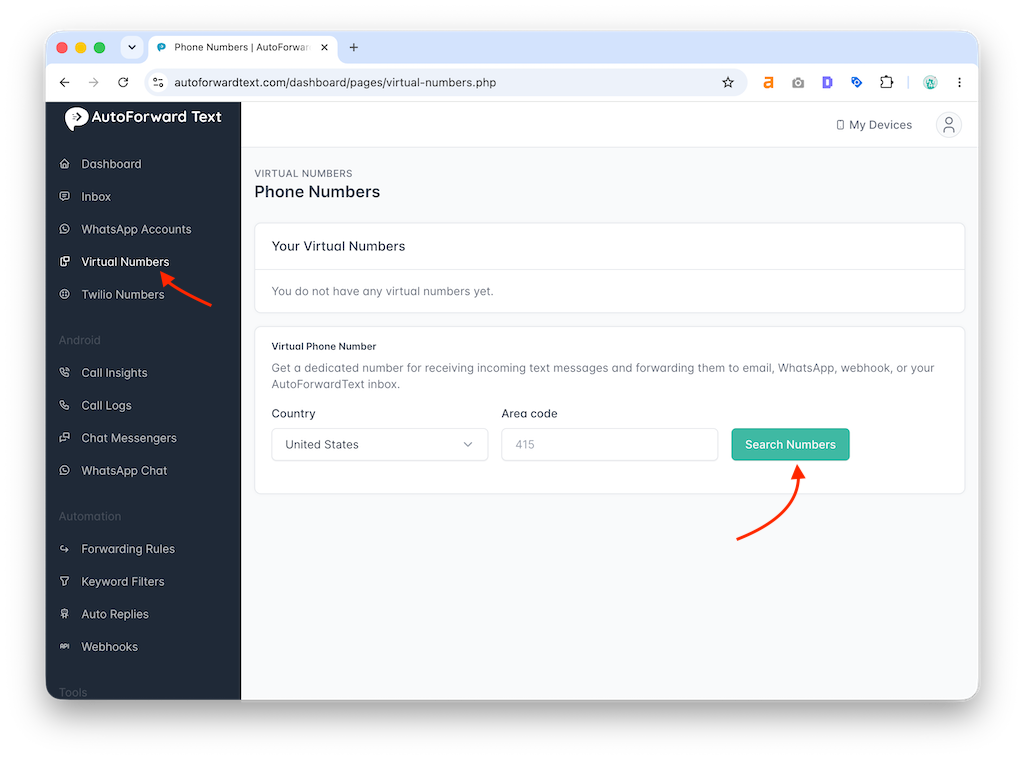
Step 1: Create or Select a Virtual Number
Go to the Virtual Numbers section in AutoForward Text and select the number you want to use for voicemail. This is the number that will receive the forwarded call.
Step 2: Open Voicemail to Email Settings
From the virtual number management page, open the Voicemail to Email setup screen.
Step 3: Copy Your Voicemail Forwarding Number
Copy your AutoForward Text voicemail forwarding number. This is the number you will enter into your carrier’s no-answer call forwarding setup.
Step 4: Enable Voicemail to Email
Turn on voicemail capture. This allows AutoForward Text to answer missed forwarded calls and record voicemail messages.
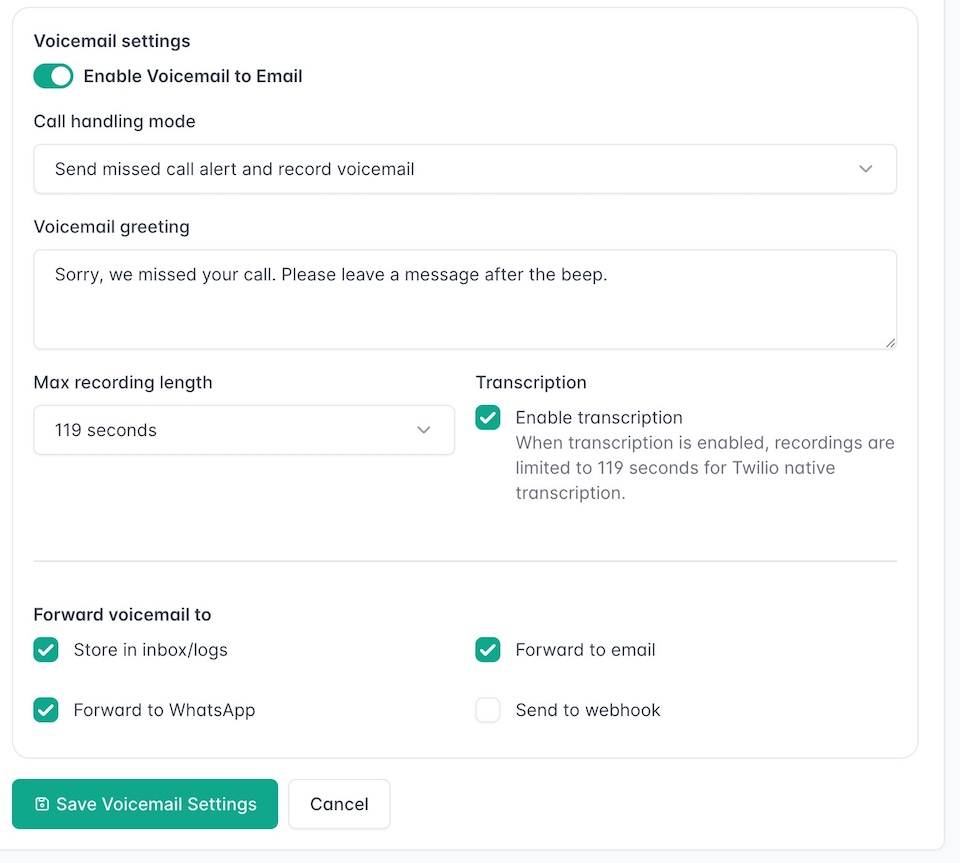
Step 5: Choose the Call Handling Mode
Select how you want missed calls to be handled. A practical default is:
Send missed call alert and record voicemail
This gives you a missed call record even if the caller hangs up before leaving a voicemail.
Step 6: Customize the Voicemail Greeting
Add a greeting that callers will hear before recording their voicemail.
Step 7: Set the Recording Length
Choose how long callers can record their message. For most small business voicemail use cases, a short recording limit is enough because callers usually leave their name, reason for calling, and callback number.
Step 8: Enable Transcription
Turn on transcription if you want a text version of the voicemail included with the email notification. This is useful because you can scan the voicemail without listening to the audio.
Step 9: Choose Where Voicemail Should Be Forwarded
For this workflow, enable Forward to email. Depending on your setup, you may also choose to store voicemail in the inbox/logs, forward to WhatsApp workflows, or send voicemail events to a webhook.
- Email: Best for simple voicemail delivery and team visibility.
- Inbox/logs: Useful for keeping a dashboard record.
- WhatsApp workflows: Useful when your team works from WhatsApp.
- Webhook/API: Useful for sending voicemail data into your CRM or internal system.
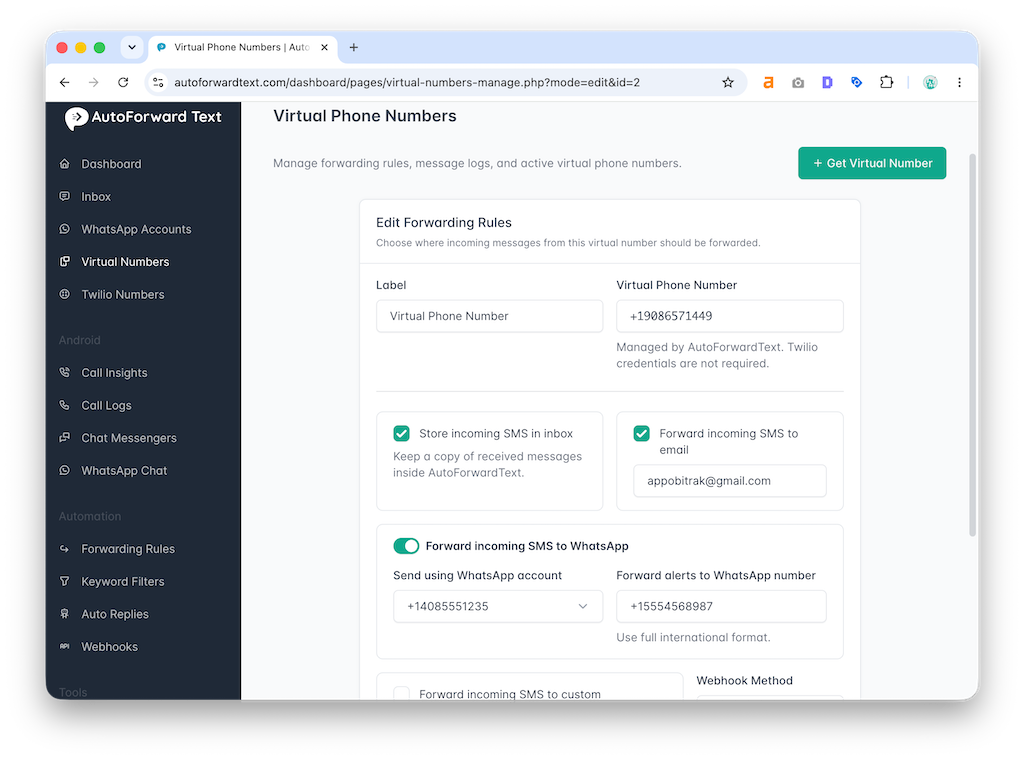
Step 10: Test the Setup
Call your existing number from another phone, do not answer, leave a voicemail, and check your email inbox. If everything is configured correctly, you should receive the voicemail details by email.
Capture Missed Calls Before They Disappear
AutoForward Text helps turn missed calls into voicemail emails, transcriptions, inbox records, and workflow alerts.
What the Voicemail Email Looks Like
A voicemail email should give you the important details quickly: who called, when they called, how long the voicemail is, and what they said.
This is far more useful than a generic missed call notification. The email gives you enough context to decide whether the call needs urgent follow-up.
Voicemail to Email vs Traditional Voicemail
Traditional voicemail is fine if only one person needs to check messages occasionally. It is weak for business workflows because it depends on someone remembering to check a phone or carrier mailbox.
| Feature | Traditional Voicemail | Voicemail to Email with Virtual Number |
|---|---|---|
| Stored on phone/carrier mailbox | Yes | No, sent to email or workflow destinations. |
| Easy to share with a team | No | Yes. |
| Searchable | Usually no | Yes, through email and transcription. |
| Works with shared inboxes | No | Yes. |
| Can include transcription | Depends on provider | Yes, if enabled. |
| Useful for business workflows | Limited | Strong. |
| Can trigger webhook/API workflows | No | Yes, depending on setup. |
The difference is not subtle. Traditional voicemail is a mailbox. Voicemail to email is a workflow.
Best Use Cases
Voicemail to email is useful anywhere missed calls matter. That usually means local businesses, service teams, appointment-based businesses, and sales teams.
1. Service Businesses
HVAC companies, plumbers, electricians, locksmiths, cleaning companies, and repair services often receive calls when staff are busy or after hours.
A missed call can easily be a missed job. Sending a voicemail to email makes the lead visible and easier to follow up.
2. Clinics and Appointment-Based Businesses
Dental clinics, salons, consultants, therapists, medical offices, and other appointment-based businesses receive calls about bookings, cancellations, and schedule changes.
Voicemail to email helps the office team see and process those messages from one inbox.
3. Real Estate Agents
Agents often miss calls while showing properties or speaking with other clients. Voicemail to email helps capture buyer, seller, renter, and landlord inquiries for follow-up.
4. Small Business Owners
Owners should not have to personally check every voicemail. Messages can go to a shared inbox, assistant, or operations team.
5. Remote Teams
If your team is distributed, voicemail to email gives everyone the same visibility without giving multiple people access to the actual phone account.
6. After-Hours Call Handling
After-hours callers can leave a message, and your team can handle it the next morning. For urgent services, the voicemail email can also be routed to the right staff member.
Example business workflow:
Missed customer call → Voicemail recording → Email to dispatch inbox → Follow-up task
Why Voicemail Transcription Matters
Listening to voicemail is slow. Reading a voicemail transcription is faster.
When transcription is enabled, the voicemail recording can be converted into text and included in the email notification. This helps you quickly understand what the caller wanted without playing the audio.
Benefits of Voicemail Transcription
- Scan missed calls quickly.
- Search voicemail content later.
- Prioritize urgent messages.
- Forward text summaries to team members.
- Keep a written record of customer requests.
- Reduce the time spent listening to short voicemail messages.
Reality check: Transcription is useful, but it may not be perfect. Background noise, accents, poor call quality, and short recordings can affect accuracy. Keep the audio recording available when the exact wording matters.
Sending Voicemail to Shared Inboxes
For business use, sending voicemail to a shared inbox is usually better than sending it to one person’s private email.
Examples of useful voicemail destinations include:
- sales@company.com for new leads.
- support@company.com for customer issues.
- dispatch@company.com for service calls.
- appointments@company.com for bookings and cancellations.
- office@company.com for general missed calls.
A shared inbox prevents voicemail from getting stuck with one person. It also gives your team a searchable record of missed calls and follow-ups.
Can You Use This with Your Existing Phone Number?
Yes, but only if your existing number forwards unanswered calls to the virtual number.
This distinction matters because a virtual number can only process calls it actually receives.
| Setup | What Happens |
|---|---|
| Caller calls virtual number directly | The virtual number can handle voicemail directly. |
| Caller calls your existing number | Your carrier must forward unanswered calls to the virtual number. |
| Carrier forwarding is not enabled | AutoForward Text will not receive the missed call. |
If you want to keep advertising your current phone number, use no-answer forwarding. If you are comfortable giving customers a new number, you can use the virtual number directly.
Can You Use Voicemail to Email Without a Physical Phone?
Yes. If customers call the virtual number directly, you do not need a physical phone for voicemail capture. The virtual number can receive the call, play the voicemail greeting, record the message, and send the voicemail to email.
But if you want to capture missed calls from an existing mobile phone or landline, that number still needs to forward unanswered calls to the virtual number.
Simple rule:
Direct calls to virtual number = no physical phone required
Missed calls from existing number = carrier forwarding required
Privacy and Security Tips
Voicemail messages can contain personal, financial, medical, or business-sensitive information. Treat voicemail to email like a real business communication system, not a random hack.
- Only forward calls from numbers you own or are authorized to manage.
- Use a secure email account with a strong password.
- Enable two-factor authentication on the destination email account.
- Avoid sending sensitive voicemail messages to public or loosely shared inboxes.
- Limit who can access voicemail recordings and transcriptions.
- Delete old voicemail recordings when they are no longer needed.
- Review your local call recording, consent, and data retention requirements.
Important: Call recording, voicemail, and consent rules vary by location. If you use voicemail recording for business, make sure your greeting and workflow match your local requirements.
Common Problems and Fixes
If voicemail to email is not working, the issue is usually in the call forwarding path. Start there before changing everything else.
| Problem | Likely Cause | Fix |
|---|---|---|
| No voicemail email arrives | Call forwarding is not enabled or the call never reached the virtual number. | Recheck your carrier’s no-answer forwarding setup and test again. |
| Phone keeps ringing but never forwards | The forwarding code may not work for your carrier. | Contact your carrier or search their support page for conditional call forwarding. |
| Caller reaches old carrier voicemail | Your carrier is still routing missed calls to its own voicemail. | Change the no-answer forwarding destination to your virtual number. |
| Email arrives without transcription | Transcription may be disabled, delayed, or unavailable for that recording. | Enable transcription and allow time for processing. |
| Recording is too short | The caller may have hung up quickly or the greeting was unclear. | Use a clear greeting and give callers a reason to leave a message. |
| Wrong number receives voicemail | The forwarding number may have been entered incorrectly. | Copy and paste the AutoForward Text virtual number again. |
Best test: Call your existing number from a different phone, do not answer, leave a voicemail, then check whether the voicemail appears in your email. This confirms the entire chain from carrier forwarding to email delivery.
Frequently Asked Questions
Can I send voicemails to email with a virtual number?
Yes. A virtual number can answer missed calls, record voicemail, and send the voicemail recording and details to your email inbox.
Do I need a physical phone for voicemail to email?
Not if callers dial the virtual number directly. If you want to capture missed calls from your existing mobile number, that mobile number must forward unanswered calls to the virtual number.
Can I use my existing phone number?
Yes. You can use your existing number by enabling No Answer Call Forwarding with your carrier, so unanswered calls are routed to your AutoForward Text virtual number.
Will this replace my carrier voicemail?
It can replace or bypass your carrier voicemail for unanswered calls that are forwarded to the virtual number. If your carrier still sends missed calls to its own voicemail, you may need to change your conditional call forwarding settings.
Can voicemail be transcribed?
Yes, if transcription is enabled. The voicemail recording can be converted into text and included in the email notification.
Can I send voicemail to a team email address?
Yes. You can send voicemail notifications to a shared inbox such as sales, support, dispatch, appointments, or office email.
Can voicemail be forwarded to WhatsApp or a webhook?
With AutoForward Text workflows, voicemail events can be routed beyond email depending on your setup, including inbox/logs, WhatsApp workflows, or webhooks.
Why am I not receiving voicemail emails?
The most common reason is that your existing number is not forwarding unanswered calls to the virtual number. Check your carrier’s No Answer Call Forwarding setup first.
Is voicemail to email good for businesses?
Yes. It is especially useful for service businesses, appointment-based businesses, sales teams, real estate agents, clinics, consultants, and companies that need missed calls turned into follow-up records.
Can I use voicemail to email for after-hours calls?
Yes. After-hours callers can leave a voicemail, and the recording or transcription can be sent to email for the team to review later.
Can I keep a record of all missed calls?
Yes. With missed call alerts and voicemail logging enabled, you can keep a record of missed calls even when the caller does not leave a voicemail.
Does voicemail to email require coding?
No. With AutoForward Text, the setup can be configured from the dashboard. Webhooks are optional for users who want to send voicemail events into custom systems.
Final Thoughts
Voicemail to email is not just a convenience feature. For many businesses, it is the difference between a missed call disappearing and a missed call becoming a follow-up task.
Traditional voicemail depends on someone remembering to check a phone. That is weak. A virtual number with voicemail to email sends the message directly into the inbox or workflow where your team already works.
If you want callers to dial a virtual number directly, the setup is simple. If you want to capture missed calls from your existing number, you need to enable No Answer Call Forwarding with your carrier first. Once the call reaches the AutoForward Text virtual number, it can be recorded, transcribed, stored, and sent to email.
That turns voicemail from a hidden mailbox into a searchable business record.
Send Voicemails to Email Automatically
AutoForward Text helps you use a virtual number to capture unanswered calls, record voicemail messages, receive transcriptions, and forward voicemail alerts to email or workflow destinations.
- Record voicemail from missed calls
- Send voicemail recordings to email
- Enable voicemail transcription
- Forward voicemail alerts to shared inboxes
- Route voicemail events to inbox/logs, WhatsApp workflows, or webhooks