
Classify Intent
Identify whether a message concerns sales, support, appointments, billing or operations.
Turn supported incoming messages into structured AI workflows that classify intent, retrieve approved business context, draft responses, update systems and escalate to people. Use n8n, Make.com or your own webhook application as the orchestration layer.
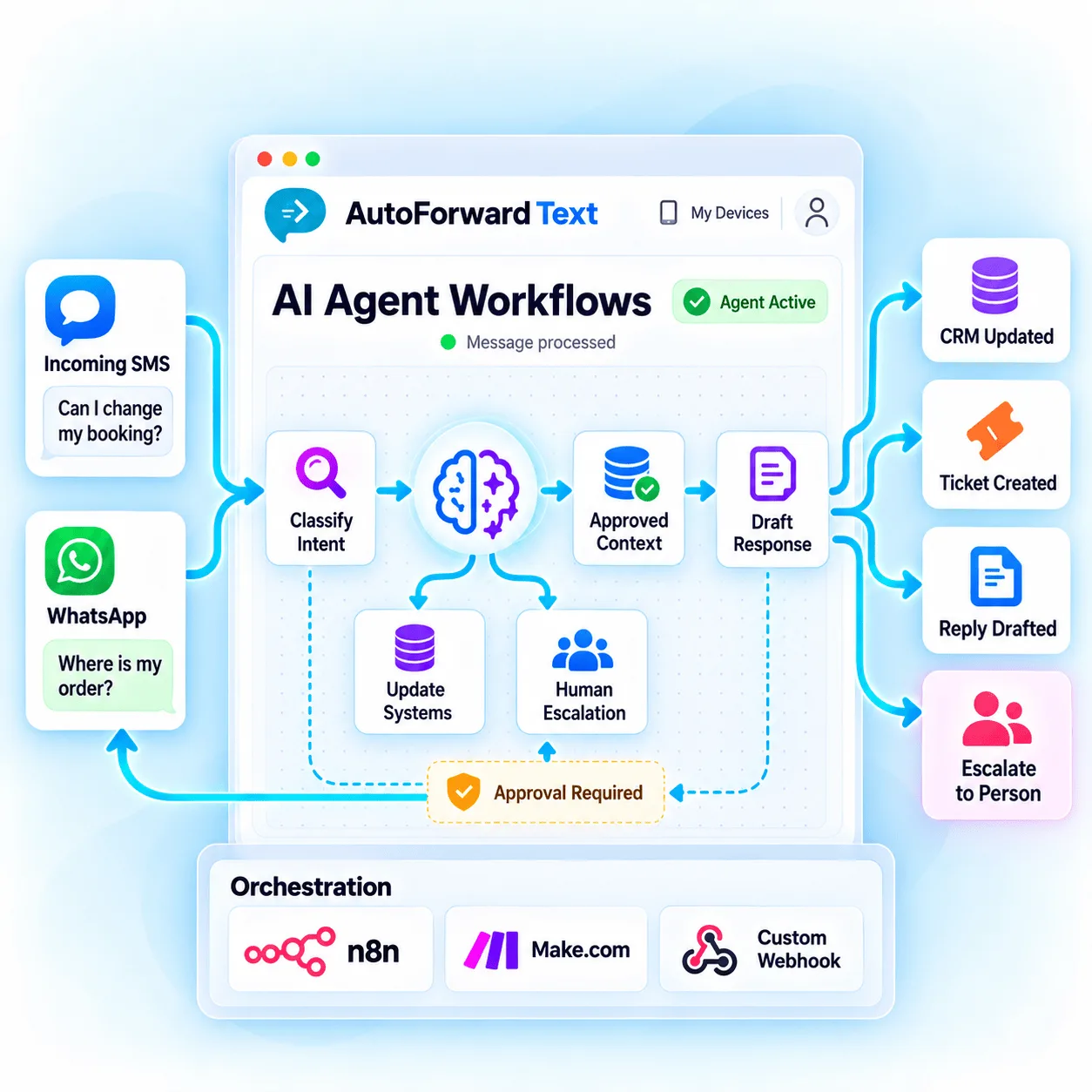
Classify intent, language, topic and urgency.
Retrieve only the business data needed for the task.
Automate narrow cases and involve people when needed.
Start with a specific business outcome. The strongest agents have narrow authority, reliable data sources and a clear path to human ownership.
Identify whether a message concerns sales, support, appointments, billing or operations.
Look up authorized CRM, order, inventory, schedule or knowledge-base information.
Prepare a concise answer grounded in approved business content.
Create tickets, update CRM records, notify teams or call narrowly scoped tools.
Detect and respond in supported languages while preserving escalation options.
Detect sensitive topics, uncertainty or urgency and stop autonomous handling.
Send the conversation and available context to the right team member.
Log approved decisions, actions and message identifiers for review.
AutoForward Text delivers supported message events. Your orchestration layer validates the payload, adds context, applies policy and chooses whether to draft, act, reply or escalate.
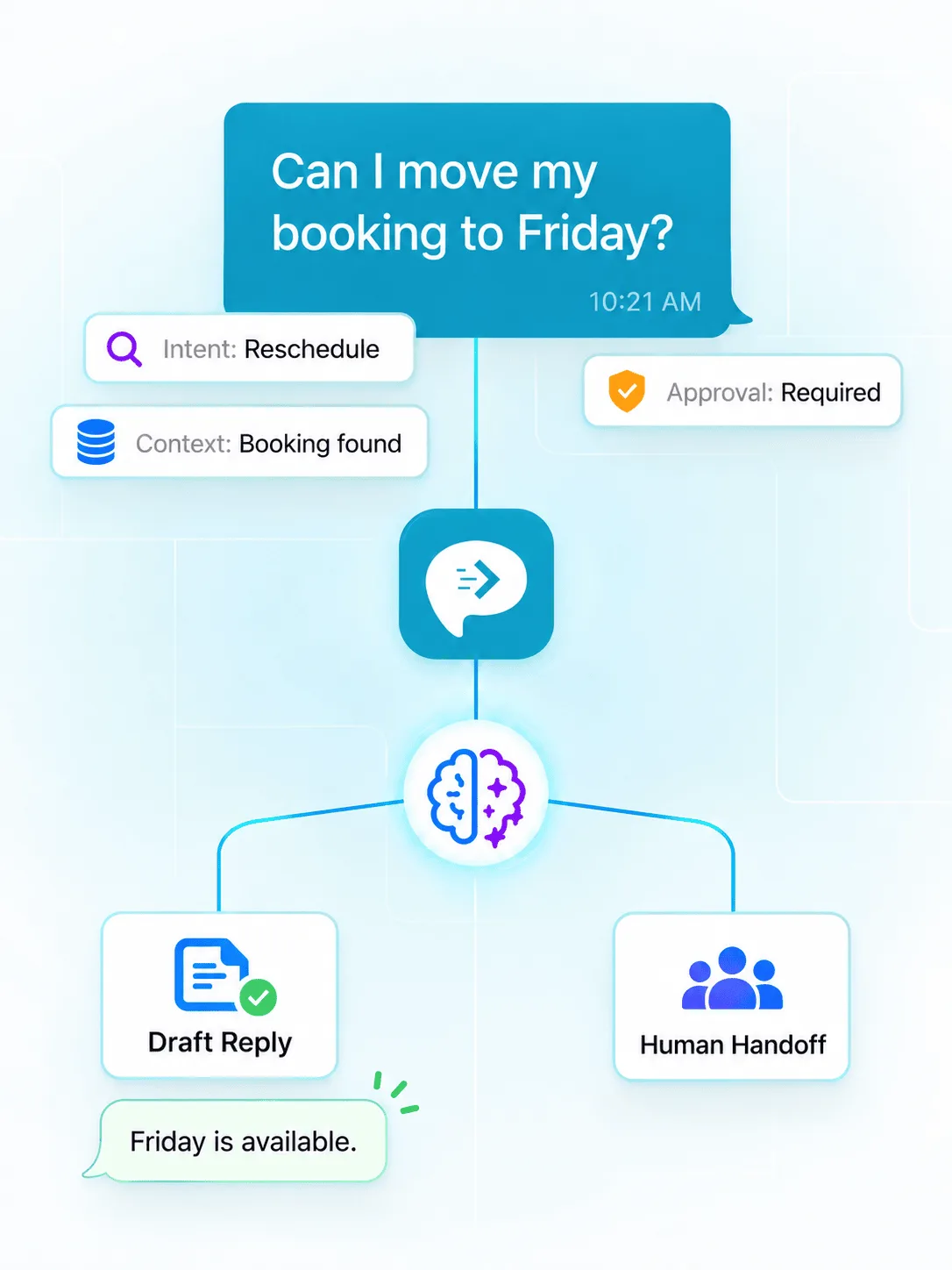
Escalation should be a designed outcome, not an error condition. Route uncertain, sensitive or high-impact conversations to authorized people with enough context to continue safely.
Medical, legal, financial, safety, complaints, cancellations, refunds and identity changes commonly need human control.
Stop when required data is missing, sources conflict or the proposed answer cannot be verified.
AutoForward Text handles supported messaging events and reply paths; your orchestration layer controls models, business systems, policy and agent tools.
Build visual or code-assisted workflows with webhooks, branching, AI nodes, HTTP requests and self-hosting options.
Explore n8nUse custom webhooks, routers, filters, app modules and HTTP actions to create managed automation scenarios.
Explore Make.comOwn the complete runtime, data path, models, queues, databases and approval interface in your application.
Explore APIsKeep each agent focused on a bounded task with measurable outcomes and a safe fallback.
Ask approved questions, capture intent and create a CRM follow-up without inventing prices or availability.
Answer grounded FAQs, collect identifiers and create a ticket when the issue needs an agent.
Collect preferred times, check authorized scheduling data and request confirmation before booking.
Verify customer and order identifiers before returning approved status information.
Acknowledge receipt, identify urgency and route the conversation to the duty team.
Classify delivery, maintenance and dispatch updates and notify the correct workflow.
Understand supported languages and transfer the translated context to the appropriate team.
Create contacts, notes, opportunities, deals, tasks or activities through connected systems.
Receiving an event does not grant permission to send. Validate the intended recipient, message text, channel capability, consent and applicable platform rules before every outbound action.
Use the supported message-specific reply endpoint with Bearer authentication and a unique idempotency key.
Use a supported outbound Android gateway, Twilio or virtual-number configuration with required permissions.
Prevent duplicate retries and ensure an agent’s own sent message cannot trigger endless responses.
Account for provider rules, WhatsApp conversation windows, approved templates and carrier requirements.
A sender can attempt prompt injection, request unauthorized data or manipulate tools. Enforce policy in code and workflow controls—not only inside the model prompt.
Never allow customer text to overwrite system policy, tool permissions or approval rules.
Use allowlists, scoped credentials, parameter validation and minimum necessary access.
Redact unnecessary data, control retention and choose approved model providers.
Record useful decision metadata, monitor failures and test attacks without exposing secrets.
Cap model use, tool calls, refunds, messages and other consequential actions.
Do not reveal account, order or appointment data from a phone number alone when stronger verification is needed.
Use timeouts, retries, deterministic fallbacks and clear human handoff.
Tell customers when they are interacting with automation where policy or law requires it.
Earn autonomy with evidence. Begin by observing and drafting, measure performance, then automate only the narrow actions that consistently meet policy.
Receive events, classify them and compare the result with human decisions.
Generate suggested replies for an authorized person to review and send.
Require explicit approval while allowing the system to prepare tools and context.
Auto-send only tested low-risk cases with limits, monitoring and instant escalation.
Your organization remains responsible for model selection, data access, agent behavior and every action the automation performs.
Explore Webhooks & APIsYes. AutoForward Text can send supported incoming SMS and WhatsApp events to n8n, Make.com or your webhook application, where an AI agent can classify, retrieve context, draft a response or trigger approved actions.
Supported WhatsApp payloads can include a message-specific reply endpoint. An authorized workflow can call that endpoint with an AutoForward Text API key and unique idempotency key, subject to channel and Meta messaging requirements.
SMS replies require a supported outbound-capable channel such as a correctly configured Android SMS gateway, Twilio or virtual number. Receiving an incoming SMS webhook alone does not authorize sending.
No. Low-risk, narrow and well-tested responses may be suitable for automation, but sensitive, ambiguous or high-impact messages should be escalated for human review.
Your automation layer can retrieve authorized business data before generating a response. Apply least-privilege access, validate identifiers and prevent customer messages from overriding system instructions or tool permissions.
Use a unique idempotency key for each intended outbound response and keep the same key when retrying that logical action. Also mark outbound events and prevent them from re-entering the same automation loop.
Capabilities depend on the connected channel, payload, model and workflow. Do not assume every media type is available; validate the actual event fields and provide a safe fallback when content cannot be processed.
Send only the minimum information needed for the task. Remove unnecessary personal or sensitive data, choose approved providers, control retention and document when customers interact with automated systems where required.
Start with supported message events, narrow tools, approved data and explicit escalation rules before allowing automated replies.