
Incoming SMS
Receive supported text events from Android, iPhone, Twilio or virtual-number channels.
Send supported incoming SMS and WhatsApp messages to an n8n webhook, then classify enquiries, notify teams, update CRMs, create tickets, call business APIs or route approved replies through connected messaging channels.
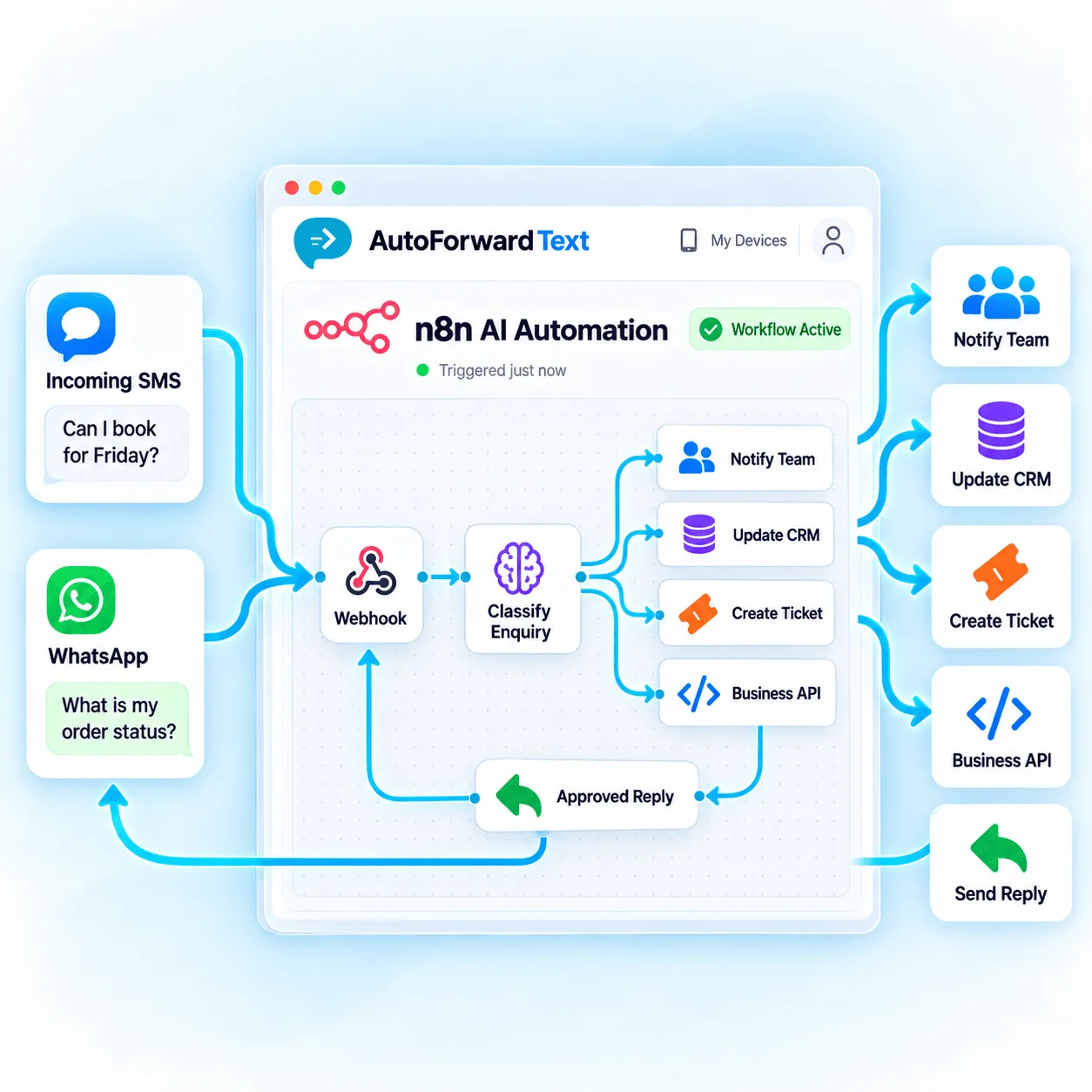
Send supported message data to an n8n webhook.
Branch, transform and connect business systems.
Authenticate replies and prevent duplicate sends.
Normalize communication from several supported sources, then use n8n to apply your own business logic and connect the systems that should act next.
Receive supported text events from Android, iPhone, Twilio or virtual-number channels.
Forward supported QR or Meta Cloud message events into an n8n webhook.
Branch by sender, keyword, source, schedule, intent or data returned by another service.
Use supported reply endpoints or SMS sending channels with explicit authentication.
Create a production webhook in n8n and add its HTTPS URL as the appropriate AutoForward Text destination. A successful inbound event can then trigger any nodes and credentials authorized in that workflow.
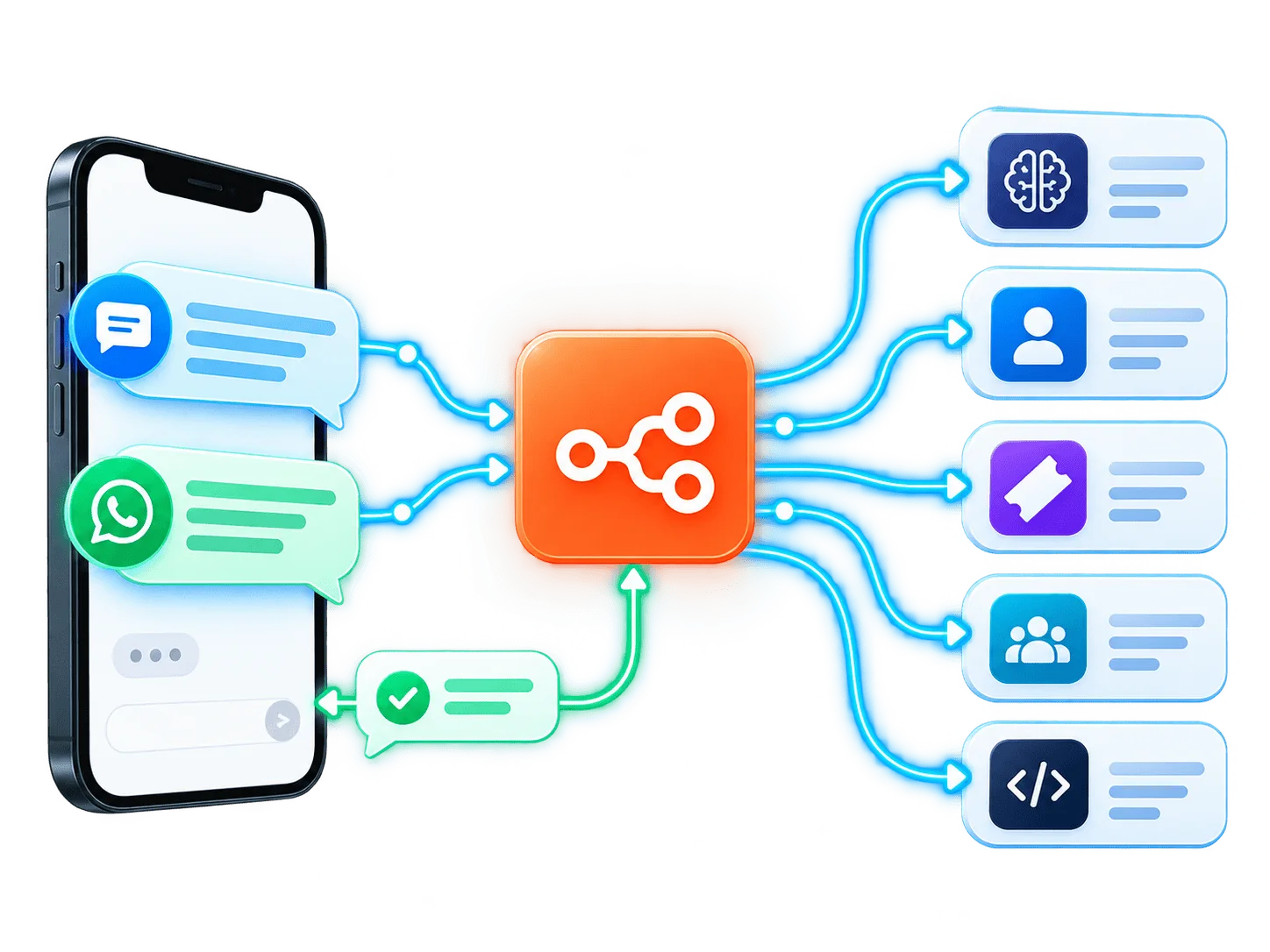
For supported WhatsApp automation, the incoming payload can include a reply endpoint tied to that conversation. Send an authenticated POST request to that URL rather than storing provider credentials throughout the workflow.
Build and test with n8n’s test URL if needed, then switch to the active production webhook before relying on the workflow.
Add the Android, iPhone, WhatsApp, Twilio or virtual channels you need.
Add an n8n Webhook node and configure the intended method and path.
Paste the webhook URL into the relevant AutoForward Text forwarding settings.
Validate fields, branch safely and connect only authorized service credentials.
Enable the production workflow and send fresh real messages from external sources.
Use deterministic routing for simple work and add AI only where it contributes meaningful classification, extraction or drafting.
Create or update HubSpot, GoHighLevel or Pipedrive records from supported enquiries.
Classify topic and urgency, then create a ticket or notify the correct support queue.
Extract requested dates and prepare a booking action for verification.
Match order references and alert fulfillment or delivery teams.
Post focused message alerts into sales, support or operations channels.
Write approved message fields into a database, sheet or internal reporting system.
Use an AI model to categorize communication while retaining human oversight.
Generate a proposed answer, validate it, then send through a supported controlled reply path.
Treat inbound processing and outbound messaging as separate capabilities. Each reply path needs its own supported source, authorization, recipient context and platform compliance.
Use the supported event reply endpoint and account for Meta conversation-window or template requirements.
Require an outbound-capable Android gateway, Twilio, virtual number or another supported sending configuration.
Mark automated output and ensure sent replies cannot re-trigger the same workflow indefinitely.
Require review for refunds, medical, legal, financial, safety or other high-impact responses.
Keep API keys, webhook URLs and third-party credentials out of public workflow exports and screenshots.
Treat webhook payload fields as untrusted input before using them in queries, prompts or outbound calls.
Generate one stable key per logical outbound reply so retries do not duplicate customer messages.
Restrict tools, destinations, spend and data access; log decisions and add human review where needed.
Test the source, inbound webhook and outbound action independently before debugging the entire workflow.
Confirm the production workflow is active and AutoForward Text uses the current production URL.
Verify the source channel is connected and the message appears in AutoForward Text logs.
Check the Bearer API key, required permission and exact event reply endpoint.
Use a unique idempotency key per intended reply and keep it stable across retries.
Channel capabilities and outbound requirements depend on the connected provider and configuration.
Read the n8n GuideYes. Supported SMS from connected Android phones, iPhone workflows, Twilio numbers and virtual numbers can be sent to an n8n webhook for routing and automation.
Yes. Supported incoming messages from connected WhatsApp accounts can be forwarded as webhook payloads to an n8n workflow.
For supported WhatsApp workflows, an incoming payload can include a message-specific reply endpoint. n8n can send an authenticated POST request to that endpoint using an AutoForward Text API key and a unique idempotency key.
Automation platforms may retry failed or delayed requests. A unique idempotency key identifies one logical reply and helps prevent the same customer message from being sent more than once.
SMS sending or replies require a supported outbound SMS channel and the necessary permissions or provider configuration. Receiving an inbound webhook alone does not automatically authorize outbound SMS.
Yes. n8n can pass supported message content to an AI model or agent, but businesses should validate outputs, protect personal data, restrict tool access and require human review for sensitive or high-impact actions.
For basic inbound delivery, acknowledge the webhook quickly with a successful response and perform slower work afterward where possible. Reply calls are separate authenticated requests to the supported reply endpoint.
Use HTTPS, protect webhook and API credentials, grant the minimum scopes, validate input, keep secrets outside workflow nodes where possible, restrict execution access and avoid logging unnecessary message content.
Receive supported messages through webhooks, add business logic and build carefully controlled team, CRM and AI-agent actions.