
Business Identity
Publish a dedicated number for customer enquiries instead of exposing an employee’s personal phone.
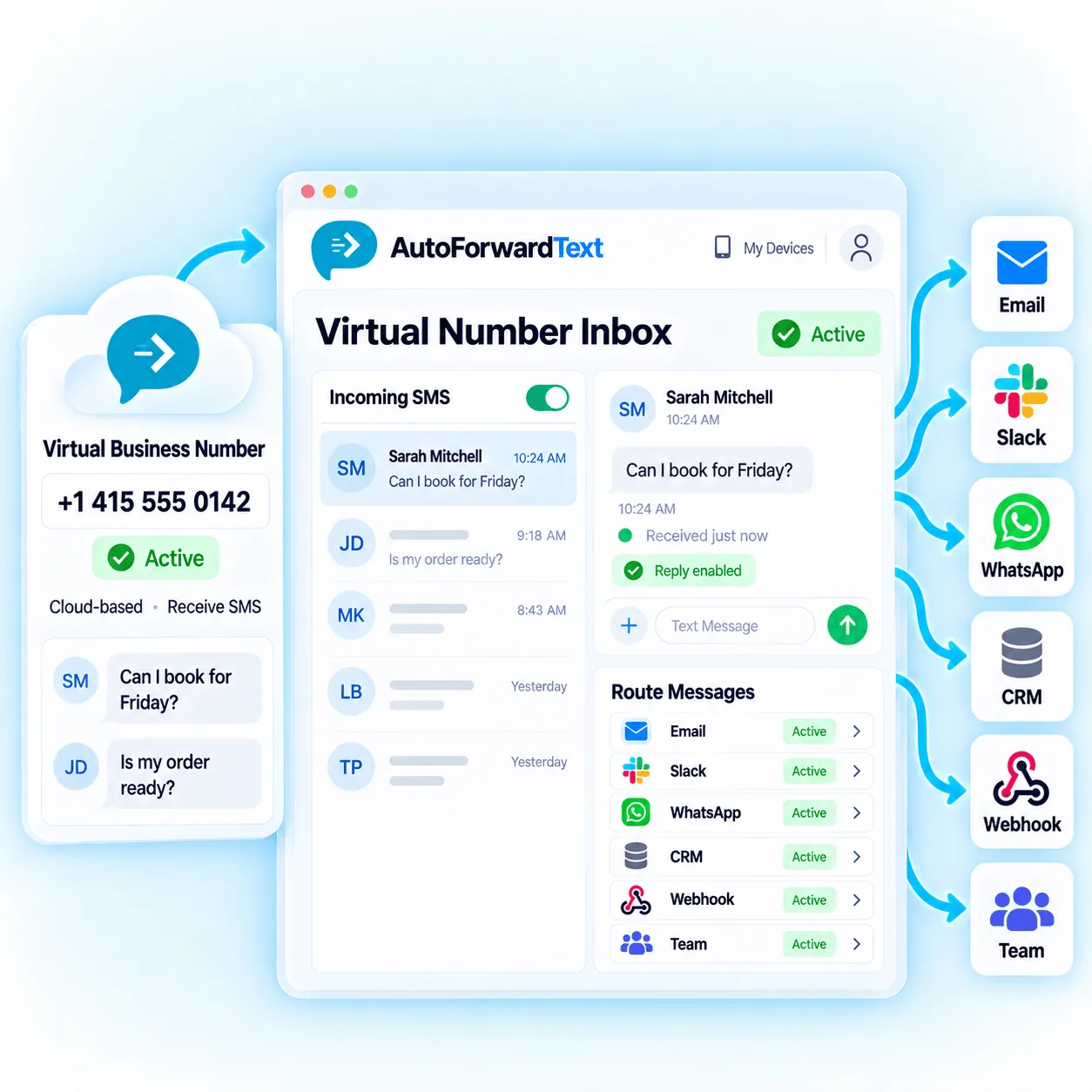
Add a cloud-based business number for supported incoming SMS without keeping another phone switched on. Bring customer enquiries, booking requests and operational messages into your AutoForward Text inbox, then route them to email, Slack, WhatsApp, CRM systems, webhooks or the people responsible for responding.
Keep customer SMS separate from personal communication.
Receive supported messages without a dedicated handset or SIM.
Route messages to teams, inboxes, CRM and automation.
A virtual number gives a business a dedicated entry point for supported SMS while AutoForward Text controls where each incoming message goes next.
Publish a dedicated number for customer enquiries instead of exposing an employee’s personal phone.
Give the team access to incoming communication rather than leaving every message with one person.
Use a supported cloud number without maintaining another physical phone and mobile SIM.
Send each message into email, collaboration, CRM and automation workflows where it can be handled.
Receiving the message is only the first step. AutoForward Text can make supported SMS visible in the destination best suited to the customer or workflow.
Review supported conversations and message history from the dashboard.
Send customer messages to Gmail, Outlook or a shared support inbox.
Notify sales, support or operations channels when an SMS arrives.
Route selected SMS into supported WhatsApp contact or group workflows.
Send supported leads and conversations into HubSpot, Pipedrive or GoHighLevel workflows.
Pass message events into your own applications, databases and internal systems.
Trigger n8n, Make.com or custom classification and routing logic.
Forward important messages to the owner, manager or duty phone.
A business virtual number is most useful when the incoming message reaches the person or system responsible for acting on it—not when it sits in another isolated inbox.
Create or update supported CRM contacts when a prospect texts the number.
Route urgent keywords to a manager, Slack channel or duty phone.
Available countries, area codes and capabilities can vary. Confirm number availability before building the number into published business materials.
Sign in to AutoForward Text and open the Virtual Numbers area.
Select a supported country, number type or available option for your business.
Choose the inbox, email, Slack, WhatsApp, CRM or webhook routes you need.
Confirm the number receives the message and every selected route behaves correctly.
All three can receive SMS, but they solve different operational needs. Choose based on whether you need a new cloud number, an existing mobile number or programmable Twilio infrastructure.
Depending on the number type, a virtual number can also receive calls, capture missed-call events and record voicemail. AutoForward Text can route voicemail details into email and supported team workflows.
Make unanswered business calls visible outside a hidden call log.
Record supported voicemail and route details to email or workflows.
Use available transcription to scan voicemail without replaying every recording.
Trigger supported SMS or WhatsApp follow-up through a connected sending channel.
Publish a number for quotes and route new leads directly to sales.
Centralize incoming support texts in a shared inbox or helpdesk workflow.
Receive booking requests and alert the person managing the schedule.
Capture tenant, buyer and maintenance messages in team workflows.
Route vendor, driver and field-service updates to operations.
Give each supported workflow a business contact point without another device.
Countries, area codes, number types and SMS capabilities are not identical everywhere.
Confirm the selected number can receive the message types and regions your business expects.
Consent, carrier, registration and local communication requirements still apply.
Validate forwarding, replies, CRM records and after-hours behavior before launch.
Confirm availability and supported capabilities for the specific number before purchasing or publishing it.
Ask About AvailabilityYes. AutoForward Text provides supported virtual numbers that can receive SMS and feed incoming-message workflows. Number availability and capabilities depend on the country and number type available when you order.
Yes. A business virtual number can separate customer communication from a personal phone, provide shared message visibility and connect incoming enquiries with email, CRM, Slack, WhatsApp and automation workflows.
A virtual number is cloud-based and does not require a dedicated physical phone or SIM for supported message reception. Other AutoForward Text channels can still use Android phones and existing SIM cards.
Supported messages can be routed to destinations such as email, another phone, Slack, WhatsApp, CRM systems, webhooks and the AutoForward Text inbox.
Supported virtual-number workflows can provide inbox or connected reply options. Reply availability depends on the number, destination and messaging configuration.
Yes. Supported incoming messages can feed connected CRM workflows, including available HubSpot, Pipedrive and GoHighLevel integrations.
Supported virtual-number configurations can receive calls, capture missed-call activity and voicemail, and route voicemail details into email or other workflows. Capabilities vary by number type.
This page is focused on legitimate business enquiries, customer support, operational communication and transactional workflows—not unsolicited bulk messaging. Carrier, consent and messaging rules still apply.
Create a dedicated customer contact point and route messages, follow-up and available conversation context to the people and systems responsible for responding.